You arc Installing the Oracle Solaris 11 Operating System by using the Text Installer. Which three options describe the features associated with the Text Installer?
Correct Answer: C,D,E
C: You are not required to create a user account. But, you must create a root password. If you create a user account in this panel, you need to provide both the user's password and a root password. In this case, root will be a role assigned to the user. To create a user account, type a username and password. The name must begin with a letter and can contain only letters and numbers. If you do not create a user account, you still need to provide a root password. In this case, root will be a regular user. Networking Configuration With Text Installer The networking panel in the text installer provide users with the following options. Automatically - Configures target system with automatic NCP, similar to the LiveCD installer's method. Manually - Selects "DefaultFixed" NCP and provides for static IPv4 configuration of one network interface (NIC). IPv4 default route and IPv6 autoconfiguration are enabled for that chosen NIC. This option also provides for manual configuration of DNS, NIS and LDAP naming services. None - Selects "DefaultFixed" NCP and configures loopback interfaces only. Reference: Installing Oracle Solaris 11 Systems, How to Perform a Text Installation
Question 97
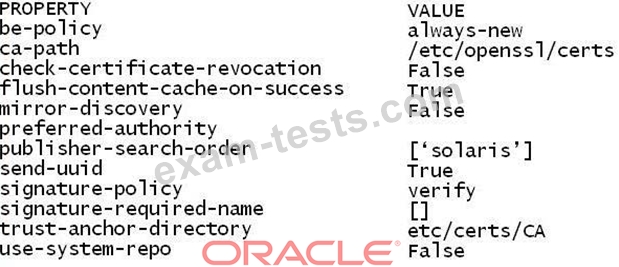
The following image properties are displayed on your system: Which two options describe the boot environment policy property that is currently set for this image?
Correct Answer: D,F
image properties described below. * be-policy Specifies when a boot environment is created during packaging operations. The following values are allowed: / default Apply the default BE creation policy: create-backup. / always-new (D, F) Require a reboot for all package operations (D) by performing them in a new BE set as active on the next boot (F). A backup BE is not created unless explicitly requested. This policy is the safest, but is more strict than most sites need since no packages can be added without a reboot.
Question 98
How are operating system updates distributed in the Oracle Solaris 11 environment?
Correct Answer: C
* Updating all of the packages on your installed system - To update all of the packages on your system that have available updates, use the pkg update command, as follows: # pkg update Running this command updates packages that you might not otherwise consider updating, for example, kernel components and other low-level system packages. *Adding or updating individual packages - To add individual software packages, use the pkg install command. Any dependent packages are also updated at the same time. *install package updates that deliver fixes- A pkg update operation might include bug fixes, so the operation is similar to applying a specific patch or patches in previous Oracle Solaris releases. Note: The IPS interfaces first check for updates for currently installed packages before retrieving them via the network. By default, interfaces check repository catalogs in the following locations: *The default installation repository at pkg.oracle.com/solaris/release. *The support repository in My Oracle Support. This repository is restricted to users with Oracle Solaris 11 Express support contracts, and it contains packages with the latest bug fixes. For this reason, a support contract must be purchased for production deployments. Reference: Updating the Software on Your Oracle Solaris 11 System
Question 99
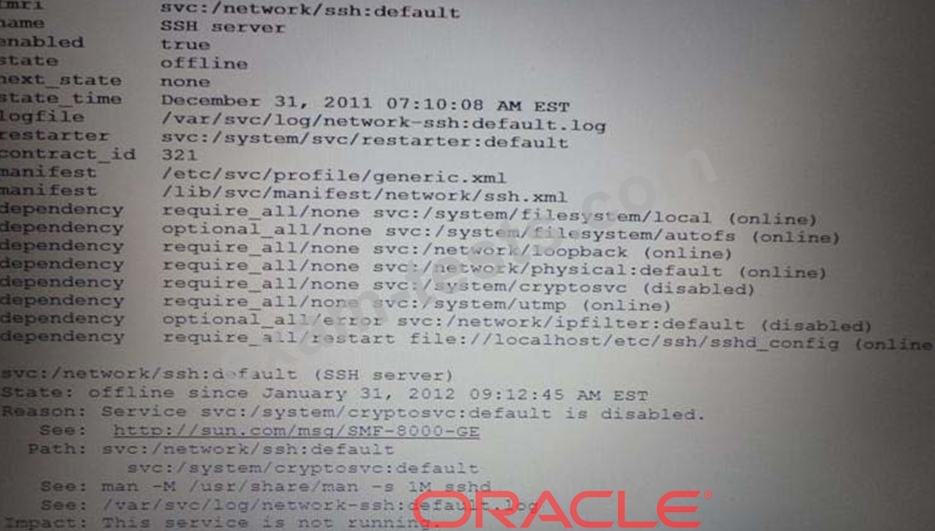
The following information is displayed for the svc:/network/ssh service: Which describes the minimum set of commands to be executed to bring the svc: /network/ssh: default service back online?
Correct Answer: C
Question 100
Solaris 11 includes a redesigned software packaging model: the Image Packaging system. Which three describe advantages of the Image Packaging System over the previous Solaris 10 SVR4 packaging model?