

Question 296
Refer to the exhibit. Which configuration must be applied to the router that configures PAT to translate all addresses in VLAN 200 while allowing devices on VLAN
100 to use their own IP addresses?

100 to use their own IP addresses?
Question 297
How does a router handle an incoming packet whose destination network is missing from the Routing table?
Question 298
Drag and Drop Question
Refer to the exhibit. An engineer is required to verify that the network parameters are valid for the users wireless LAN connectivity on a /24 subnet. Drag and drop the values from the left onto the network parameters on the right. Not all values are used.


Refer to the exhibit. An engineer is required to verify that the network parameters are valid for the users wireless LAN connectivity on a /24 subnet. Drag and drop the values from the left onto the network parameters on the right. Not all values are used.

Question 299
Refer to the exhibit.

What is the correct next hop for router R1 to reach IP addresses 192.168.2.86 and 10.20.1.50?
What is the correct next hop for router R1 to reach IP addresses 192.168.2.86 and 10.20.1.50?
Question 300
Physical connectivity is implemented between the two Layer 2 switches,
and the network connectivity between them must be configured.
I . Configure an LACP EtherChanneI and number it as 44; configure it
between switches SWI and SW2 using interfaces EthernetO/O and
Ethernet0/1 on both sides. The LACP mode must match on both ends.
2. Configure the EtherChanneI as a trunk link.
3. Configure the trunk link with 802. Iq tags.
4. Configure VLAN 'MONITORING' as the untagged VLAN of the
EtherChannel.
Guidelines
This is a lab item in which tasks will be performed on virtual devices.
* Refer to the Tasks tab to view the tasks for this lab item.
* Refer to the Topology tab to access the device console(s) and perform the tasks.
* Console access is available for all required devices by clicking the device icon or using the tab(s) above the console window.
* All necessary preconfigurations have been applied.
* Do not change the enable password or hostname for any device.
* Save your configurations to NVRAM before moving to the next item.
* Click Next at the bottom of the screen to submit this lab and move to the next question.
* When Next is clicked, the lab closes and cannot be reopened.
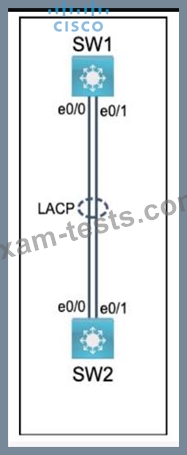
and the network connectivity between them must be configured.
I . Configure an LACP EtherChanneI and number it as 44; configure it
between switches SWI and SW2 using interfaces EthernetO/O and
Ethernet0/1 on both sides. The LACP mode must match on both ends.
2. Configure the EtherChanneI as a trunk link.
3. Configure the trunk link with 802. Iq tags.
4. Configure VLAN 'MONITORING' as the untagged VLAN of the
EtherChannel.
Guidelines
This is a lab item in which tasks will be performed on virtual devices.
* Refer to the Tasks tab to view the tasks for this lab item.
* Refer to the Topology tab to access the device console(s) and perform the tasks.
* Console access is available for all required devices by clicking the device icon or using the tab(s) above the console window.
* All necessary preconfigurations have been applied.
* Do not change the enable password or hostname for any device.
* Save your configurations to NVRAM before moving to the next item.
* Click Next at the bottom of the screen to submit this lab and move to the next question.
* When Next is clicked, the lab closes and cannot be reopened.