
- Home
- Cisco Certification
- 350-701 Exam
- Cisco.350-701.v2023-05-04.q372 Practice Test

Question 191
What is a difference between FlexVPN and DMVPN?
Correct Answer: B
Question 192
Which cloud service model offers an environment for cloud consumers to develop and deploy applications without needing to manage or maintain the underlying cloud infrastructure?
Correct Answer: A
Explanation
Question 193
When using Cisco AMP for Networks which feature copies a file to the Cisco AMP cloud for analysis?
Correct Answer: B
Explanation Spero analysis examines structural characteristics such as metadata and header information in executable files. After generating a Spero signature based on this information, if the file is an eligible executable file, the device submits it to the Spero heuristic engine in the AMP cloud. Based on the Spero signature, the Spero engine determines whether the file is malware. Reference: https://www.cisco.com/c/en/us/td/docs/security/firepower/60/configuration/guide/fpmc-config-guidev60/Reference_a_wrapper_Chapter_topic_here.html -> Spero analysis only uploads the signature of the (executable) files to the AMP cloud. It does not upload the whole file. Dynamic analysis sends files to AMP ThreatGrid. Dynamic Analysis submits (the whole) files to Cisco Threat Grid (formerly AMP Threat Grid). Cisco Threat Grid runs the file in a sandbox environment, analyzes the file's behavior to determine whether the file is malicious, and returns a threat score that indicates the likelihood that a file contains malware. From the threat score, you can view a dynamic analysis summary report with the reasons for the assigned threat score. You can also look in Cisco Threat Grid to view detailed reports for files that your organization submitted, as well as scrubbed reports with limited data for files that your organization did not submit. Local malware analysis allows a managed device to locally inspect executables, PDFs, office documents, and other types of files for the most common types of malware, using a detection rule set provided by the Cisco Talos Security Intelligence and Research Group (Talos). Because local analysis does not query the AMP cloud, and does not run the file, local malware analysis saves time and system resources. -> Malware analysis does not upload files to anywhere, it only checks the files locally. There is no sandbox analysis feature, it is just a method of dynamic analysis that runs suspicious files in a virtual machine.
Spero analysis examines structural characteristics such as metadata and header information in executable files. After generating a Spero signature based on this information, if the file is an eligible executable file, the device submits it to the Spero heuristic engine in the AMP cloud. Based on the Spero signature, the Spero engine determines whether the file is malware.
Reference:
-> Spero analysis only uploads the signature of the (executable) files to the AMP cloud. It does not upload the whole file. Dynamic analysis sends files to AMP ThreatGrid.
Dynamic Analysis submits (the whole) files to Cisco Threat Grid (formerly AMP Threat Grid). Cisco Threat Grid runs the file in a sandbox environment, analyzes the file's behavior to determine whether the file is malicious, and returns a threat score that indicates the likelihood that a file contains malware. From the threat score, you can view a dynamic analysis summary report with the reasons for the assigned threat score. You can also look in Cisco Threat Grid to view detailed reports for files that your organization submitted, as well as scrubbed reports with limited data for files that your organization did not submit.
Local malware analysis allows a managed device to locally inspect executables, PDFs, office documents, and other types of files for the most common types of malware, using a detection rule set provided by the Cisco Talos Security Intelligence and Research Group (Talos). Because local analysis does not query the AMP cloud, and does not run the file, local malware analysis saves time and system resources. -> Malware analysis does not upload files to anywhere, it only checks the files locally.
There is no sandbox analysis feature, it is just a method of dynamic analysis that runs suspicious files in a Explanation Spero analysis examines structural characteristics such as metadata and header information in executable files. After generating a Spero signature based on this information, if the file is an eligible executable file, the device submits it to the Spero heuristic engine in the AMP cloud. Based on the Spero signature, the Spero engine determines whether the file is malware. Reference: https://www.cisco.com/c/en/us/td/docs/security/firepower/60/configuration/guide/fpmc-config-guidev60/Reference_a_wrapper_Chapter_topic_here.html -> Spero analysis only uploads the signature of the (executable) files to the AMP cloud. It does not upload the whole file. Dynamic analysis sends files to AMP ThreatGrid. Dynamic Analysis submits (the whole) files to Cisco Threat Grid (formerly AMP Threat Grid). Cisco Threat Grid runs the file in a sandbox environment, analyzes the file's behavior to determine whether the file is malicious, and returns a threat score that indicates the likelihood that a file contains malware. From the threat score, you can view a dynamic analysis summary report with the reasons for the assigned threat score. You can also look in Cisco Threat Grid to view detailed reports for files that your organization submitted, as well as scrubbed reports with limited data for files that your organization did not submit. Local malware analysis allows a managed device to locally inspect executables, PDFs, office documents, and other types of files for the most common types of malware, using a detection rule set provided by the Cisco Talos Security Intelligence and Research Group (Talos). Because local analysis does not query the AMP cloud, and does not run the file, local malware analysis saves time and system resources. -> Malware analysis does not upload files to anywhere, it only checks the files locally. There is no sandbox analysis feature, it is just a method of dynamic analysis that runs suspicious files in a virtual machine.
Spero analysis examines structural characteristics such as metadata and header information in executable files. After generating a Spero signature based on this information, if the file is an eligible executable file, the device submits it to the Spero heuristic engine in the AMP cloud. Based on the Spero signature, the Spero engine determines whether the file is malware.
Reference:
-> Spero analysis only uploads the signature of the (executable) files to the AMP cloud. It does not upload the whole file. Dynamic analysis sends files to AMP ThreatGrid.
Dynamic Analysis submits (the whole) files to Cisco Threat Grid (formerly AMP Threat Grid). Cisco Threat Grid runs the file in a sandbox environment, analyzes the file's behavior to determine whether the file is malicious, and returns a threat score that indicates the likelihood that a file contains malware. From the threat score, you can view a dynamic analysis summary report with the reasons for the assigned threat score. You can also look in Cisco Threat Grid to view detailed reports for files that your organization submitted, as well as scrubbed reports with limited data for files that your organization did not submit.
Local malware analysis allows a managed device to locally inspect executables, PDFs, office documents, and other types of files for the most common types of malware, using a detection rule set provided by the Cisco Talos Security Intelligence and Research Group (Talos). Because local analysis does not query the AMP cloud, and does not run the file, local malware analysis saves time and system resources. -> Malware analysis does not upload files to anywhere, it only checks the files locally.
There is no sandbox analysis feature, it is just a method of dynamic analysis that runs suspicious files in a Explanation Spero analysis examines structural characteristics such as metadata and header information in executable files. After generating a Spero signature based on this information, if the file is an eligible executable file, the device submits it to the Spero heuristic engine in the AMP cloud. Based on the Spero signature, the Spero engine determines whether the file is malware. Reference: https://www.cisco.com/c/en/us/td/docs/security/firepower/60/configuration/guide/fpmc-config-guidev60/Reference_a_wrapper_Chapter_topic_here.html -> Spero analysis only uploads the signature of the (executable) files to the AMP cloud. It does not upload the whole file. Dynamic analysis sends files to AMP ThreatGrid. Dynamic Analysis submits (the whole) files to Cisco Threat Grid (formerly AMP Threat Grid). Cisco Threat Grid runs the file in a sandbox environment, analyzes the file's behavior to determine whether the file is malicious, and returns a threat score that indicates the likelihood that a file contains malware. From the threat score, you can view a dynamic analysis summary report with the reasons for the assigned threat score. You can also look in Cisco Threat Grid to view detailed reports for files that your organization submitted, as well as scrubbed reports with limited data for files that your organization did not submit. Local malware analysis allows a managed device to locally inspect executables, PDFs, office documents, and other types of files for the most common types of malware, using a detection rule set provided by the Cisco Talos Security Intelligence and Research Group (Talos). Because local analysis does not query the AMP cloud, and does not run the file, local malware analysis saves time and system resources. -> Malware analysis does not upload files to anywhere, it only checks the files locally. There is no sandbox analysis feature, it is just a method of dynamic analysis that runs suspicious files in a virtual machine.
Question 194
Under which two circumstances is a CoA issued? (Choose two)
Correct Answer: B,D
The profiling service issues the change of authorization in the following cases:
- Endpoint deleted-When an endpoint is deleted from the Endpoints page and the endpoint is disconnected or removed from the network.
An exception action is configured-If you have an exception action configured per profile that leads to an unusual or an unacceptable event from that endpoint. The profiling service moves the endpoint to the corresponding static profile by issuing a CoA.
- An endpoint is profiled for the first time-When an endpoint is not statically assigned and profiled for the first time; for example, the profile changes from an unknown to a known profile.
+ An endpoint identity group has changed-When an endpoint is added or removed from an endpoint identity group that is used by an authorization policy.
The profiling service issues a CoA when there is any change in an endpoint identity group, and the endpoint identity group is used in the authorization policy for the following:
++ The endpoint identity group changes for endpoints when they are dynamically profiled ++ The endpoint identity group changes when the static assignment flag is set to true for a dynamic endpoint - An endpoint profiling policy has changed and the policy is used in an authorization policy-When an endpoint profiling policy changes, and the policy is included in a logical profile that is used in an authorization policy. The endpoint profiling policy may change due to the profiling policy match or when an endpoint is statically assigned to an endpoint profiling policy, which is associated to a logical profile. In both the cases, the profiling service issues a CoA, only when the endpoint profiling policy is used in an authorization policy. Reference: https://www.cisco.com/c/en/us/td/docs/security/ise/2-1/admin_guide/b_ise_admin_guide_21/ b_ise_admin_guide_20_chapter_010100.html
++ The endpoint identity group changes when the static assignment flag is set to true for a dynamic endpoint - An endpoint profiling policy has changed and the policy is used in an authorization policy-When an endpoint profiling policy changes, and the policy is included in a logical profile that is used in an authorization policy. The endpoint profiling policy may change due to the profiling policy match or when an endpoint is statically assigned to an endpoint profiling policy, which is associated to a logical profile. In both the cases, the profiling service issues a CoA, only when the endpoint profiling policy is used in an authorization policy.
Reference:
++ The endpoint identity group changes for endpoints when they are dynamically profiled ++ The endpoint identity group changes when the static assignment flag is set to true for a dynamic endpoint - An endpoint profiling policy has changed and the policy is used in an authorization policy-When an endpoint profiling policy changes, and the policy is included in a logical profile that is used in an authorization policy. The endpoint profiling policy may change due to the profiling policy match or when an endpoint is statically assigned to an endpoint profiling policy, which is associated to a logical profile. In both the cases, the profiling service issues a CoA, only when the endpoint profiling policy is used in an authorization policy. Reference: https://www.cisco.com/c/en/us/td/docs/security/ise/2-1/admin_guide/b_ise_admin_guide_21/ b_ise_admin_guide_20_chapter_010100.html
- Endpoint deleted-When an endpoint is deleted from the Endpoints page and the endpoint is disconnected or removed from the network.
An exception action is configured-If you have an exception action configured per profile that leads to an unusual or an unacceptable event from that endpoint. The profiling service moves the endpoint to the corresponding static profile by issuing a CoA.
- An endpoint is profiled for the first time-When an endpoint is not statically assigned and profiled for the first time; for example, the profile changes from an unknown to a known profile.
+ An endpoint identity group has changed-When an endpoint is added or removed from an endpoint identity group that is used by an authorization policy.
The profiling service issues a CoA when there is any change in an endpoint identity group, and the endpoint identity group is used in the authorization policy for the following:
++ The endpoint identity group changes for endpoints when they are dynamically profiled ++ The endpoint identity group changes when the static assignment flag is set to true for a dynamic endpoint - An endpoint profiling policy has changed and the policy is used in an authorization policy-When an endpoint profiling policy changes, and the policy is included in a logical profile that is used in an authorization policy. The endpoint profiling policy may change due to the profiling policy match or when an endpoint is statically assigned to an endpoint profiling policy, which is associated to a logical profile. In both the cases, the profiling service issues a CoA, only when the endpoint profiling policy is used in an authorization policy. Reference: https://www.cisco.com/c/en/us/td/docs/security/ise/2-1/admin_guide/b_ise_admin_guide_21/ b_ise_admin_guide_20_chapter_010100.html
++ The endpoint identity group changes when the static assignment flag is set to true for a dynamic endpoint - An endpoint profiling policy has changed and the policy is used in an authorization policy-When an endpoint profiling policy changes, and the policy is included in a logical profile that is used in an authorization policy. The endpoint profiling policy may change due to the profiling policy match or when an endpoint is statically assigned to an endpoint profiling policy, which is associated to a logical profile. In both the cases, the profiling service issues a CoA, only when the endpoint profiling policy is used in an authorization policy.
Reference:
++ The endpoint identity group changes for endpoints when they are dynamically profiled ++ The endpoint identity group changes when the static assignment flag is set to true for a dynamic endpoint - An endpoint profiling policy has changed and the policy is used in an authorization policy-When an endpoint profiling policy changes, and the policy is included in a logical profile that is used in an authorization policy. The endpoint profiling policy may change due to the profiling policy match or when an endpoint is statically assigned to an endpoint profiling policy, which is associated to a logical profile. In both the cases, the profiling service issues a CoA, only when the endpoint profiling policy is used in an authorization policy. Reference: https://www.cisco.com/c/en/us/td/docs/security/ise/2-1/admin_guide/b_ise_admin_guide_21/ b_ise_admin_guide_20_chapter_010100.html
Question 195
An administrator is configuring a DHCP server to better secure their environment. They need to be able to ratelimit the traffic and ensure that legitimate requests are not dropped. How would this be accomplished?
Correct Answer: A
To understand DHCP snooping we need to learn about DHCP spoofing attack first.
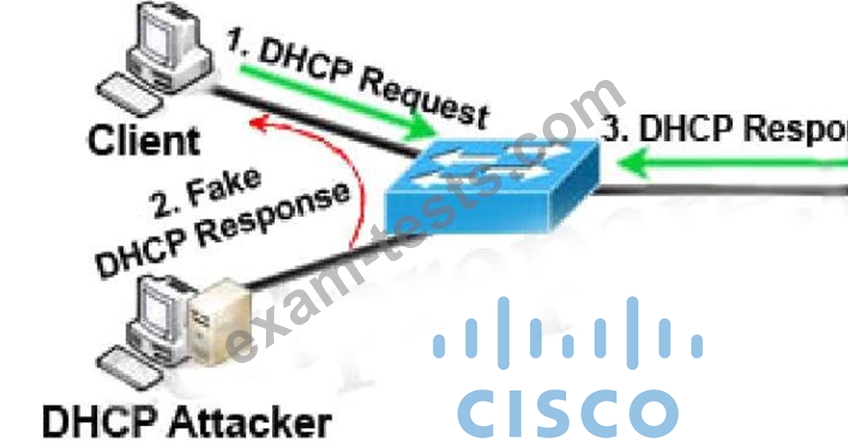
DHCP spoofing is a type of attack in that the attacker listens for DHCP Requests from clients and answers them with fake DHCP Response before the authorized DHCP Response comes to the clients. The fake DHCP Response often gives its IP address as the client default gateway -> all the traffic sent from the client will go through the attacker computer, the attacker becomes a "man-in-the-middle".
The attacker can have some ways to make sure its fake DHCP Response arrives first. In fact, if the attacker is "closer" than the DHCP Server then he doesn't need to do anything. Or he can DoS the DHCP Server so that it can't send the DHCP Response.
DHCP snooping can prevent DHCP spoofing attacks. DHCP snooping is a Cisco Catalyst feature that determines which switch ports can respond to DHCP requests. Ports are identified as trusted and untrusted.
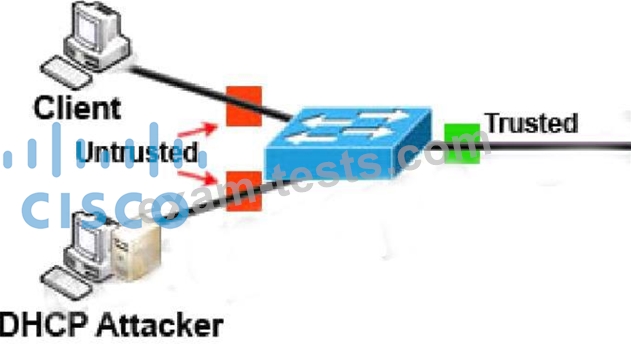
Only ports that connect to an authorized DHCP server are trusted, and allowed to send all types of DHCP messages. All other ports on the switch are untrusted and can send only DHCP requests. If a DHCP response is seen on an untrusted port, the port is shut down.
DHCP spoofing is a type of attack in that the attacker listens for DHCP Requests from clients and answers them with fake DHCP Response before the authorized DHCP Response comes to the clients. The fake DHCP Response often gives its IP address as the client default gateway -> all the traffic sent from the client will go through the attacker computer, the attacker becomes a "man-in-the-middle".
The attacker can have some ways to make sure its fake DHCP Response arrives first. In fact, if the attacker is "closer" than the DHCP Server then he doesn't need to do anything. Or he can DoS the DHCP Server so that it can't send the DHCP Response.
DHCP snooping can prevent DHCP spoofing attacks. DHCP snooping is a Cisco Catalyst feature that determines which switch ports can respond to DHCP requests. Ports are identified as trusted and untrusted.
Only ports that connect to an authorized DHCP server are trusted, and allowed to send all types of DHCP messages. All other ports on the switch are untrusted and can send only DHCP requests. If a DHCP response is seen on an untrusted port, the port is shut down.
- Other Version
- 2909Cisco.350-701.v2025-10-04.q562
- 1735Cisco.350-701.v2025-06-19.q238
- 2738Cisco.350-701.v2024-12-18.q472
- 3784Cisco.350-701.v2023-08-01.q405
- 2961Cisco.350-701.v2023-03-16.q218
- 8260Cisco.350-701.v2022-10-19.q571
- 8375Cisco.350-701.v2022-07-08.q453
- 4739Cisco.350-701.v2022-02-02.q204
- 116Cisco.Prepawaypdf.350-701.v2021-12-15.by.ellen.316q.pdf
- Latest Upload
- 250PaloAltoNetworks.NGFW-Engineer.v2026-05-01.q43
- 362Nokia.4A0-113.v2026-05-01.q69
- 397EC-COUNCIL.312-49v11.v2026-04-30.q214
- 306Microsoft.MB-820.v2026-04-30.q101
- 247Salesforce.MC-202.v2026-04-30.q57
- 271BICSI.INSTC_V8.v2026-04-29.q53
- 411NMLS.MLO.v2026-04-28.q82
- 275NCARB.Project-Management.v2026-04-28.q27
- 493EMC.D-AV-DY-23.v2026-04-27.q184
- 1302ServiceNow.CSA.v2026-04-27.q483
[×]
Download PDF File
Enter your email address to download Cisco.350-701.v2023-05-04.q372 Practice Test