Question 136
You have an Azure subscription.
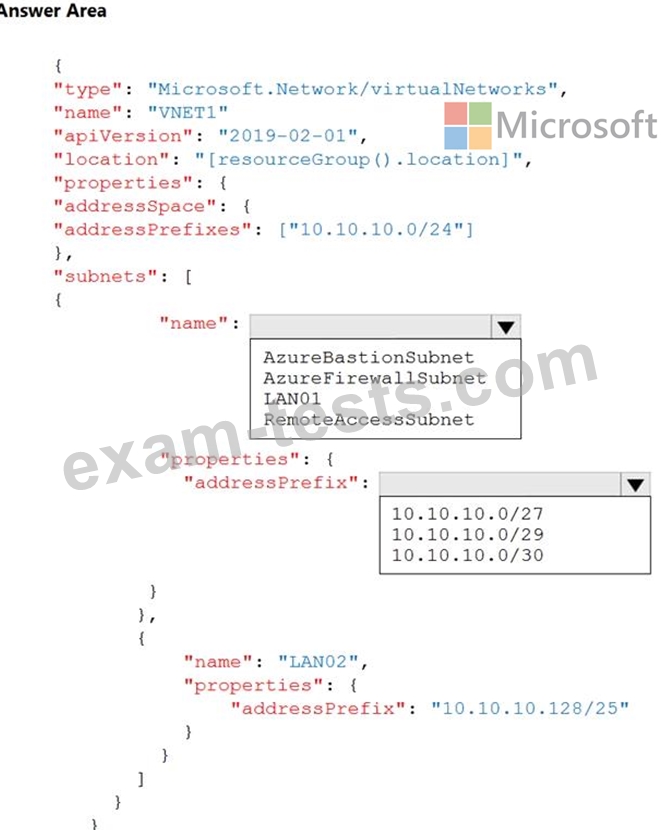
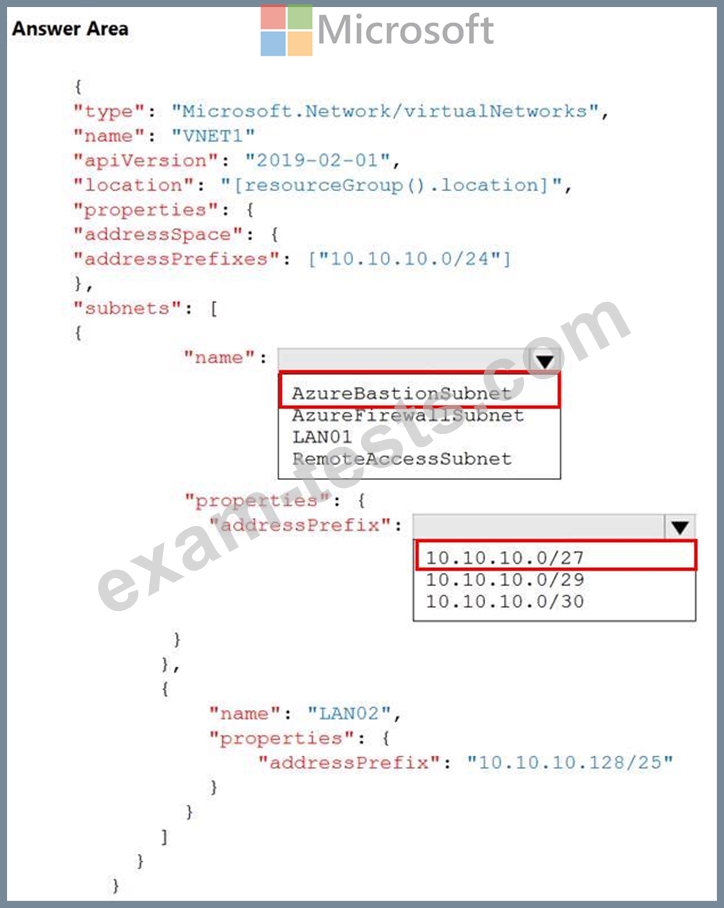
You plan to use an Azure Resource Manager template to deploy a virtual network named VNET1 that will use Azure Bastion.
How should you complete the template? To answer, select the appropriate options in the answer area.
NOTE: Each correct selection is worth one point.
You plan to use an Azure Resource Manager template to deploy a virtual network named VNET1 that will use Azure Bastion.
How should you complete the template? To answer, select the appropriate options in the answer area.
NOTE: Each correct selection is worth one point.
Question 137
Note: This question is part of a series of questions that present the same scenario. Each question in the series contains a unique solution that might meet the stated goals. Some question sets might have more than one correct solution, while others might not have a correct solution.
After you answer a question in this section, you will NOT be able to return to it. As a result, these questions will not appear in the review screen.
You have an Azure virtual machine named VM1. VM1 was deployed by using a custom Azure Resource Manager template named ARM1.json.
You receive a notification that VM1 will be affected by maintenance.
You need to move VM1 to a different host immediately.
Solution: From the Redeploy blade, you click Redeploy.
Does this meet the goal?
After you answer a question in this section, you will NOT be able to return to it. As a result, these questions will not appear in the review screen.
You have an Azure virtual machine named VM1. VM1 was deployed by using a custom Azure Resource Manager template named ARM1.json.
You receive a notification that VM1 will be affected by maintenance.
You need to move VM1 to a different host immediately.
Solution: From the Redeploy blade, you click Redeploy.
Does this meet the goal?
Question 138
You have an Azure Active Directory (Azure AD) tenant named contoso.onmicrosoft.com.
The User administrator role is assigned to a user named Admin1.
An external partner has a Microsoft account that uses the [email protected] sign in.
Admin1 attempts to invite the external partner to sign in to the Azure AD tenant and receives the following error message: "Unable to invite user [email protected] - Generic authorization exception." You need to ensure that Admin1 can invite the external partner to sign in to the Azure AD tenant.
What should you do?
The User administrator role is assigned to a user named Admin1.
An external partner has a Microsoft account that uses the [email protected] sign in.
Admin1 attempts to invite the external partner to sign in to the Azure AD tenant and receives the following error message: "Unable to invite user [email protected] - Generic authorization exception." You need to ensure that Admin1 can invite the external partner to sign in to the Azure AD tenant.
What should you do?
Question 139
You have an Azure subscription.
You activate Enterprise Mobility + Security E5 licenses for all users.
You need the users to request approval before they can create virtual machines.
What should you configure first?
You activate Enterprise Mobility + Security E5 licenses for all users.
You need the users to request approval before they can create virtual machines.
What should you configure first?
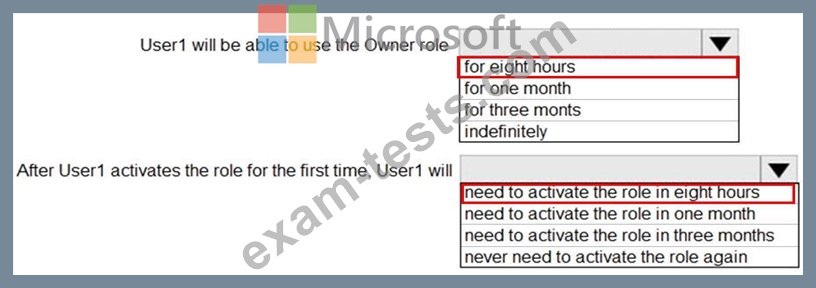
Question 140
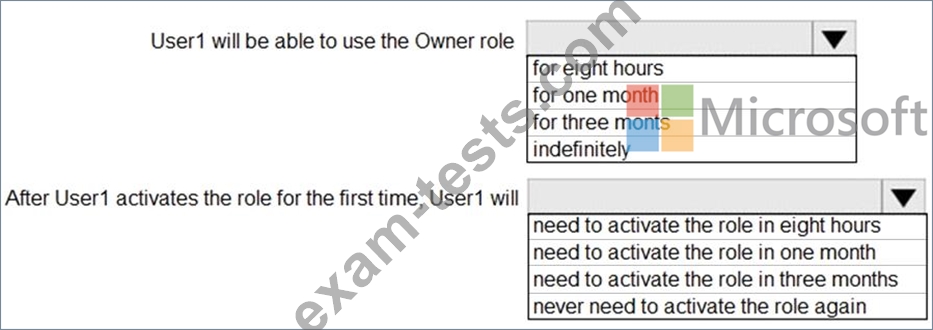
From Azure Active Directory (AD) Privileged Identify Management, you configure the Role settings for the Owner role of an Azure subscription as shown in the following exhibit.

From Azure AD Privileged Identify Management, you assign the Owner role for the subscription to a user named User1, and you set the Assignment type to Active and Permanently eligible.
Use the drop-down menus to select the answer choice that completes each statement based on the information presented in the graphic.
NOTE: Each correct selection is worth one point.
From Azure AD Privileged Identify Management, you assign the Owner role for the subscription to a user named User1, and you set the Assignment type to Active and Permanently eligible.
Use the drop-down menus to select the answer choice that completes each statement based on the information presented in the graphic.
NOTE: Each correct selection is worth one point.