

Question 36
Note: This question is part of a series of questions that present the same scenario. Each question in the series contains a unique solution that might meet the stated goals. Some question sets might have more than one correct solution, while others might not have a correct solution.
After you answer a question in this section, you will NOT be able to return to it. As a result, these questions will not appear in the review screen.
You have a Windows Virtual Desktop host pool named Pool1 that is integrated with an Azure Active Directory Domain Services (Azure AD DS) managed domain.
You need to configure idle session timeout settings for users that connect to the session hosts in Pool1.
Solution: From the Azure portal, you modify the Session behavior settings in the RDP Properties of Pool1.
Does that meet the goal?
After you answer a question in this section, you will NOT be able to return to it. As a result, these questions will not appear in the review screen.
You have a Windows Virtual Desktop host pool named Pool1 that is integrated with an Azure Active Directory Domain Services (Azure AD DS) managed domain.
You need to configure idle session timeout settings for users that connect to the session hosts in Pool1.
Solution: From the Azure portal, you modify the Session behavior settings in the RDP Properties of Pool1.
Does that meet the goal?
Question 37
Which users can create Pool4, and which users can join session hosts to the domain? To answer, select the appropriate options in the answer area.
NOTE: Each correct selection is worth one point.

NOTE: Each correct selection is worth one point.

Question 38
You have a Azure Virtual Desktop host pool in the East US region.
You need to implement a disaster recovery solution that meets the following requirements:
* If users cannot connect to the Azure Virtual Desktop resources in the East US region, the users must be able to connect to the equivalent resources in the West US region.
* Users must connect to the Azure Virtual Desktop resources in either the East US or the West US region by selecting a single icon in the Remote Desktop client
* In the event of a disaster, failover between the Azure regions must be initiated manually by an administrator.
* Failover times must be minimized.
What should you do?
You need to implement a disaster recovery solution that meets the following requirements:
* If users cannot connect to the Azure Virtual Desktop resources in the East US region, the users must be able to connect to the equivalent resources in the West US region.
* Users must connect to the Azure Virtual Desktop resources in either the East US or the West US region by selecting a single icon in the Remote Desktop client
* In the event of a disaster, failover between the Azure regions must be initiated manually by an administrator.
* Failover times must be minimized.
What should you do?
Question 39
You have a Windows Virtual Desktop host pool that has a max session limit of 15. Disconnected sessions are signed out immediately.
The session hosts for the host pool are shown in the following exhibit.
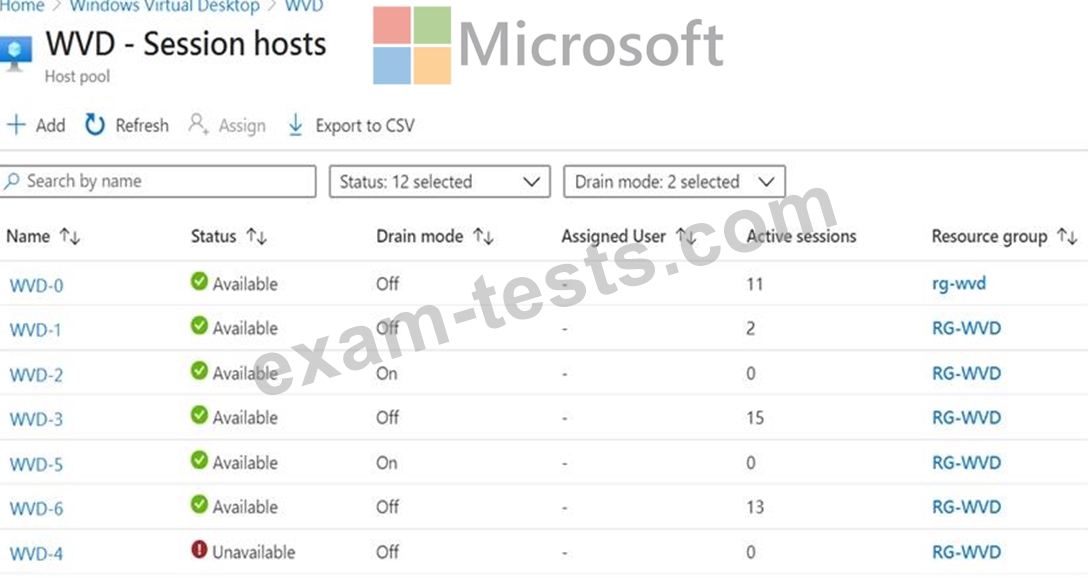
Use the drop-down menus to select the answer choice that completes each statement based on the information presented in the graphic.
NOTE: Each correct selection is worth one point.

The session hosts for the host pool are shown in the following exhibit.
Use the drop-down menus to select the answer choice that completes each statement based on the information presented in the graphic.
NOTE: Each correct selection is worth one point.

Question 40
You have a Azure Virtual Desktop deployment.
You need to monitor the deployment of using the Azure Virtual Desktop Insights solution in Azure Monitor.
What should you use as the Diagnostic settings destination for the host pool?
You need to monitor the deployment of using the Azure Virtual Desktop Insights solution in Azure Monitor.
What should you use as the Diagnostic settings destination for the host pool?
Premium Bundle
Newest AZ-140 Exam PDF Dumps shared by BraindumpsPass.com for Helping Passing AZ-140 Exam! BraindumpsPass.com now offer the updated AZ-140 exam dumps, the BraindumpsPass.com AZ-140 exam questions have been updated and answers have been corrected get the latest BraindumpsPass.com AZ-140 pdf dumps with Exam Engine here: