

Question 16
Note: This question is part of a series of questions that present the same scenario. Each question in the series contains a unique solution that might meet the stated goals. Some question sets might have more than one correct solution, while others might not have a correct solution.
After you answer a question in this section, you will NOT be able to return to it. As a result, these questions will not appear in the review screen.
You have a Windows Virtual Desktop host pool that contains five session hosts. The session hosts run Windows 10 Enterprise multi-session.
You need to prevent users from accessing the internet from Windows Virtual Desktop sessions. The session hosts must be allowed to access all the required Microsoft services.
Solution: You modify the IP configuration of each session host.
Does that meet the goal?
After you answer a question in this section, you will NOT be able to return to it. As a result, these questions will not appear in the review screen.
You have a Windows Virtual Desktop host pool that contains five session hosts. The session hosts run Windows 10 Enterprise multi-session.
You need to prevent users from accessing the internet from Windows Virtual Desktop sessions. The session hosts must be allowed to access all the required Microsoft services.
Solution: You modify the IP configuration of each session host.
Does that meet the goal?



Question 17
Note: This question is part of a series of questions that present the same scenario. Each question in the series contains a unique solution that might meet the stated goals. Some question sets might have more than one correct solution, while others might not have a correct solution.
After you answer a question in this section, you will NOT be able to return to it. As a result, these questions will not appear in the review screen.
You have the following:
A Microsoft 365 E5 tenant
An on-premises Active Directory domain
A hybrid Azure Active Directory (Azure AD) tenant
An Azure Active Directory Domain Services (Azure AD DS) managed domain
An Azure Virtual Desktop deployment
The Azure Virtual Desktop deployment contains personal desktops that are hybrid joined to the on-premises domain and enrolled in Microsoft Intune.
You need to configure the security settings for the Microsoft Edge browsers on the personal desktops.
Solution: You configure a configuration profile in Intune.
Does this meet the goal?
After you answer a question in this section, you will NOT be able to return to it. As a result, these questions will not appear in the review screen.
You have the following:
A Microsoft 365 E5 tenant
An on-premises Active Directory domain
A hybrid Azure Active Directory (Azure AD) tenant
An Azure Active Directory Domain Services (Azure AD DS) managed domain
An Azure Virtual Desktop deployment
The Azure Virtual Desktop deployment contains personal desktops that are hybrid joined to the on-premises domain and enrolled in Microsoft Intune.
You need to configure the security settings for the Microsoft Edge browsers on the personal desktops.
Solution: You configure a configuration profile in Intune.
Does this meet the goal?
Question 18
You have an Azure virtual machine named VM1 that runs Windows 10 Enterprise multi-session.
You plan to add language packs to VM1 and create a custom image of VM1 for a Windows Virtual Desktop host pool.
You need to ensure that modern apps can use the additional language packs when you deploy session hosts by using the custom image.
Which command should you run first? To answer, select the appropriate options in the answer area.
NOTE: Each correct selection is worth one point.

You plan to add language packs to VM1 and create a custom image of VM1 for a Windows Virtual Desktop host pool.
You need to ensure that modern apps can use the additional language packs when you deploy session hosts by using the custom image.
Which command should you run first? To answer, select the appropriate options in the answer area.
NOTE: Each correct selection is worth one point.


Question 19
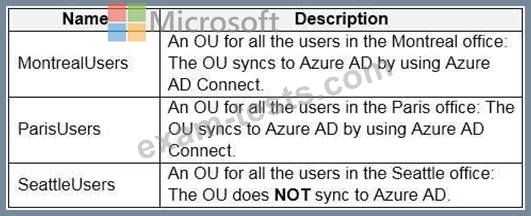
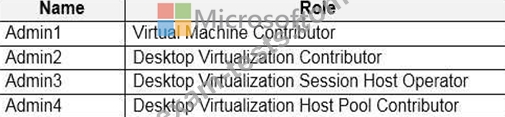
You have a hybrid Azure Active Directory (Azure AD) tenant named contoso.com that contains the users shown in the following table.

You have an Azure Virtual Desktop host pool. All the session hosts have a folder named C\Folder1.
You create an FSLogix Application Masking rule as shown in the following exhibit.

You create assignments for the Application Masking rule as shown in the following exhibit.
For each of the following statements, select Yes if the statement is true, Otherwise, select No.
NOTE: Each correct selection is worth one point.

You have an Azure Virtual Desktop host pool. All the session hosts have a folder named C\Folder1.
You create an FSLogix Application Masking rule as shown in the following exhibit.
You create assignments for the Application Masking rule as shown in the following exhibit.
For each of the following statements, select Yes if the statement is true, Otherwise, select No.
NOTE: Each correct selection is worth one point.


Question 20
Note: This question is part of a series of questions that present the same scenario. Each question in the series contains a unique solution that might meet the stated goals. Some question sets might have more than one correct solution, while others might not have a correct solution.
After you answer a question in this section, you will NOT be able to return to it. As a result, these questions will not appear in the review screen.
You have an Azure Virtual Desktop host pool that runs Windows 10 Enterprise multi-session.
User sessions are load-balanced between the session hosts. Idle session timeout is 30 minutes.
You plan to shut down a session host named Host1 to perform routine maintenance.
You need to prevent new user sessions to Host1 without disconnecting active user sessions.
Solution: From the properties of the virtual machine of Host1, you enable just-in-time (JIT) VM access.
Does this meet the goal?
After you answer a question in this section, you will NOT be able to return to it. As a result, these questions will not appear in the review screen.
You have an Azure Virtual Desktop host pool that runs Windows 10 Enterprise multi-session.
User sessions are load-balanced between the session hosts. Idle session timeout is 30 minutes.
You plan to shut down a session host named Host1 to perform routine maintenance.
You need to prevent new user sessions to Host1 without disconnecting active user sessions.
Solution: From the properties of the virtual machine of Host1, you enable just-in-time (JIT) VM access.
Does this meet the goal?