Question 1
You have an Azure Virtual Desktop host pool named Pool1 in the East US region.
You have a storage account named storage1 that contains FSLogix profile containers. In the East US region, you have a shared image gallery named SIG1 that contains a virtual machine image named Image1. Image1 is used to create new session hosts in Pool1.
You plan to deploy a new Azure Virtual Desktop host pool named Pool2 to the South India region.
You need to implement a session host deployment solution for Pool2 that meets the following requirements:
Image1 must replicate in the South India region.
The session hosts in Pool2 must be based on Image1.
Changes to Image1 must be available in the South India and East US regions.
What should you include in the solution?
You have a storage account named storage1 that contains FSLogix profile containers. In the East US region, you have a shared image gallery named SIG1 that contains a virtual machine image named Image1. Image1 is used to create new session hosts in Pool1.
You plan to deploy a new Azure Virtual Desktop host pool named Pool2 to the South India region.
You need to implement a session host deployment solution for Pool2 that meets the following requirements:
Image1 must replicate in the South India region.
The session hosts in Pool2 must be based on Image1.
Changes to Image1 must be available in the South India and East US regions.
What should you include in the solution?
Question 2
You have an Azure Virtual Desktop deployment that contains a host pool. The pool has the following settings:
* Resource group: RG1
* Host pool name: Pool1
* Location: East US
* Host pool type: Pooled
The deployment contains the workspaces shown in the following table.

For Pool1, you plan to create a RemoteApp application group named AppGroup1.
In which workspaces can you register AppGroup1?
* Resource group: RG1
* Host pool name: Pool1
* Location: East US
* Host pool type: Pooled
The deployment contains the workspaces shown in the following table.
For Pool1, you plan to create a RemoteApp application group named AppGroup1.
In which workspaces can you register AppGroup1?
Question 3
You need to configure the virtual machines that have the Pool1 prefix. The solution must meet the technical requirements.
What should you use?
What should you use?


Question 4
You have an Azure Active Directory Domain Services (Azure AD DS) managed domain named conioso.com.
You create a Azure Virtual Desktop host pool named Pool1. You assign the Virtual Machine Contributor role for the Azure subscription to a user named Admin1.
You need to ensure that Admin1 can add session hosts to Pool1. The solution must use the principle of least privilege.
Which two actions should you perform? Each correct answer presents part of the solution.
NOTE: Each correct selection is worth one point.
You create a Azure Virtual Desktop host pool named Pool1. You assign the Virtual Machine Contributor role for the Azure subscription to a user named Admin1.
You need to ensure that Admin1 can add session hosts to Pool1. The solution must use the principle of least privilege.
Which two actions should you perform? Each correct answer presents part of the solution.
NOTE: Each correct selection is worth one point.
Question 5
You have an Azure subscription that contains the virtual machines shown in the following table.

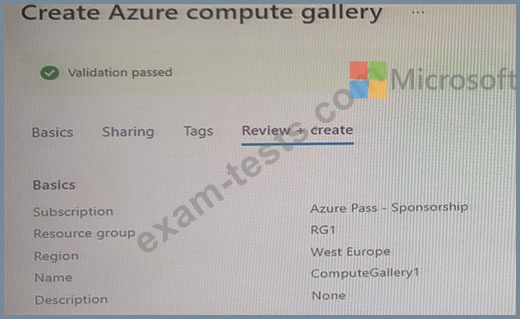
You create an Azure Compute Gallery as shown in the Azure compute gallery exhibit. (Click the Azure compute gallery tab.)
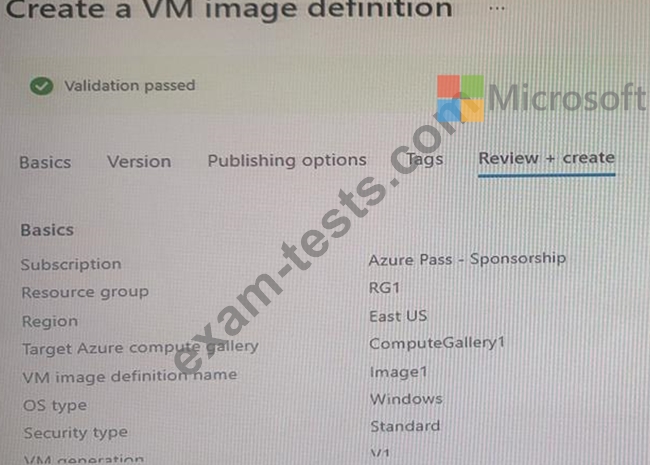
You create a virtual machine image definition as shown in the VM image definition exhibit. (Click the VM image definition tab.)
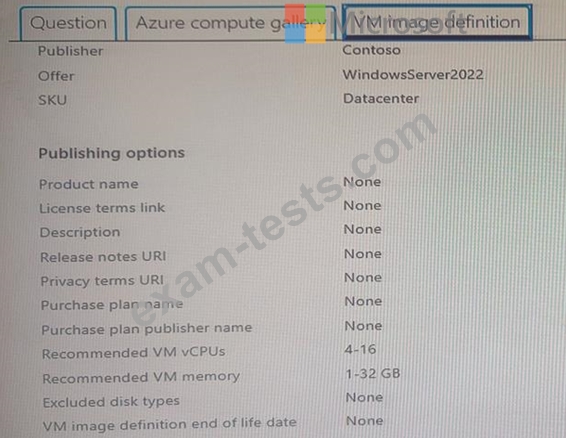
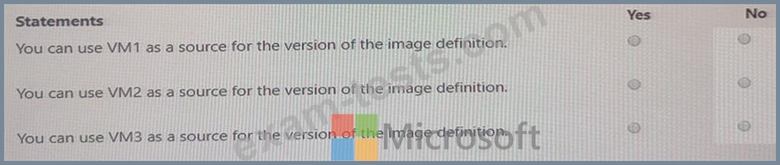
For each of the following statements, select Yes if the statement is true. Otherwise, select No.
You create an Azure Compute Gallery as shown in the Azure compute gallery exhibit. (Click the Azure compute gallery tab.)
You create a virtual machine image definition as shown in the VM image definition exhibit. (Click the VM image definition tab.)
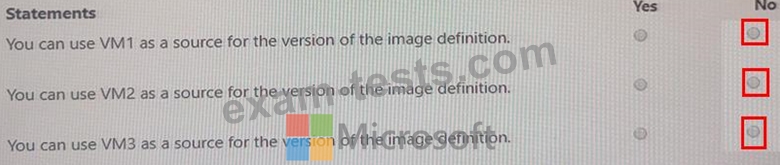
For each of the following statements, select Yes if the statement is true. Otherwise, select No.