Question 46
Your company has the offices shown in the following table.

The company has an Azure Active Directory (Azure AD) tenant named contoso.com that contains a user named User1.
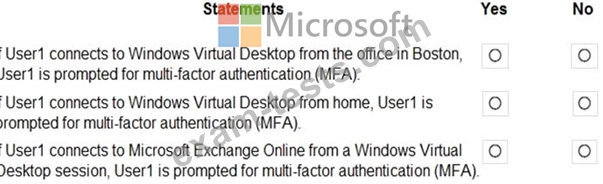
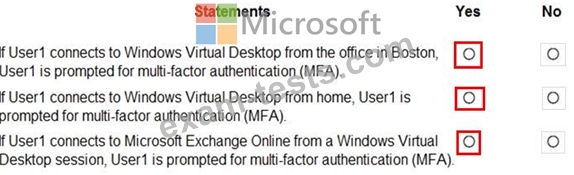
Users connect to a Windows Virtual Desktop deployment named WVD1. WVD1 contains session hosts that have public IP addresses from the 52.166.253.0/24 subnet.
Contoso.com has a conditional access policy that has the following settings:
Name: Policy1
Assignments:
Users and groups: User1
Cloud apps or actions: Windows Virtual Desktop
Access controls:
Grant: Grant access, Require multi-factor authentication
Enable policy: On
For each of the following statements, select Yes if the statement is true. Otherwise, select No.
NOTE: Each correct selection is worth one point.
The company has an Azure Active Directory (Azure AD) tenant named contoso.com that contains a user named User1.
Users connect to a Windows Virtual Desktop deployment named WVD1. WVD1 contains session hosts that have public IP addresses from the 52.166.253.0/24 subnet.
Contoso.com has a conditional access policy that has the following settings:
Name: Policy1
Assignments:
Users and groups: User1
Cloud apps or actions: Windows Virtual Desktop
Access controls:
Grant: Grant access, Require multi-factor authentication
Enable policy: On
For each of the following statements, select Yes if the statement is true. Otherwise, select No.
NOTE: Each correct selection is worth one point.
Question 47
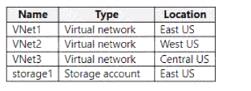
You have an Azure subscription that contains the resources shown in the following table.
You have a virtual machine named Server1 that runs Windows Server and is connected to VNet3.
You need to deploy the Azure Virtual Desktop host pools shown in the following table.
The solution must meet the following requirements:
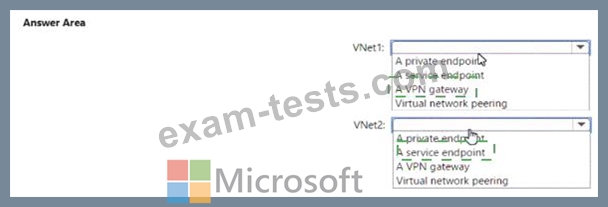
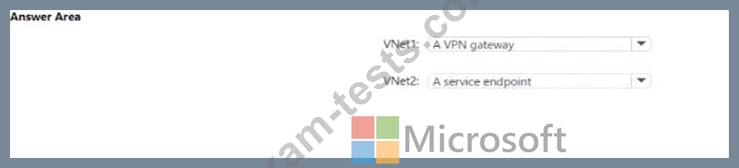
* The session hosts in Pool1 must access Server1 via the Microsoft backbone network.
* The session hosts in Pool2 must access storage1 via the Microsoft backbone network.
What should you configure on the virtual networks? To answer, select the appropriate options in the answer area.
NOTE: Each correct selection is worth one point.
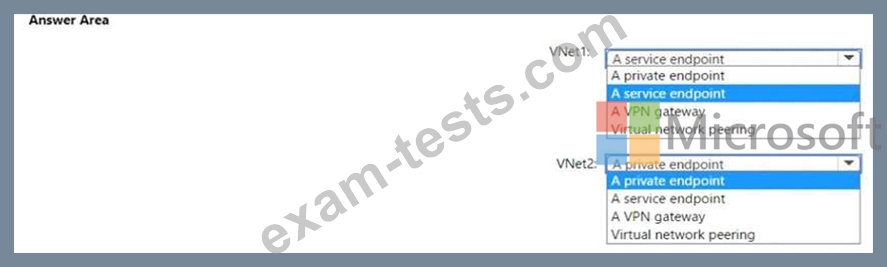
You have a virtual machine named Server1 that runs Windows Server and is connected to VNet3.
You need to deploy the Azure Virtual Desktop host pools shown in the following table.
The solution must meet the following requirements:
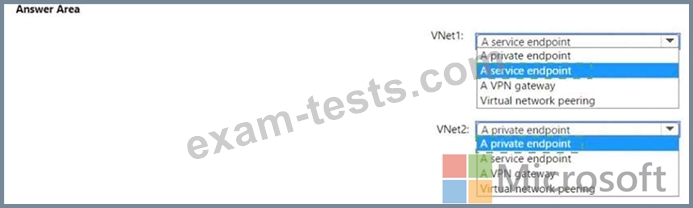
* The session hosts in Pool1 must access Server1 via the Microsoft backbone network.
* The session hosts in Pool2 must access storage1 via the Microsoft backbone network.
What should you configure on the virtual networks? To answer, select the appropriate options in the answer area.
NOTE: Each correct selection is worth one point.

Question 48
Note: This question is part of a series of questions that present the same scenario. Each question in the series contains a unique solution that might meet the stated goals. Some question sets might have more than one correct solution, while others might not have a correct solution.
After you answer a question in this section, you will NOT be able to return to it. As a result, these questions will not appear in the review screen.
You have a Windows Virtual Desktop host pool named Pool1 that is integrated with an Azure Active Directory Domain Services (Azure AD DS) managed domain.
You need to configure idle session timeout settings for users that connect to the session hosts in Pool1.
Solution: From an Azure AD DS-joined computer, you modify the AADDC Computers GPO settings.
Does that meet the goal?
After you answer a question in this section, you will NOT be able to return to it. As a result, these questions will not appear in the review screen.
You have a Windows Virtual Desktop host pool named Pool1 that is integrated with an Azure Active Directory Domain Services (Azure AD DS) managed domain.
You need to configure idle session timeout settings for users that connect to the session hosts in Pool1.
Solution: From an Azure AD DS-joined computer, you modify the AADDC Computers GPO settings.
Does that meet the goal?
Question 49
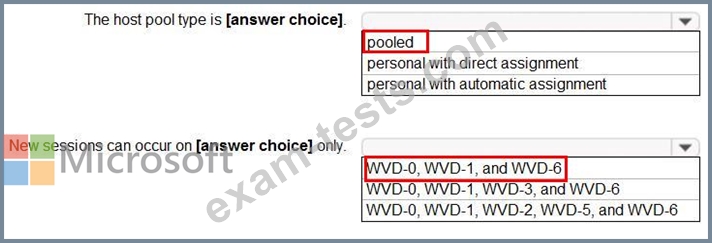
You have a Windows Virtual Desktop host pool that has a max session limit of 15. Disconnected sessions are signed out immediately.
The session hosts for the host pool are shown in the following exhibit.
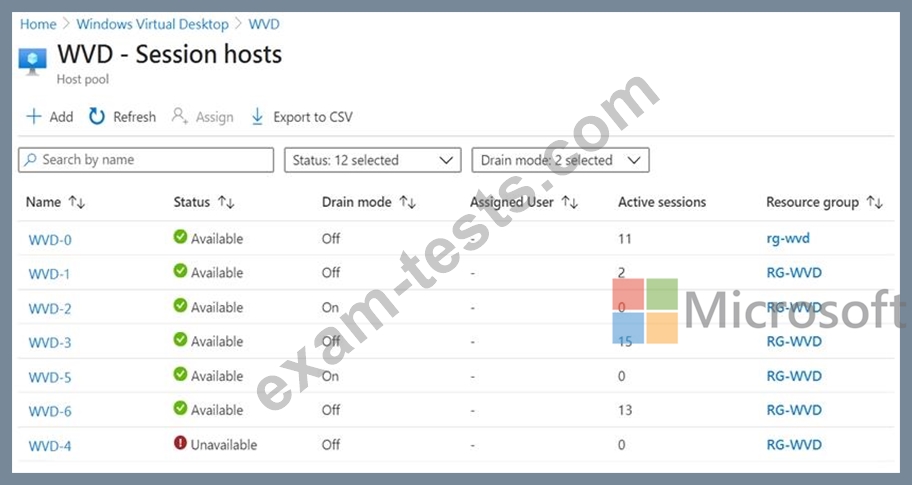
Use the drop-down menus to select the answer choice that completes each statement based on the information presented in the graphic.
NOTE: Each correct selection is worth one point.
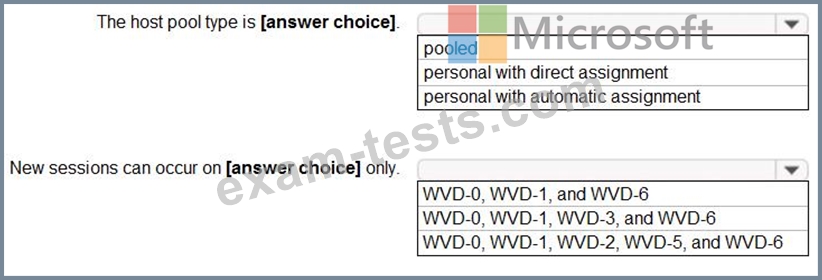
The session hosts for the host pool are shown in the following exhibit.
Use the drop-down menus to select the answer choice that completes each statement based on the information presented in the graphic.
NOTE: Each correct selection is worth one point.
Question 50
You have an A2ure subscription that contains the resources shown in the following table.
You have a virtual machine named Sever 1 that runs Windows Server and is connected to VNet3.

You have a virtual machine named Sever 1 that runs Windows Server and is connected to VNet3.