

Question 6
Your network contains an on-premises Active Directory domain named contoso.com that syncs to an Azure Active Directory (Azure AD) tenant.
You have an Azure subscription that contains an Azure Virtual Desktop host pool.
You create an Azure Storage account named storage1.
You need to use FSLogix profile containers in storage1 to store user profiles for a group named Group1. The solution must use the principle of least privilege.
What should you include in the solution? To answer, select the appropriate options in the answer area.

You have an Azure subscription that contains an Azure Virtual Desktop host pool.
You create an Azure Storage account named storage1.
You need to use FSLogix profile containers in storage1 to store user profiles for a group named Group1. The solution must use the principle of least privilege.
What should you include in the solution? To answer, select the appropriate options in the answer area.

Question 7
You have two Azure subscriptions that are linked to an Azure Active Directory (Azure AD) tenant named contoso.com and contain an Azure Virtual Desktop deployment. The tenant contains a user named User1.
When User1 signs in to Azure Security Center, the user receives the message shown in the following exhibit.
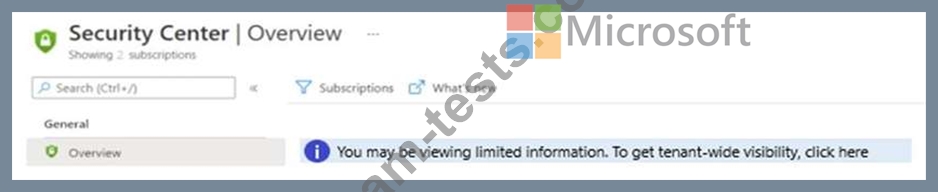
You need to ensure that User1 can manage security information for the tenant. The solution must use the principle of least privilege.
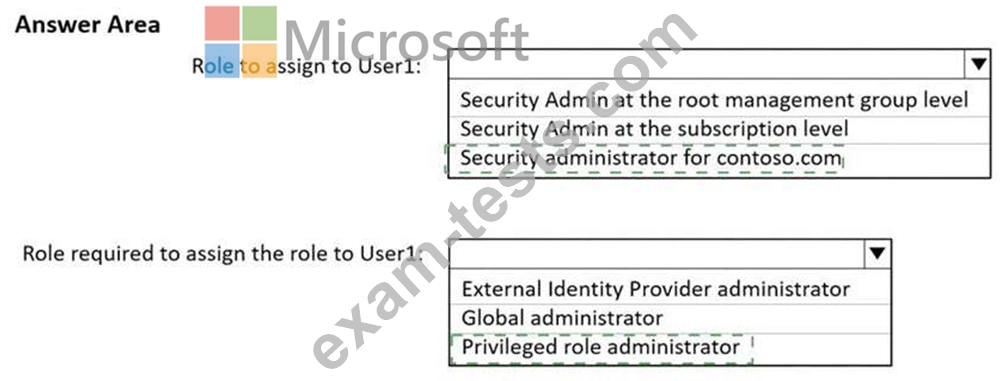
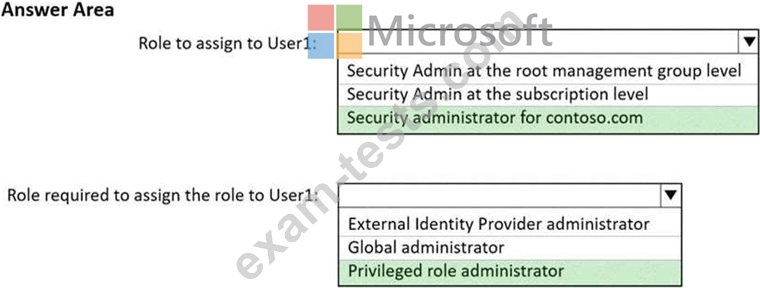
What should you do? To answer, select the appropriate options in the answer area.
NOTE: Each correct selection is worth one point.
Hot Area:
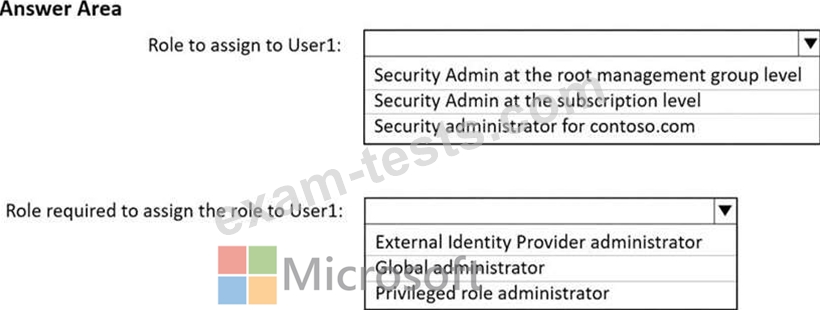
When User1 signs in to Azure Security Center, the user receives the message shown in the following exhibit.
You need to ensure that User1 can manage security information for the tenant. The solution must use the principle of least privilege.
What should you do? To answer, select the appropriate options in the answer area.
NOTE: Each correct selection is worth one point.
Hot Area:
Question 8
You create an Azure Virtual Desktop host pool as shown in the following exhibit.
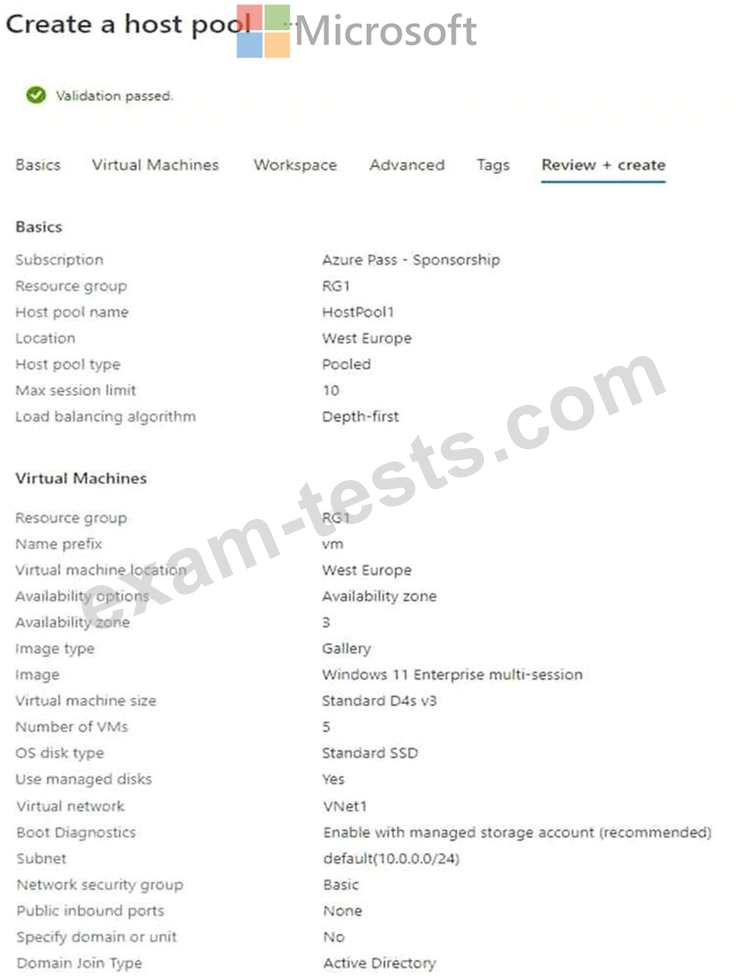
Use the drop-down menus to select the answer choice that answers each question based on the information presented in the graphic.
NOTE: Each correct selection is worth one point.
Hot Area:
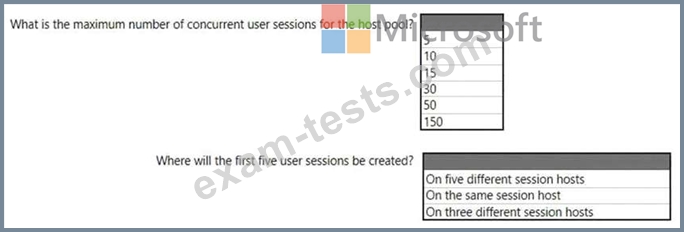
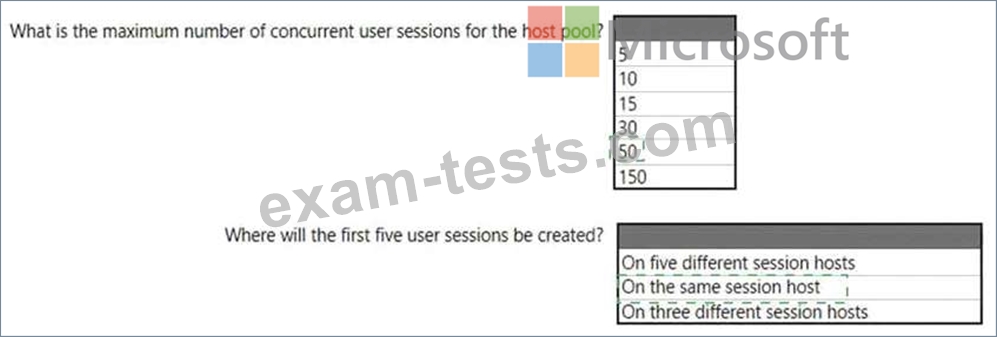
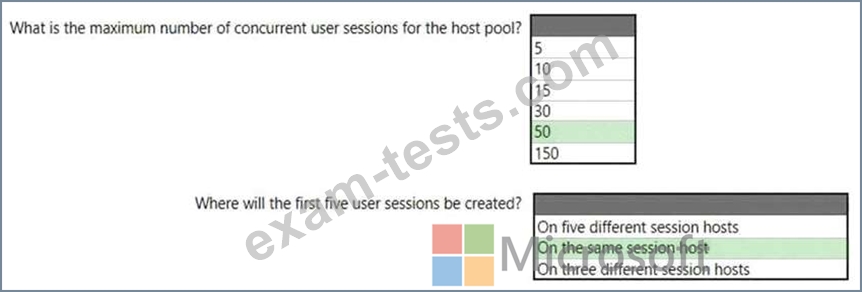
Use the drop-down menus to select the answer choice that answers each question based on the information presented in the graphic.
NOTE: Each correct selection is worth one point.
Hot Area:
Question 9
You have an Azure Virtual Desktop Deployment that contains a workspace named Workspace1 and a user named User1. Workspace1 contains a Desktop application group named Pool1Desktop.
At 09:00, you create a conditional access policy that has the following settings:
Assignments:
- Users and groups: User1
- Cloud apps or actions: Azure Virtual Desktop
- Conditions: 0 conditions selected
Access controls
- Grant: Grant access, Require multi-factor authentication
- Sessions: Sign-in frequency 1 hour
User1 performs the actions shown in the following table.
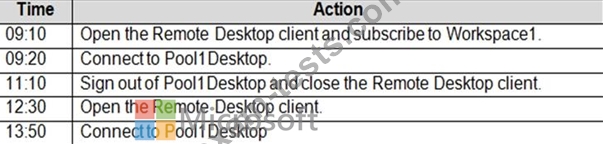
For each of the following statements, select Yes if the statement is true. Otherwise, select No.
NOTE: Each correct selection is worth one point.
At 09:00, you create a conditional access policy that has the following settings:
Assignments:
- Users and groups: User1
- Cloud apps or actions: Azure Virtual Desktop
- Conditions: 0 conditions selected
Access controls
- Grant: Grant access, Require multi-factor authentication
- Sessions: Sign-in frequency 1 hour
User1 performs the actions shown in the following table.
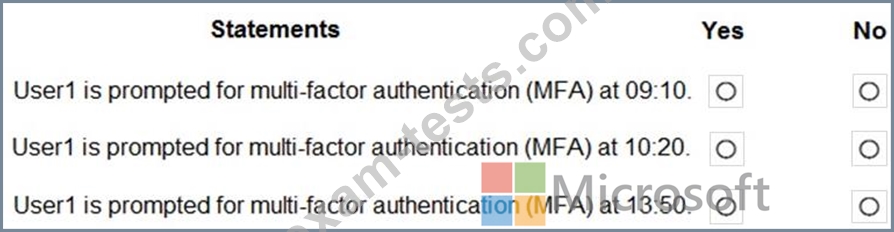
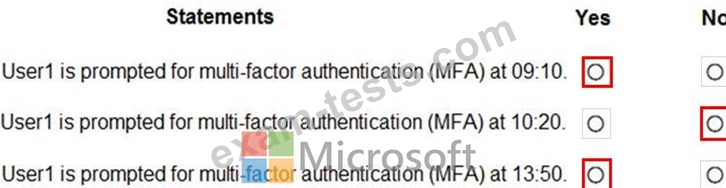
For each of the following statements, select Yes if the statement is true. Otherwise, select No.
NOTE: Each correct selection is worth one point.
Question 10
You have an Azure Virtual Desktop host pool. The pool contains session hosts that run Windows 10 Enterprise multi-session.
You connect to a Remote Desktop session on Pool1 and discover an issue with the frequency of screen updates.
You need to identify whether the issue related to insufficient server, network, or client resources. The solution must minimize how long it takes to identify the resource type.
What should you do?
You connect to a Remote Desktop session on Pool1 and discover an issue with the frequency of screen updates.
You need to identify whether the issue related to insufficient server, network, or client resources. The solution must minimize how long it takes to identify the resource type.
What should you do?