

Question 41
Note: This question is part of a series of questions that present the same scenario. Each question in the series contains a unique solution that might meet the stated goals. Some question sets might have more than one correct solution, while others might not have a correct solution.
After you answer a question in this section, you will NOT be able to return to it. As a result, these questions will not appear in the review screen.
You have an Azure Virtual Desktop host pool that runs Windows 10 Enterprise multi-session.
User sessions are load-balanced between the session hosts. Idle session timeout is 30 minutes.
You plan to shut down a session host named Host1 to perform routine maintenance.
You need to prevent new user sessions to Host1 without disconnecting active user sessions.
Solution: you change the Drain mode of Host1.
Does this meet the goal?
After you answer a question in this section, you will NOT be able to return to it. As a result, these questions will not appear in the review screen.
You have an Azure Virtual Desktop host pool that runs Windows 10 Enterprise multi-session.
User sessions are load-balanced between the session hosts. Idle session timeout is 30 minutes.
You plan to shut down a session host named Host1 to perform routine maintenance.
You need to prevent new user sessions to Host1 without disconnecting active user sessions.
Solution: you change the Drain mode of Host1.
Does this meet the goal?
Question 42
You have a Azure Virtual Desktop host pool in the East US region.
You need to implement a disaster recovery solution that meets the following requirements:
* If users cannot connect to the Azure Virtual Desktop resources in the East US region, the users must be able to connect to the equivalent resources in the West US region.
* Users must connect to the Azure Virtual Desktop resources in either the East US or the West US region by selecting a single icon in the Remote Desktop client
* In the event of a disaster, failover between the Azure regions must be initiated manually by an administrator.
* Failover times must be minimized.
What should you do?
You need to implement a disaster recovery solution that meets the following requirements:
* If users cannot connect to the Azure Virtual Desktop resources in the East US region, the users must be able to connect to the equivalent resources in the West US region.
* Users must connect to the Azure Virtual Desktop resources in either the East US or the West US region by selecting a single icon in the Remote Desktop client
* In the event of a disaster, failover between the Azure regions must be initiated manually by an administrator.
* Failover times must be minimized.
What should you do?
Question 43
DRAG DROP
You plan to deploy Windows Virtual Desktop.
You need to create Azure NetApp Files storage to store FSLogix profile containers.
Which four actions should you perform in sequence after you register the NetApp Resource Provider? To answer, move the appropriate actions from the list of actions to the answer area and arrange them in the correct order.
NOTE: More than one order of answer choices is correct. You will receive credit for any of the correct orders you select.
Select and Place:

You plan to deploy Windows Virtual Desktop.
You need to create Azure NetApp Files storage to store FSLogix profile containers.
Which four actions should you perform in sequence after you register the NetApp Resource Provider? To answer, move the appropriate actions from the list of actions to the answer area and arrange them in the correct order.
NOTE: More than one order of answer choices is correct. You will receive credit for any of the correct orders you select.
Select and Place:

Question 44
You have an Azure subscription that contains the virtual machines shown in the following table.

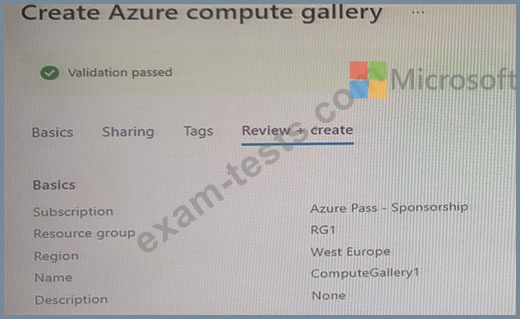
You create an Azure Compute Gallery as shown in the Azure compute gallery exhibit. (Click the Azure compute gallery tab.)
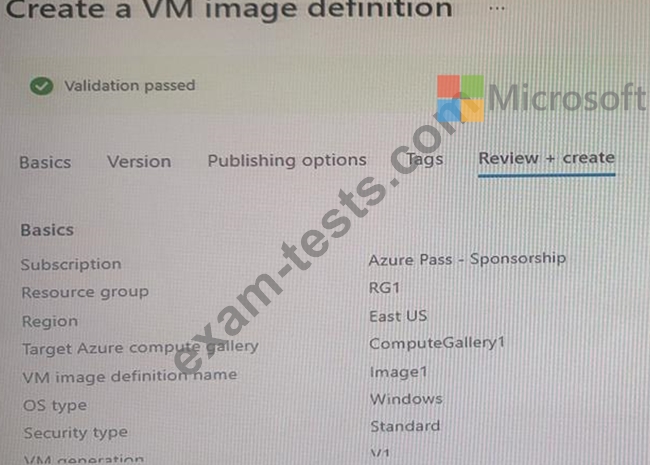
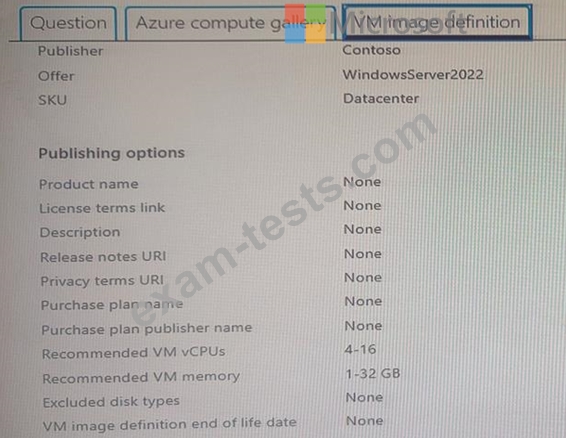
You create a virtual machine image definition as shown in the VM image definition exhibit. (Click the VM image definition tab.)
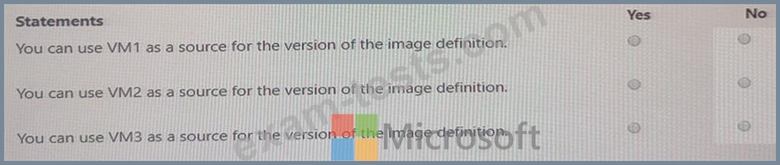
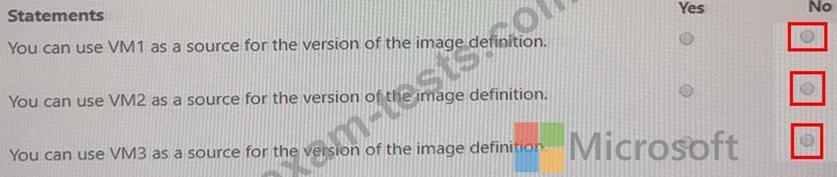
For each of the following statements, select Yes if the statement is true. Otherwise, select No.
You create an Azure Compute Gallery as shown in the Azure compute gallery exhibit. (Click the Azure compute gallery tab.)
You create a virtual machine image definition as shown in the VM image definition exhibit. (Click the VM image definition tab.)
For each of the following statements, select Yes if the statement is true. Otherwise, select No.
Question 45
You have an Azure Active Directory Domain Services (Azure AD D5) domain named contoso.com.
You have an Azure Storage account named storage1. Storage1 hosts a file share named share1 that has share and file system permissions configured. Share1 is configured to use contoso.com for authentication, You create an Azure Virtual Desktop host pool named Pool1. Pool1 contains two session hosts that use the Windows 10 multi-session + Microsoft 365 Apps image.
You need to configure an FSLogix profile container for Pool1.
What should you do next?
You have an Azure Storage account named storage1. Storage1 hosts a file share named share1 that has share and file system permissions configured. Share1 is configured to use contoso.com for authentication, You create an Azure Virtual Desktop host pool named Pool1. Pool1 contains two session hosts that use the Windows 10 multi-session + Microsoft 365 Apps image.
You need to configure an FSLogix profile container for Pool1.
What should you do next?