

Question 1
You have an Azure subscription that contains a user named Admin1 and a resource group named RG1.
In Azure Monitor, you create the alert rules shown in the following table.

Admin1 performs the following actions on RG1:
Adds a virtual network named VNET1
Adds a Delete lock named Lock1
Which rules will trigger an alert as a result of the actions of Admin1? To answer, select the appropriate options in the answer area.
NOTE: Each correct selection is worth one point.

In Azure Monitor, you create the alert rules shown in the following table.
Admin1 performs the following actions on RG1:
Adds a virtual network named VNET1
Adds a Delete lock named Lock1
Which rules will trigger an alert as a result of the actions of Admin1? To answer, select the appropriate options in the answer area.
NOTE: Each correct selection is worth one point.

Question 2
What is the membership of Group1 and Group2? To answer, select the appropriate options in the answer area.
NOTE: Each correct selection is worth one point.

NOTE: Each correct selection is worth one point.

Question 3
You need to meet the identity and access requirements for Group1.
What should you do?
What should you do?


Question 4
You have an Azure subscription named Subscription1 that contains the resources shown in the following table.

You create a custom RBAC role in Subscription1 by using the following JSON file.

You assign Role1 to User1 on RG1.
For each of the following statements, select Yes if the statement is true. Otherwise, select No.
NOTE: Each correct selection is worth one point.
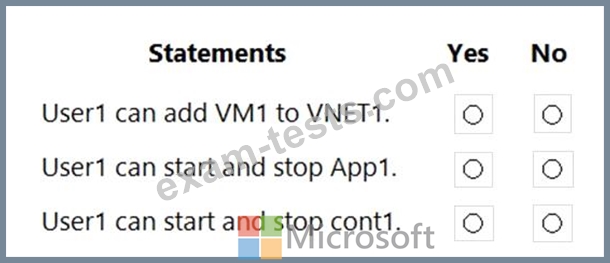
You create a custom RBAC role in Subscription1 by using the following JSON file.
You assign Role1 to User1 on RG1.
For each of the following statements, select Yes if the statement is true. Otherwise, select No.
NOTE: Each correct selection is worth one point.

Question 5
You have an Azure subscription mat contains a resource group named RG1. RG1 contains a storage account named storage1.
You have two custom Azure rotes named Role1 and Role2 that are scoped to RG1.
The permissions for Role1 are shown in the following JSON code.


You have two custom Azure rotes named Role1 and Role2 that are scoped to RG1.
The permissions for Role1 are shown in the following JSON code.
