How many fingerprints can you enroll on iPad Air (4th generation)?
Correct Answer: D
You can enroll up to five fingerprints on iPad Air (4th generation) using Touch ID. Touch ID is a feature that allows you to securely and conveniently unlock your iPad, authorize purchases and payments, and sign in to many third-party apps. You can add multiple fingerprints (both of your thumbs and forefingers, for example) or register multiple reads of the same finger to provide even more data from a variety of angles. References: = Apple - Support - Manuals, Set up Touch ID on iPad; iPad Air: How to set up and use Apple's new Touch ID fingerprint sensor.
Question 117
How many days do you have to recover deleted files from iCIoud Drive?
Correct Answer: A
Question 118
Which VPN protocols can you manually configure in macOS System Settings?
Correct Answer: B
According to the Apple Support website, you can manually configure a VPN connection on your Mac by choosing one of the following VPN protocols: L2TP over IPSec, Cisco IPSec, or IKEv2. L2TP (Layer 2 Tunneling Protocol) is an extension of PPTP (Point-to-Point Tunneling Protocol) used by internet service providers to enable a VPN over the internet. IPSec (Internet Protocol Security) is a set of security protocols. IKEv2 (Internet Key Exchange) is a protocol that sets up a security association in IPSec. The other options, SSTP, Wireguard, and OpenVPN, are not supported by macOS System Settings, and require third-party software to use. References: 1 Set up a VPN connection on Mac - Apple Support
Question 119
A user migrated to their new iPhone using a Mac backup of their old iPhone. The user reports their Health and Activity data is missing. Why is the Health and Activity data missing?
Correct Answer: C
Health and Activity data on an iPhone is sensitive and tied to the Health app, which includes information like steps, workouts, and medical records. When backing up an iPhone to a Mac, this data is included only if the backup is encrypted. An encrypted backup, created using a password in Finder (macOS Catalina and later) or iTunes (older macOS versions), securely stores Health and Activity data alongside other sensitive information like saved passwords. If the user restored from an unencrypted backup, Health and Activity data would not be included, as unencrypted backups exclude this data by design for privacy reasons. * Option A is incorrect because the backup process doesn't allow selective exclusion of Health and Activity data during creation; it's an all-or-nothing inclusion with encryption. * Option B is incorrect because Health and Activity dataisbacked up to a computer if the backup is encrypted. * Option D is incorrect because the restore process doesn't offer an option to deselect specific data types like Health and Activity; the backup either includes it (if encrypted) or doesn't (if unencrypted).This behavior is consistent across iOS versions, including iOS 18 in 2025. For official confirmation, refer to Apple's support article "What does iCloud back up?" (support.apple.com/HT207428) and "Back up iPhone using your Mac" (support.apple.com/HT201352), which note that Health data requires encryption.
Question 120
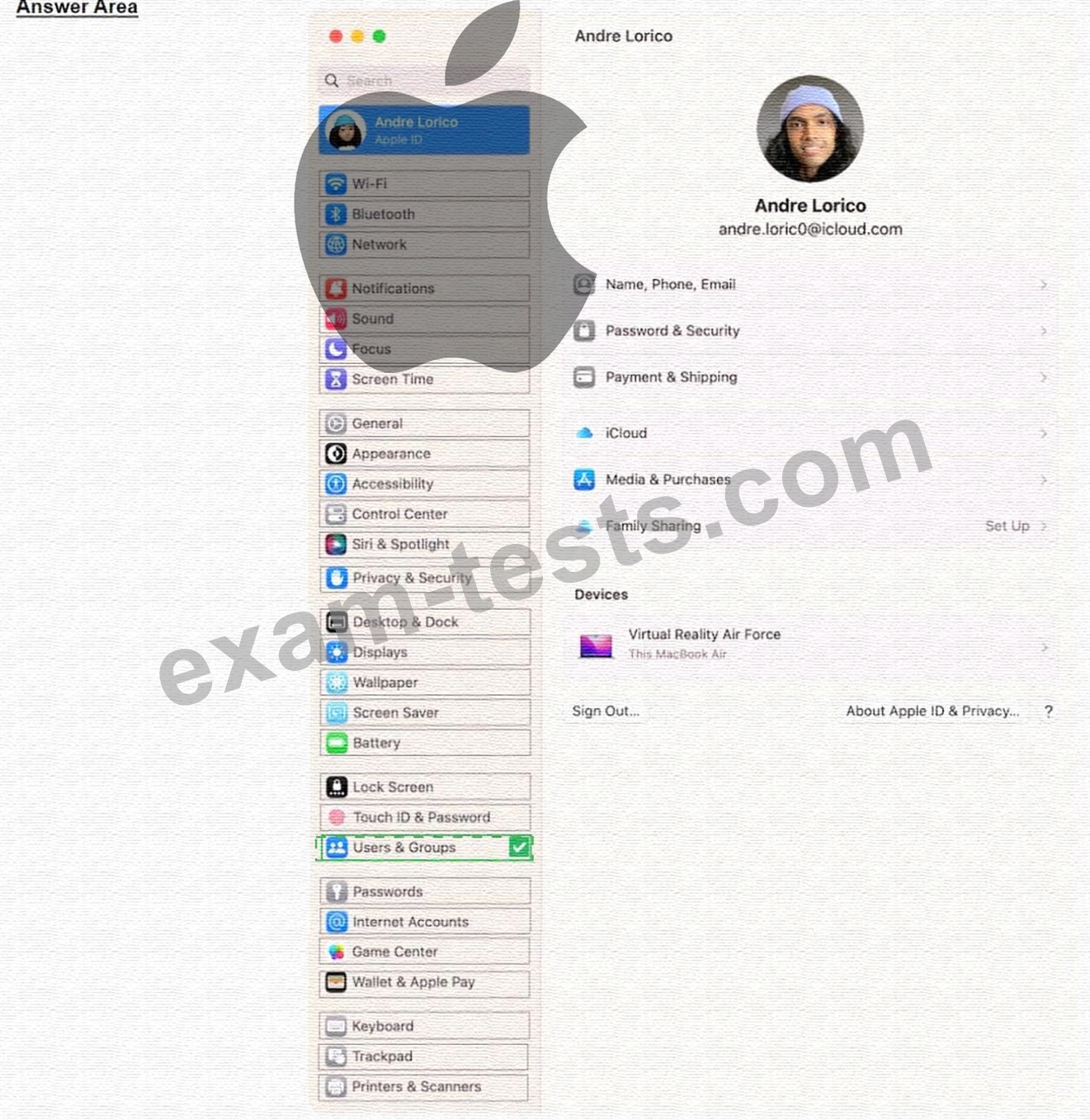
Select the setting in the sidebar that you should use to delete a user on your Mac.
Correct Answer:
Explanation https://support.apple.com/guide/mac-help/delete-a-user-or-group-mchlp1557/mac#:~:text=On%20your%20Mac% On your Mac, choose Apple menu > System Settings, then click Users & Groups in the sidebar. (You may need to scroll down.) Click the Infobutton next to the user or group you want to delete, then click Delete User or Delete Group. Note: If a user is logged in to this Mac now, you can't select them.