Within the MITRE-Based Falcon Detections Framework, what is the correct way to interpret Keep Access > Persistence > Create Account?
Correct Answer: A
Explanation According to the [CrowdStrike website], the MITRE-Based Falcon Detections Framework is a way of categorizing and describing detections based on the MITRE ATT&CK knowledge base ofadversary behaviors and techniques. The framework uses three levels of granularity: category, tactic, and technique. The category is the highest level and represents the main objective of an adversary, such as initial access, execution, credential access, etc. The tactic is the second level and represents the sub-objective of an adversary within a category, such as persistence, privilege escalation, defense evasion, etc. The technique is the lowest level and represents the specific way an adversary can achieve a tactic, such as create account, modify registry, obfuscated files or information, etc. Therefore, the correct way to interpret Keep Access > Persistence > Create Account is that an adversary is trying to keep access through persistence by creating an account.
Question 7
When analyzing an executable with a global prevalence of common; but you do not know what the executable is. what is the best course of action?
Correct Answer: B
Explanation According to the CrowdStrike Falcon Devices Add-on for Splunk Installation and Configuration Guide v3.1.5+, global prevalence is a field that indicates how frequently the hash of a file is seen across all CrowdStrike customer environments1. A global prevalence of common means that the file is widely distributed and likely benign1. However, if you do not know what the executable is, you may want to investigate it further to confirm its legitimacy and functionality1. One way to do that is to click the VT Hash button from the detection, which will pivot you to VirusTotal, a service that analyzes files and URLs for viruses, malware, and other threats1. You can then see more information about the file, such as its name, size, type, signatures, detections, comments, etc1.
Question 8
What happens when a quarantined file is released?
Correct Answer: D
Explanation According to the CrowdStrike Falcon Data Replicator (FDR) Add-on for Splunk Guide, when you release a file from quarantine, you are restoring it to its original location and allowing it to execute on any host in your organization1. This action also removes the file from the quarantine list and deletes it from the CrowdStrike Cloud1.
Question 9
The Falcon platform will show a maximum of how many detections per day for a single Agent Identifier (AID)?
Correct Answer: C
Explanation According to the CrowdStrike Falcon Data Replicator (FDR) Add-on for Splunk Guide, the Falcon platform will show a maximum of 1000 detections per day for a single AID1. This is a limitimposed by the Falcon API, which is used to retrieve the detections from the CrowdStrike Cloud1. If there are more than 1000 detections per day for a single AID, only the first 1000 will be shown1.
Question 10
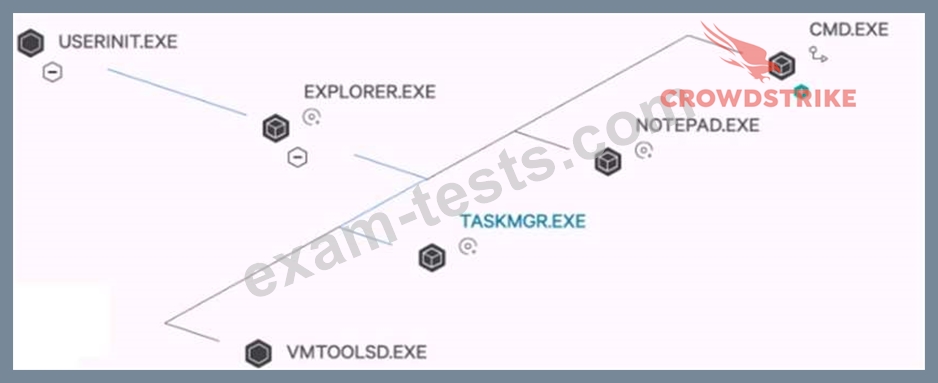
How are processes on the same plane ordered (bottom 'VMTOOLSD.EXE' to top CMD.EXE')?
Correct Answer: B
Explanation According to the CrowdStrike Falcon Devices Add-on for Splunk Installation and Configuration Guide v3.1.5+, the process tree view provides a visualization of program ancestry, which shows the parent-child and sibling relationships among the processes1. You can also see the event types and timestamps for each process1. The processes on the same plane are ordered by time started in descending order, meaning that the most recent process is at the bottom and the oldest process is at the top1. For example, in the image you sent me, CMD.EXE is the oldest process and VMTOOLSD.EXE is the most recent process on that plane1.