

Question 56
You have a Deployment named 'frontend-deployment' with 5 replicas of a frontend container. You need to implement a rolling update strategy that allows for a maximum of 2 pods to be unavailable at any given time. You also want to ensure that the update process is completed within a specified timeout of 8 minutes. If the update fails to complete within the timeout, the deployment should revert to the previous version. Additionally, you want to configure a 'post-start' hook for the frontend container that executes a health check script to verify the application's readiness before it starts accepting traffic.

Question 57
You must connect to the correct host.
Failure to do so may result in a zero score.
[candidate@base] $ ssh Cka000051
Context
You manage a WordPress application. Some Pods are not starting because resource requests are too high.
Your task Is to prepare a Linux system for Kubernetes . Docker is already installed, but you need to configure it for kubeadm .
Task
Complete these tasks to prepare the system for Kubernetes :
Set up cri-dockerd :
. Install the Debian package
~/cri-dockerd_0.3.9.3-0.ubuntu-jammy_am
d64.deb
Debian packages are installed using
dpkg .
. Enable and start the cri-docker service
Configure these system parameters:
. Set net.bridge.bridge-nf-call-iptables to 1
Failure to do so may result in a zero score.
[candidate@base] $ ssh Cka000051
Context
You manage a WordPress application. Some Pods are not starting because resource requests are too high.
Your task Is to prepare a Linux system for Kubernetes . Docker is already installed, but you need to configure it for kubeadm .
Task
Complete these tasks to prepare the system for Kubernetes :
Set up cri-dockerd :
. Install the Debian package
~/cri-dockerd_0.3.9.3-0.ubuntu-jammy_am
d64.deb
Debian packages are installed using
dpkg .
. Enable and start the cri-docker service
Configure these system parameters:
. Set net.bridge.bridge-nf-call-iptables to 1
Question 58
Score:7%

Task
Create a new PersistentVolumeClaim
* Name: pv-volume
* Class: csi-hostpath-sc
* Capacity: 10Mi
Create a new Pod which mounts the PersistentVolumeClaim as a volume:
* Name: web-server
* Image: nginx
* Mount path: /usr/share/nginx/html
Configure the new Pod to have ReadWriteOnce access on the volume.
Finally, using kubectl edit or kubectl patch expand the PersistentVolumeClaim to a capacity of 70Mi and record that change.
Task
Create a new PersistentVolumeClaim
* Name: pv-volume
* Class: csi-hostpath-sc
* Capacity: 10Mi
Create a new Pod which mounts the PersistentVolumeClaim as a volume:
* Name: web-server
* Image: nginx
* Mount path: /usr/share/nginx/html
Configure the new Pod to have ReadWriteOnce access on the volume.
Finally, using kubectl edit or kubectl patch expand the PersistentVolumeClaim to a capacity of 70Mi and record that change.
Question 59
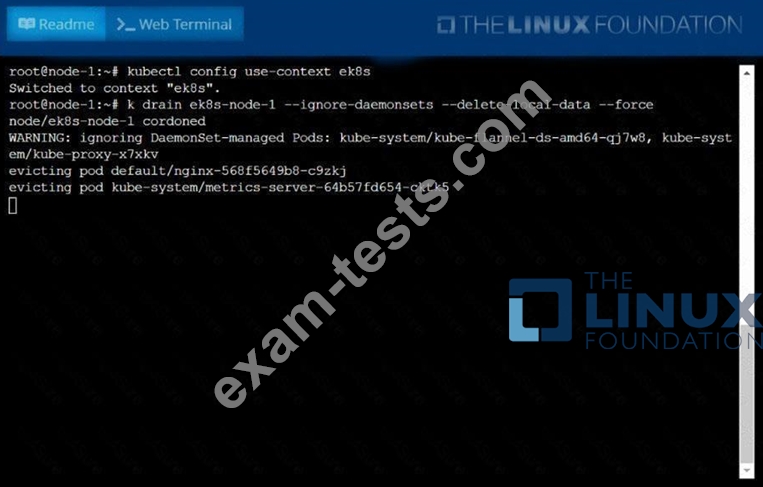
Set the node named ek8s-node-1 as unavailable and reschedule all the pods running on it.
Question 60
Check the Image version of nginx-dev pod using jsonpath