

Question 16
Create a pod that having 3 containers in it? (Multi-Container)
Question 17
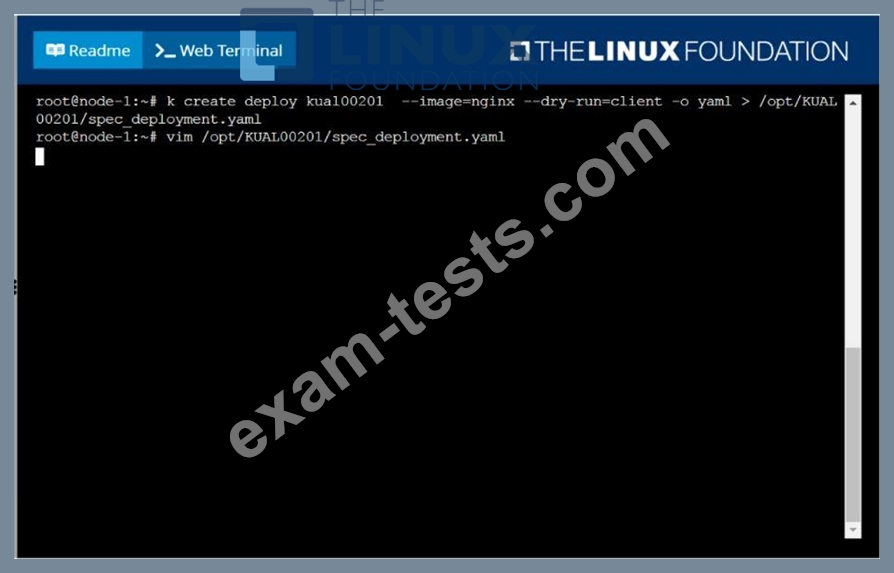
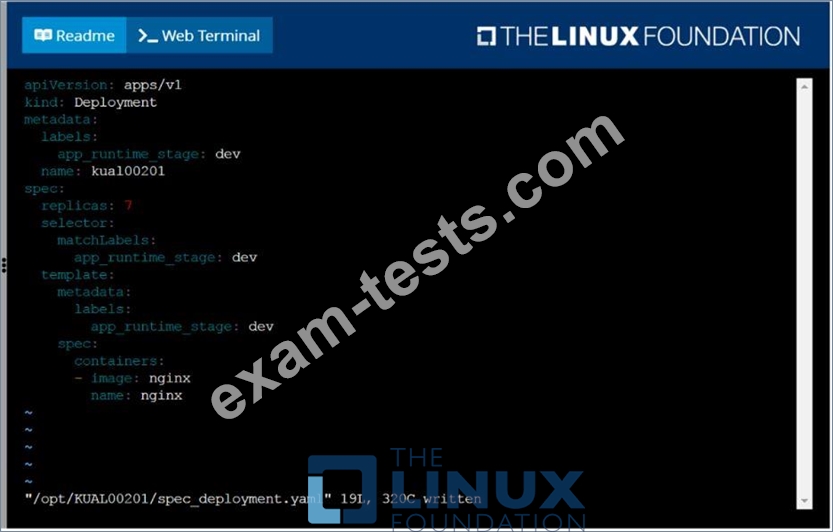
Create a deployment spec file that will:
* Launch 7 replicas of the nginx Image with the labelapp_runtime_stage=dev
* deployment name: kual00201
Save a copy of this spec file to /opt/KUAL00201/spec_deployment.yaml
(or /opt/KUAL00201/spec_deployment.json).
When you are done, clean up (delete) any new Kubernetes API object that you produced during this task.
* Launch 7 replicas of the nginx Image with the labelapp_runtime_stage=dev
* deployment name: kual00201
Save a copy of this spec file to /opt/KUAL00201/spec_deployment.yaml
(or /opt/KUAL00201/spec_deployment.json).
When you are done, clean up (delete) any new Kubernetes API object that you produced during this task.
Question 18
Score: 4%
Context
You have been asked to create a new ClusterRole for a deployment pipeline and bind it to a specific ServiceAccount scoped to a specific namespace.
Task
Create a new ClusterRole named deployment-clusterrole, which only allows to create the following resource types:
* Deployment
* StatefulSet
* DaemonSet
Create a new ServiceAccount named cicd-token in the existing namespace app-team1.
Bind the new ClusterRole deployment-clusterrole lo the new ServiceAccount cicd-token , limited to the namespace app-team1.
Context
You have been asked to create a new ClusterRole for a deployment pipeline and bind it to a specific ServiceAccount scoped to a specific namespace.
Task
Create a new ClusterRole named deployment-clusterrole, which only allows to create the following resource types:
* Deployment
* StatefulSet
* DaemonSet
Create a new ServiceAccount named cicd-token in the existing namespace app-team1.
Bind the new ClusterRole deployment-clusterrole lo the new ServiceAccount cicd-token , limited to the namespace app-team1.
Question 19
You have a deployment named 'web-app' running 3 replicas of a Node.js application. During an update, you observe that two pods are stuck in a 'CrashLoopBackOff state. The logs indicate that the pods are failing to connect to a Redis database. How do you debug this issue and identify the root cause of the pod failures?
Question 20
Configure the kubelet systemd- managed service, on the node labelled with name=wk8s-node-1, to launch a pod containing a single container of Image httpd named webtool automatically. Any spec files required should be placed in the /etc/kubernetes/manifests directory on the node.
You can ssh to the appropriate node using:
[student@node-1] $ ssh wk8s-node-1
You can assume elevated privileges on the node with the following command:
[student@wk8s-node-1] $ | sudo -i
You can ssh to the appropriate node using:
[student@node-1] $ ssh wk8s-node-1
You can assume elevated privileges on the node with the following command:
[student@wk8s-node-1] $ | sudo -i


