

Question 26
Check the rollout history and make sure everything is ok after the update
Question 27
You need to set up a load balancer for your Nginx service with the following requirements:
- Session affinity: Preserve client sessions across multiple pods, even if the pod is restarted or rescheduled.
- Health checks: Regularly check the health of Nginx pods and automatically remove unhealthy pods from the load balancer pool.
- Custom header: Add a custom header with the name "X-App-Version" and value "vl .0" to all requests to your Nginx service. How would you configure your Kubernetes resources to meet these requirements?
- Session affinity: Preserve client sessions across multiple pods, even if the pod is restarted or rescheduled.
- Health checks: Regularly check the health of Nginx pods and automatically remove unhealthy pods from the load balancer pool.
- Custom header: Add a custom header with the name "X-App-Version" and value "vl .0" to all requests to your Nginx service. How would you configure your Kubernetes resources to meet these requirements?


Question 28
Check to see how many worker nodes are ready (not including nodes tainted NoSchedule) and write the number to /opt/KUCC00104/kucc00104.txt.


Question 29
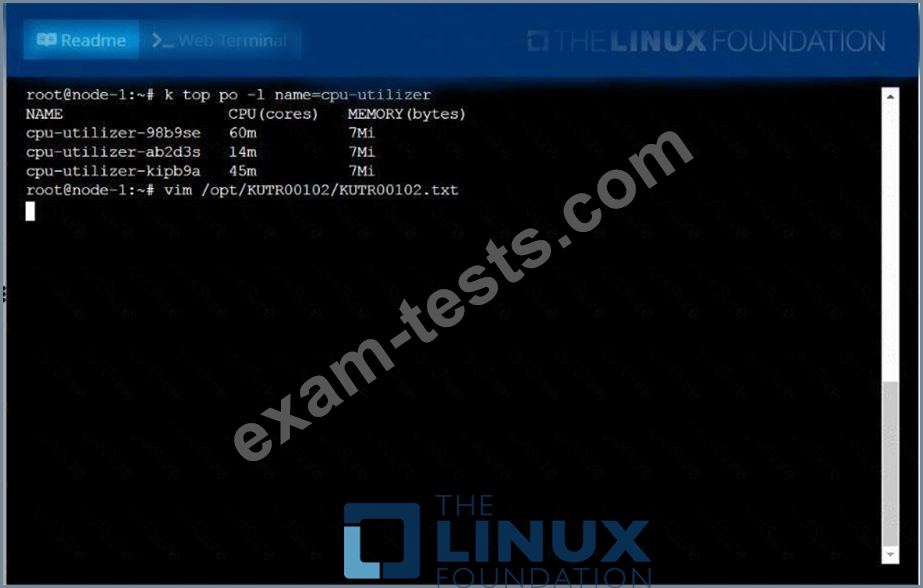
From the pod labelname=cpu-utilizer, find podsrunning high CPU workloads and write the name of the pod consumingmost CPU to thefile/opt/KUTR00102/KUTR00102.txt(which already exists).

Question 30
Given a partially-functioning Kubernetes cluster, identify symptoms of failure on the cluster.
Determine the node, the failing service, and take actions to bring up the failed service and restore the health of the cluster. Ensure that any changes are made permanently.
You can ssh to the relevant I nodes (
[student@node-1] $ ssh <nodename
You can assume elevated privileges on any node in the cluster with the following command:
[student@nodename] $ | sudo -i
Determine the node, the failing service, and take actions to bring up the failed service and restore the health of the cluster. Ensure that any changes are made permanently.
You can ssh to the relevant I nodes (
[student@node-1] $ ssh <nodename
You can assume elevated privileges on any node in the cluster with the following command:
[student@nodename] $ | sudo -i


