

Question 1
Given the following code:
Counter = 0;
const logCounter = () => {
console.log(counter);
);
logCounter();
setTimeout(logCOunter, 1100);
setInterval(() => {
Counter++
logCounter();
}, 1000);
What is logged by the first four log statements?
Counter = 0;
const logCounter = () => {
console.log(counter);
);
logCounter();
setTimeout(logCOunter, 1100);
setInterval(() => {
Counter++
logCounter();
}, 1000);
What is logged by the first four log statements?
Question 2
Refer to the following code:
01 function Tiger(){
02 this.Type = 'Cat';
03 this.size = 'large';
04 }
05
06 let tony = new Tiger();
07 tony.roar = () =>{
08 console.log('They\'re great1');
09 };
10
11 function Lion(){
12 this.type = 'Cat';
13 this.size = 'large';
14 }
15
16 let leo = new Lion();
17 //Insert code here
18 leo.roar();
Which two statements could be inserted at line 17 to enable the function call on line 18?
Choose 2 answers.
01 function Tiger(){
02 this.Type = 'Cat';
03 this.size = 'large';
04 }
05
06 let tony = new Tiger();
07 tony.roar = () =>{
08 console.log('They\'re great1');
09 };
10
11 function Lion(){
12 this.type = 'Cat';
13 this.size = 'large';
14 }
15
16 let leo = new Lion();
17 //Insert code here
18 leo.roar();
Which two statements could be inserted at line 17 to enable the function call on line 18?
Choose 2 answers.
Question 3
There is a new requirement for a developer to implement a currPrice method that will return the current price of the item or sales..
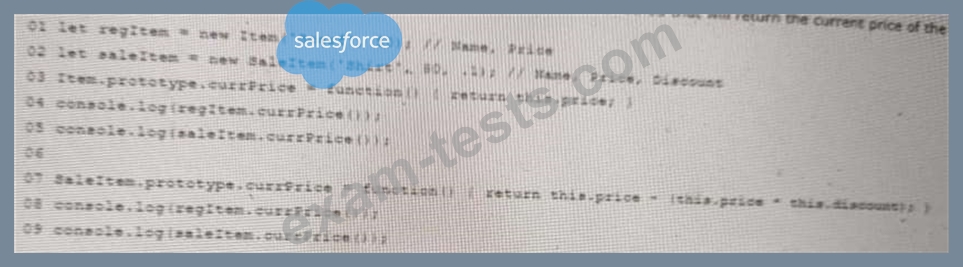
What is the output when executing the code above
What is the output when executing the code above
Question 4
A developer creates a simple webpage with an input field. When a user enters text in the input field and clicks the button, the actual value of the field must be displayed in the console.
Here is the HTML file content:
<input type =" text" value="Hello" name ="input">
<button type ="button" >Display </button>
The developer wrote the javascript code below:
Const button = document.querySelector('button');
button.addEvenListener('click', () => (
Const input = document.querySelector('input');
console.log(input.getAttribute('value'));
When the user clicks the button, the output is always "Hello".
What needs to be done make this code work as expected?
Here is the HTML file content:
<input type =" text" value="Hello" name ="input">
<button type ="button" >Display </button>
The developer wrote the javascript code below:
Const button = document.querySelector('button');
button.addEvenListener('click', () => (
Const input = document.querySelector('input');
console.log(input.getAttribute('value'));
When the user clicks the button, the output is always "Hello".
What needs to be done make this code work as expected?
Question 5
Refer to the following code block:
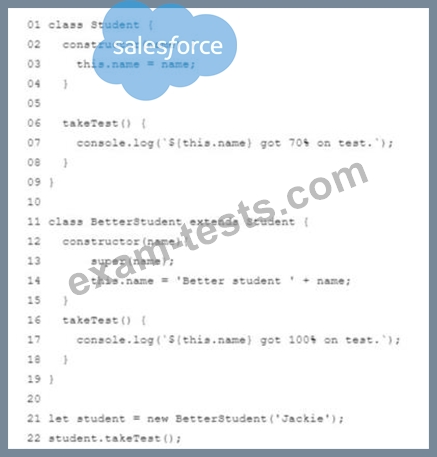
What is the console output?
What is the console output?