

Question 76
A developer creates a simple webpage with an input field. When a user enters text in the input field and clicks the button, the actual value of the field must be displayed in the console.
Here is the HTML file content:
<input type =" text" value="Hello" name ="input">
<button type ="button" >Display </button> The developer wrote the javascript code below:
Const button = document.querySelector('button');
button.addEvenListener('click', () => (
Const input = document.querySelector('input');
console.log(input.getAttribute('value'));
When the user clicks the button, the output is always "Hello".
What needs to be done to make this code work as expected?
Here is the HTML file content:
<input type =" text" value="Hello" name ="input">
<button type ="button" >Display </button> The developer wrote the javascript code below:
Const button = document.querySelector('button');
button.addEvenListener('click', () => (
Const input = document.querySelector('input');
console.log(input.getAttribute('value'));
When the user clicks the button, the output is always "Hello".
What needs to be done to make this code work as expected?
Question 77
Refer to the code below:

Which value can a developer expect when referencing country,capital,cityString?
Which value can a developer expect when referencing country,capital,cityString?
Question 78
Given the JavaScript below:
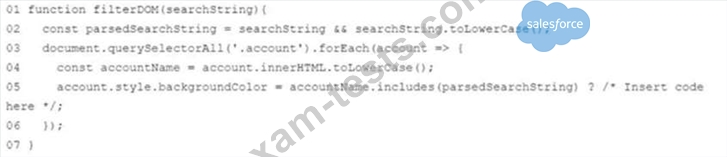
Which code should replace the placeholder comment on line 05 to highlight accounts that match the search string'
Which code should replace the placeholder comment on line 05 to highlight accounts that match the search string'
Question 79
A developer copied a JavaScript object:

How does the developer access dan's forstName,lastName? Choose 2 answers
How does the developer access dan's forstName,lastName? Choose 2 answers
Question 80
Refer to the code below:
Const myFunction = arr => {
Return arr.reduce((result, current) =>{
Return result = current;
}, 10};
}
What is the output of this function when called with an empty array ?
Const myFunction = arr => {
Return arr.reduce((result, current) =>{
Return result = current;
}, 10};
}
What is the output of this function when called with an empty array ?