

Question 46
Change the logical volume capacity named vo from 190M to 300M. and the size of the floating range should set between 280 and 320. (This logical volume has been mounted in advance.)
Question 47
Add a new logical partition having size 100MB and create the data which will be the mount point for the new partition.
Question 48
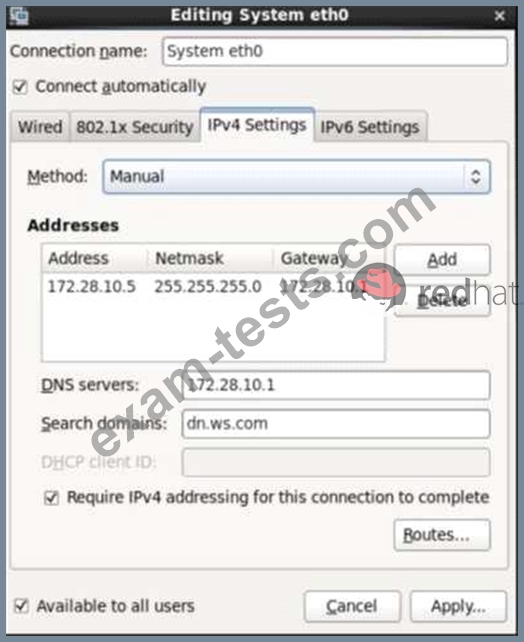
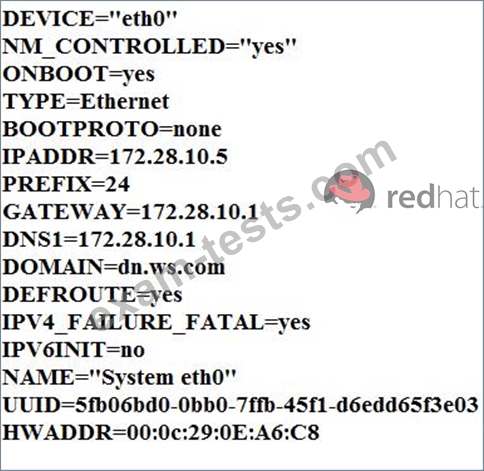
Configure your Host Name, IP Address, Gateway and DNS.
Host name: dtop5.dn.ws.com
IP Address: 172.28.10.5/4
Gateway: 172.28.10.1
DNS: 172.28.10.1
Host name: dtop5.dn.ws.com
IP Address: 172.28.10.5/4
Gateway: 172.28.10.1
DNS: 172.28.10.1

Question 49
There are two different networks 192.168.0.0/24 and 192.168.1.0/24. Where 192.168.0.254 and
192.168.1.254 IP Address are assigned on Server. Verify your network settings by pinging 192.168.1.0/24 Network's Host.
192.168.1.254 IP Address are assigned on Server. Verify your network settings by pinging 192.168.1.0/24 Network's Host.
Question 50
SIMULATION
According the following requirements to create user, user group and the group members:
- A group named admin.
- A user named mary, and belong to admin as the secondary group.
- A user named alice, and belong to admin as the secondary group.
- A user named bobby, bobby's login shell should be non-interactive. Bobby not belong to admin as the secondary group.
Mary, Alice, bobby users must be set "password" as the user's password.
According the following requirements to create user, user group and the group members:
- A group named admin.
- A user named mary, and belong to admin as the secondary group.
- A user named alice, and belong to admin as the secondary group.
- A user named bobby, bobby's login shell should be non-interactive. Bobby not belong to admin as the secondary group.
Mary, Alice, bobby users must be set "password" as the user's password.