

Question 1
Copy /etc/fstab document to /var/TMP directory. According the following requirements to configure the permission of this document.
The owner of this document must be root.
This document belongs to root group.
User mary have read and write permissions for this document.
User alice have read and execute permissions for this document.
Create user named bob, set uid is 1000. Bob have read and write permissions for this document.
All users has read permission for this document in the system.
The owner of this document must be root.
This document belongs to root group.
User mary have read and write permissions for this document.
User alice have read and execute permissions for this document.
Create user named bob, set uid is 1000. Bob have read and write permissions for this document.
All users has read permission for this document in the system.
Question 2
SIMULATION
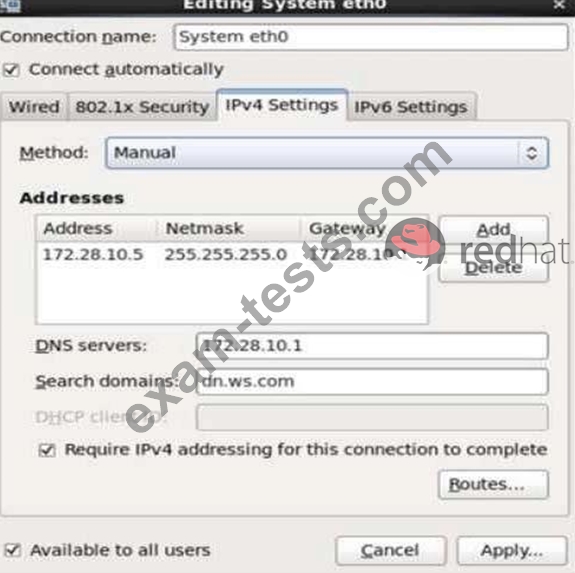
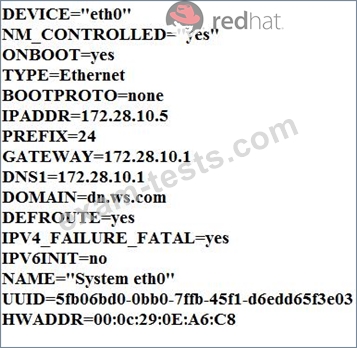
Configure your Host Name, IP Address, Gateway and DNS.
Host name: dtop5.dn.ws.com
IP Address: 172.28.10.5/4
Gateway: 172.28.10.1
DNS: 172.28.10.1
Configure your Host Name, IP Address, Gateway and DNS.
Host name: dtop5.dn.ws.com
IP Address: 172.28.10.5/4
Gateway: 172.28.10.1
DNS: 172.28.10.1

Question 3
Part 1 (on Node1 Server)
Task 15 [Running Containers]
Create a container named logserver with the image rhel8/rsyslog found from the registry registry.domain15.example.com:5000 The container should run as the root less user shangril a. use redhat as password [sudo user] Configure the container with systemd services as the shangrila user using the service name, "container-logserver" so that it can be persistent across reboot.
Use admin as the username and admin123 as the credentials for the image registry.
Task 15 [Running Containers]
Create a container named logserver with the image rhel8/rsyslog found from the registry registry.domain15.example.com:5000 The container should run as the root less user shangril a. use redhat as password [sudo user] Configure the container with systemd services as the shangrila user using the service name, "container-logserver" so that it can be persistent across reboot.
Use admin as the username and admin123 as the credentials for the image registry.
Question 4
Which of the following sections must exist in a Packer template?
Question 5
A recently installed application writes log data to /opt/app/log/info.log. If Filebeat is already installed and
set up for communication with a remote Logstash, what has to be done in order to submit the log data of the
new application to Logstash?
set up for communication with a remote Logstash, what has to be done in order to submit the log data of the
new application to Logstash?