
- Home
- Forescout Certification
- FSCP Exam
- Forescout.FSCP.v2026-03-30.q27 Practice Test

Question 1
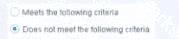
When configuring policy conditions, which of the statements is true regarding this image?
Select one:
Select one:
Correct Answer: A
Based on the policy condition image showing "Does not meet the following criteria", the correct statement is that it negates the criteria as part of the property.
Understanding "Does not meet the following criteria":
According to the Forescout Administration Guide:
The "Does not meet the following criteria" radio button option in policy conditions creates a logical negation of the condition:
* "Meets the following criteria" - Endpoint matches if the condition is true
* "Does not meet the following criteria" - Endpoint matches if the condition is FALSE (negated) How the Negation Works:
According to the documentation:
"Use the AND value between both properties: Windows>Manageable Domain>Does not meet the following criteria" This syntax shows that "Does not meet the following criteria" negates the entire criteria evaluation:
* Normal condition: "Windows Antivirus Running = True"
* Result: Matches endpoints WITH antivirus running
* Negated condition: "Windows Antivirus Running Does not meet the following criteria (= True)"
* Result: Matches endpoints WITHOUT antivirus running (negates the criteria) Negation Happens at Property Level:
The negation is applied as part of the property evaluation, not as a separate NOT operator. When you select
"Does not meet the following criteria":
* The condition is evaluated normally
* The result is then negated/inverted
* The endpoint matches only if the negated result is true
Why Other Options Are Incorrect:
* B. Modifies the irresolvable condition to TRUE - "Does not meet the following criteria" doesn't specifically affect irresolvable property handling
* C. Generates a NOT condition in the sub-rule condition - The negation is part of this property's evaluation, not a separate sub-rule NOT condition
* D. Irresolvable hosts would match the condition - "Does not meet the following criteria" doesn't specifically target irresolvable hosts
* E. Modifies the evaluate irresolvable condition to FALSE - This setting doesn't affect the "Evaluate irresolvable as" setting Referenced Documentation:
* Forescout Administration Guide v8.3
* Forescout Administration Guide v8.4
* ForeScout CounterACT Administration Guide - Policy Conditions section
* Manage Actions documentation
Understanding "Does not meet the following criteria":
According to the Forescout Administration Guide:
The "Does not meet the following criteria" radio button option in policy conditions creates a logical negation of the condition:
* "Meets the following criteria" - Endpoint matches if the condition is true
* "Does not meet the following criteria" - Endpoint matches if the condition is FALSE (negated) How the Negation Works:
According to the documentation:
"Use the AND value between both properties: Windows>Manageable Domain>Does not meet the following criteria" This syntax shows that "Does not meet the following criteria" negates the entire criteria evaluation:
* Normal condition: "Windows Antivirus Running = True"
* Result: Matches endpoints WITH antivirus running
* Negated condition: "Windows Antivirus Running Does not meet the following criteria (= True)"
* Result: Matches endpoints WITHOUT antivirus running (negates the criteria) Negation Happens at Property Level:
The negation is applied as part of the property evaluation, not as a separate NOT operator. When you select
"Does not meet the following criteria":
* The condition is evaluated normally
* The result is then negated/inverted
* The endpoint matches only if the negated result is true
Why Other Options Are Incorrect:
* B. Modifies the irresolvable condition to TRUE - "Does not meet the following criteria" doesn't specifically affect irresolvable property handling
* C. Generates a NOT condition in the sub-rule condition - The negation is part of this property's evaluation, not a separate sub-rule NOT condition
* D. Irresolvable hosts would match the condition - "Does not meet the following criteria" doesn't specifically target irresolvable hosts
* E. Modifies the evaluate irresolvable condition to FALSE - This setting doesn't affect the "Evaluate irresolvable as" setting Referenced Documentation:
* Forescout Administration Guide v8.3
* Forescout Administration Guide v8.4
* ForeScout CounterACT Administration Guide - Policy Conditions section
* Manage Actions documentation
Question 2
When troubleshooting a SecureConnector management issue for a Windows host, how would you determine if SecureConnector management packets are reaching CounterACT successfully?
Correct Answer: E
Comprehensive and Detailed Explanation From Exact Extract of Forescout Platform Administration and Deployment:
According to the Forescout Quick Installation Guide and official port configuration documentation, SecureConnector for Windows uses TCP port 10003, and the management packets should be captured from the host IP address reaching the management port (not the monitor port). Therefore, the correct command would use tcpdump filtering for tcp port 10003 traffic reaching the management port.
SecureConnector Port Assignments:
According to the official documentation:
SecureConnector Type
Port
Protocol
Function
Windows
10003/TCP
TLS (encrypted)
Allows SecureConnector to create a secure encrypted TLS connection to the Appliance from Windows machines OS X
10005/TCP
TLS (encrypted)
Allows SecureConnector to create a secure encrypted TLS connection to the Appliance from OS X machines Linux
10006/TCP
TLS 1.2 (encrypted)
Allows SecureConnector to create a secure connection over TLS 1.2 to the Appliance from Linux machines Port 2200 is for Legacy Linux SecureConnector (older versions using SSH encryption), not for Windows.
Forescout Appliance Interface Types:
* Management Port - Used for administrative access and SecureConnector connections
* Monitor Port - Used for monitoring and analyzing network traffic
* Response Port - Used for policy actions and responses
SecureConnector connections reach the management port, not the monitor port.
Troubleshooting SecureConnector Connectivity:
To verify that SecureConnector management packets from a Windows host are successfully reaching CounterACT, use the following tcpdump command:
bash
tcpdump -i [management_interface] -nn "tcp port 10003 and src [windows_host_ip]" This command:
* Monitors the management interface
* Filters for TCP port 10003 traffic
* Captures packets from the Windows host IP address reaching the management port
* Verifies bidirectional TLS communication
Why Other Options Are Incorrect:
* A. tcp port 10005 from host IP reaching monitor port - Port 10005 is for OS X, not Windows; should reach management port, not monitor port
* B. tcp port 2200 reaching management port - Port 2200 is for legacy Linux SecureConnector with SSH, not Windows
* C. tcp port 10003 reaching monitor port - Port 10003 is correct for Windows, but should reach management port, not monitor port
* D. tcp port 2200 reaching management port - Port 2200 is for legacy Linux SecureConnector, not Windows SecureConnector Connection Process:
According to the documentation:
* SecureConnector on the Windows endpoint initiates a connection to port 10003
* Connection is established to the Appliance's management port
* When SecureConnector connects to an Appliance or Enterprise Manager, it is redirected to the Appliance to which its host is assigned
* Ensure port 10003 is open to all Appliances and Enterprise Manager for transparent mobility Referenced Documentation:
* Forescout Quick Installation Guide v8.2
* Forescout Quick Installation Guide v8.1
* Port configuration section: SecureConnector for Windows
According to the Forescout Quick Installation Guide and official port configuration documentation, SecureConnector for Windows uses TCP port 10003, and the management packets should be captured from the host IP address reaching the management port (not the monitor port). Therefore, the correct command would use tcpdump filtering for tcp port 10003 traffic reaching the management port.
SecureConnector Port Assignments:
According to the official documentation:
SecureConnector Type
Port
Protocol
Function
Windows
10003/TCP
TLS (encrypted)
Allows SecureConnector to create a secure encrypted TLS connection to the Appliance from Windows machines OS X
10005/TCP
TLS (encrypted)
Allows SecureConnector to create a secure encrypted TLS connection to the Appliance from OS X machines Linux
10006/TCP
TLS 1.2 (encrypted)
Allows SecureConnector to create a secure connection over TLS 1.2 to the Appliance from Linux machines Port 2200 is for Legacy Linux SecureConnector (older versions using SSH encryption), not for Windows.
Forescout Appliance Interface Types:
* Management Port - Used for administrative access and SecureConnector connections
* Monitor Port - Used for monitoring and analyzing network traffic
* Response Port - Used for policy actions and responses
SecureConnector connections reach the management port, not the monitor port.
Troubleshooting SecureConnector Connectivity:
To verify that SecureConnector management packets from a Windows host are successfully reaching CounterACT, use the following tcpdump command:
bash
tcpdump -i [management_interface] -nn "tcp port 10003 and src [windows_host_ip]" This command:
* Monitors the management interface
* Filters for TCP port 10003 traffic
* Captures packets from the Windows host IP address reaching the management port
* Verifies bidirectional TLS communication
Why Other Options Are Incorrect:
* A. tcp port 10005 from host IP reaching monitor port - Port 10005 is for OS X, not Windows; should reach management port, not monitor port
* B. tcp port 2200 reaching management port - Port 2200 is for legacy Linux SecureConnector with SSH, not Windows
* C. tcp port 10003 reaching monitor port - Port 10003 is correct for Windows, but should reach management port, not monitor port
* D. tcp port 2200 reaching management port - Port 2200 is for legacy Linux SecureConnector, not Windows SecureConnector Connection Process:
According to the documentation:
* SecureConnector on the Windows endpoint initiates a connection to port 10003
* Connection is established to the Appliance's management port
* When SecureConnector connects to an Appliance or Enterprise Manager, it is redirected to the Appliance to which its host is assigned
* Ensure port 10003 is open to all Appliances and Enterprise Manager for transparent mobility Referenced Documentation:
* Forescout Quick Installation Guide v8.2
* Forescout Quick Installation Guide v8.1
* Port configuration section: SecureConnector for Windows
Question 3
Which of the following is true regarding the Windows Installed Programs property which employs the "for any
/for all" logic mechanism?
/for all" logic mechanism?
Correct Answer: B
Comprehensive and Detailed Explanation From Exact Extract of Forescout Platform Administration and Deployment:
The Windows Installed Programs property condition utilizes multiple sub-properties including Program Name, Program Version, Program Vendor, and Program Path. However, when using the "for ANY/for ALL" logic mechanism, the "any/all" refers to the PROGRAMS and not to the sub-properties.
How the "Any/All" Logic Works with Windows Installed Programs:
When configuring a policy condition with the Windows Installed Programs property, the "any/all" logic determines whether an endpoint should match the condition based on:
* "For ANY" - The endpoint matches the policy condition if ANY of the configured programs are installed on the endpoint
* "For ALL" - The endpoint matches the policy condition if ALL of the configured programs are installed on the endpoint Example: If an administrator creates a condition like:
* Windows Installed Programs contains "Microsoft Office" OR "Adobe Reader"
* Using "For ANY": The endpoint matches if it has EITHER Microsoft Office OR Adobe Reader installed
* Using "For ALL": The endpoint matches only if it has BOTH Microsoft Office AND Adobe Reader installed The sub-properties (Program Name, Version, Vendor, Path) are used to define and identify which specific programs to match against, but the "any/all" logic applies to the PROGRAMS themselves, not to the sub- properties.
Why Other Options Are Incorrect:
* A - Incorrectly states the "any/all" evaluates the programs for the sub-properties
* B - Factually incorrect; the condition definitely has multiple sub-properties (Name, Version, Vendor, Path)
* C - Confuses the scope; the "any/all" does not refer to "program's properties" but to multiple programs
* D - Inverted logic; the "any/all" refers to the programs, not the sub-properties Referenced Documentation:
* Forescout Administration Guide v8.3, v8.4
* Working with Policy Conditions - List of Properties by Category
* Windows Applications Content Module Configuration Guide
The Windows Installed Programs property condition utilizes multiple sub-properties including Program Name, Program Version, Program Vendor, and Program Path. However, when using the "for ANY/for ALL" logic mechanism, the "any/all" refers to the PROGRAMS and not to the sub-properties.
How the "Any/All" Logic Works with Windows Installed Programs:
When configuring a policy condition with the Windows Installed Programs property, the "any/all" logic determines whether an endpoint should match the condition based on:
* "For ANY" - The endpoint matches the policy condition if ANY of the configured programs are installed on the endpoint
* "For ALL" - The endpoint matches the policy condition if ALL of the configured programs are installed on the endpoint Example: If an administrator creates a condition like:
* Windows Installed Programs contains "Microsoft Office" OR "Adobe Reader"
* Using "For ANY": The endpoint matches if it has EITHER Microsoft Office OR Adobe Reader installed
* Using "For ALL": The endpoint matches only if it has BOTH Microsoft Office AND Adobe Reader installed The sub-properties (Program Name, Version, Vendor, Path) are used to define and identify which specific programs to match against, but the "any/all" logic applies to the PROGRAMS themselves, not to the sub- properties.
Why Other Options Are Incorrect:
* A - Incorrectly states the "any/all" evaluates the programs for the sub-properties
* B - Factually incorrect; the condition definitely has multiple sub-properties (Name, Version, Vendor, Path)
* C - Confuses the scope; the "any/all" does not refer to "program's properties" but to multiple programs
* D - Inverted logic; the "any/all" refers to the programs, not the sub-properties Referenced Documentation:
* Forescout Administration Guide v8.3, v8.4
* Working with Policy Conditions - List of Properties by Category
* Windows Applications Content Module Configuration Guide
Question 4
What is the best practice to pass an endpoint from one policy to another?
Correct Answer: B
Comprehensive and Detailed Explanation From Exact Extract of Forescout Platform Administration and Deployment:
According to the Forescout Platform Administration and Deployment Documentation, the best practice to pass an endpoint from one policy to another is to use SUB-RULES.
Sub-Rules and Policy Routing:
Sub-rules are conditional branches within a Forescout policy that allow for sophisticated endpoint routing and handling. When an endpoint matches a sub-rule condition, it can be directed to perform specific actions or be passed to another policy group for further evaluation.
Key Advantages of Using Sub-Rules:
* Granular Control - Sub-rules enable precise segmentation of endpoints based on multiple properties and conditions
* Hierarchical Processing - Once an endpoint matches a sub-rule, it proceeds down the sub-rule branch; later sub-rules of the policy are not evaluated for that endpoint
* Efficient Endpoint Routing - Sub-rules allow endpoints to be efficiently routed to appropriate policy handlers without evaluating unnecessary conditions
* Policy Chaining - Sub-rules facilitate the logical flow and routing of endpoints through multiple policy layers Best Practice Implementation:
The documentation emphasizes that when designing policies for endpoint management, administrators should:
* Use sub-rules to create conditional branches that evaluate endpoints against multiple criteria
* Route endpoints to appropriate policy handlers based on their properties and compliance status
* Avoid using simple property-based routing when complex multi-step evaluation is needed Why Other Options Are Incorrect:
* A. Use operating system property - While OS properties can be used in conditions, they are not the mechanism for passing endpoints between policies
* C. Use function property - Function properties are not used for inter-policy endpoint routing
* D. Use groups - While groups are useful for organizing endpoints, they are not the primary best practice for passing endpoints between policies
* E. Use policy condition - Policy conditions define what endpoints should be evaluated, but sub-rules provide the actual routing mechanism Referenced Documentation:
* Forescout Platform Administration Guide - Defining Policy Sub-Rules
* "Defining Forescout Platform Policy Sub-Rules" - Best Practice section
* Sub-Rule Advanced Options documentation
According to the Forescout Platform Administration and Deployment Documentation, the best practice to pass an endpoint from one policy to another is to use SUB-RULES.
Sub-Rules and Policy Routing:
Sub-rules are conditional branches within a Forescout policy that allow for sophisticated endpoint routing and handling. When an endpoint matches a sub-rule condition, it can be directed to perform specific actions or be passed to another policy group for further evaluation.
Key Advantages of Using Sub-Rules:
* Granular Control - Sub-rules enable precise segmentation of endpoints based on multiple properties and conditions
* Hierarchical Processing - Once an endpoint matches a sub-rule, it proceeds down the sub-rule branch; later sub-rules of the policy are not evaluated for that endpoint
* Efficient Endpoint Routing - Sub-rules allow endpoints to be efficiently routed to appropriate policy handlers without evaluating unnecessary conditions
* Policy Chaining - Sub-rules facilitate the logical flow and routing of endpoints through multiple policy layers Best Practice Implementation:
The documentation emphasizes that when designing policies for endpoint management, administrators should:
* Use sub-rules to create conditional branches that evaluate endpoints against multiple criteria
* Route endpoints to appropriate policy handlers based on their properties and compliance status
* Avoid using simple property-based routing when complex multi-step evaluation is needed Why Other Options Are Incorrect:
* A. Use operating system property - While OS properties can be used in conditions, they are not the mechanism for passing endpoints between policies
* C. Use function property - Function properties are not used for inter-policy endpoint routing
* D. Use groups - While groups are useful for organizing endpoints, they are not the primary best practice for passing endpoints between policies
* E. Use policy condition - Policy conditions define what endpoints should be evaluated, but sub-rules provide the actual routing mechanism Referenced Documentation:
* Forescout Platform Administration Guide - Defining Policy Sub-Rules
* "Defining Forescout Platform Policy Sub-Rules" - Best Practice section
* Sub-Rule Advanced Options documentation
Question 5
What best defines a 'Post-Connect Methodology'?
Correct Answer: C
Comprehensive and Detailed Explanation From Exact Extract of Forescout Platform Administration and Deployment:
According to the Forescout Blog on Post-Connect Access Controls and the Comply-to-Connect framework documentation, a Post-Connect Methodology is best defined as treating endpoints as "Innocent until proven guilty".
Definition of Post-Connect Methodology:
According to the official documentation:
"Post-connect" is described as treating endpoints as innocent until they are proven guilty. They can connect to the network, during and after which they are assessed for acceptance criteria." How Post-Connect Works:
According to the Post-Connect Access Controls blog:
* Initial Connection - Endpoints are allowed to connect to the network immediately (innocent)
* Assessment During/After Connection - After connecting, endpoints are assessed for acceptance criteria
* Compliance Checking - Endpoints are checked for:
* Corporate asset status (must be company-owned)
* Security compliance (antivirus, patches, encryption, etc.)
* Remediation or Quarantine - Based on assessment results:
* Compliant endpoints: Full access
* Non-compliant endpoints: Placed in quarantine for remediation
Post-Connect vs. Pre-Connect:
According to the Comply-to-Connect documentation:
* Pre-Connect - "Guilty until proven innocent" - Endpoint must prove compliance BEFORE getting network access
* Post-Connect - "Innocent until proven guilty" - Endpoint connects first, then compliance is assessed Benefits of Post-Connect Methodology:
According to the documentation:
"The greatest benefit to the post-connect approach is a positive user experience. Unless a system is out of compliance and ends up in a quarantine, your company's users have no idea access controls are even taking place on the network." Acceptance Criteria in Post-Connect:
According to the framework:
* Corporate Asset Verification - Determines if the endpoint belongs to the organization
* Compliance Assessment - Checks for:
* Updated antivirus
* Patch levels
* Disk encryption status
* Security tool functionality
If an endpoint fails these criteria, it's placed in quarantine (controlled network access) rather than being completely blocked.
Why Other Options Are Incorrect:
* A. 802.1X is a flavor of Post-Connect - 802.1X is a pre-connect access control method (requires authentication before network access)
* B. Guilty until proven innocent - This describes pre-connect methodology, not post-connect
* D. Used subsequent to pre-connect - While post-connect can follow pre-connect, this doesn't define what post-connect is
* E. Assessed for critical compliance before IP address is assigned - This describes pre-connect methodology Referenced Documentation:
* Forescout Blog - Post-Connect Access Controls
* Comply-to-Connect Brief - Pre-connect vs Post-connect comparison
* Achieving Comply-to-Connect Requirements with Forescout
According to the Forescout Blog on Post-Connect Access Controls and the Comply-to-Connect framework documentation, a Post-Connect Methodology is best defined as treating endpoints as "Innocent until proven guilty".
Definition of Post-Connect Methodology:
According to the official documentation:
"Post-connect" is described as treating endpoints as innocent until they are proven guilty. They can connect to the network, during and after which they are assessed for acceptance criteria." How Post-Connect Works:
According to the Post-Connect Access Controls blog:
* Initial Connection - Endpoints are allowed to connect to the network immediately (innocent)
* Assessment During/After Connection - After connecting, endpoints are assessed for acceptance criteria
* Compliance Checking - Endpoints are checked for:
* Corporate asset status (must be company-owned)
* Security compliance (antivirus, patches, encryption, etc.)
* Remediation or Quarantine - Based on assessment results:
* Compliant endpoints: Full access
* Non-compliant endpoints: Placed in quarantine for remediation
Post-Connect vs. Pre-Connect:
According to the Comply-to-Connect documentation:
* Pre-Connect - "Guilty until proven innocent" - Endpoint must prove compliance BEFORE getting network access
* Post-Connect - "Innocent until proven guilty" - Endpoint connects first, then compliance is assessed Benefits of Post-Connect Methodology:
According to the documentation:
"The greatest benefit to the post-connect approach is a positive user experience. Unless a system is out of compliance and ends up in a quarantine, your company's users have no idea access controls are even taking place on the network." Acceptance Criteria in Post-Connect:
According to the framework:
* Corporate Asset Verification - Determines if the endpoint belongs to the organization
* Compliance Assessment - Checks for:
* Updated antivirus
* Patch levels
* Disk encryption status
* Security tool functionality
If an endpoint fails these criteria, it's placed in quarantine (controlled network access) rather than being completely blocked.
Why Other Options Are Incorrect:
* A. 802.1X is a flavor of Post-Connect - 802.1X is a pre-connect access control method (requires authentication before network access)
* B. Guilty until proven innocent - This describes pre-connect methodology, not post-connect
* D. Used subsequent to pre-connect - While post-connect can follow pre-connect, this doesn't define what post-connect is
* E. Assessed for critical compliance before IP address is assigned - This describes pre-connect methodology Referenced Documentation:
* Forescout Blog - Post-Connect Access Controls
* Comply-to-Connect Brief - Pre-connect vs Post-connect comparison
* Achieving Comply-to-Connect Requirements with Forescout
- Latest Upload
- 200PaloAltoNetworks.NGFW-Engineer.v2026-05-01.q43
- 292Nokia.4A0-113.v2026-05-01.q69
- 250EC-COUNCIL.312-49v11.v2026-04-30.q214
- 227Microsoft.MB-820.v2026-04-30.q101
- 205Salesforce.MC-202.v2026-04-30.q57
- 203BICSI.INSTC_V8.v2026-04-29.q53
- 332NMLS.MLO.v2026-04-28.q82
- 241NCARB.Project-Management.v2026-04-28.q27
- 454EMC.D-AV-DY-23.v2026-04-27.q184
- 1107ServiceNow.CSA.v2026-04-27.q483
[×]
Download PDF File
Enter your email address to download Forescout.FSCP.v2026-03-30.q27 Practice Test