

Question 86
A developer at Universal Containers creates a new landing page based on HTML, CSS, and JavaScript TO ensure that visitors have a good experience, a script named personaliseContext needs to be executed when the webpage is fully loaded (HTML content and all related files ), in order to do some custom initialization.
Which statement should be used to call personalizeWebsiteContent based on the above business requirement?
Which statement should be used to call personalizeWebsiteContent based on the above business requirement?
Question 87
Refer to the following array:
Let arr = [ 1,2, 3, 4, 5];
Which three options result in x evaluating as [3, 4, 5] ?
Choose 3 answers.
Let arr = [ 1,2, 3, 4, 5];
Which three options result in x evaluating as [3, 4, 5] ?
Choose 3 answers.
Question 88
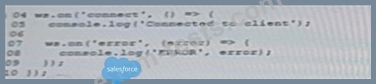
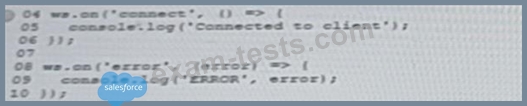
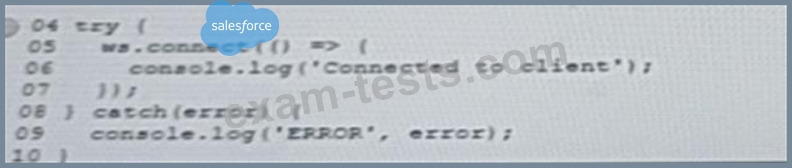
A developer is setting up a new Node.js server with a client library that is built using events and callbacks.
The library:
* Will establish a web socket connection and handle receipt of messages to the server
* Will be imported with require, and made available with a variable called ws.
The developer also wants to add error logging if a connection fails.
Given this information, which code segment show the correct way to set up a client two events that listen at execution time?
A)

B)
C)
D)
The library:
* Will establish a web socket connection and handle receipt of messages to the server
* Will be imported with require, and made available with a variable called ws.
The developer also wants to add error logging if a connection fails.
Given this information, which code segment show the correct way to set up a client two events that listen at execution time?
A)
B)
C)
D)
Question 89
A developer wants to create an object from a function in the browser using the code below.
What happens due to lack of the new keyword on line 02?
What happens due to lack of the new keyword on line 02?
Question 90
Refer to the HTML below:
<div id="main">
<ul>
<li>Leo</li>
<li>Tony</li>
<li>Tiger</li>
</ul>
</div>
Which JavaScript statement results in changing " Tony" to "Mr. T."?
<div id="main">
<ul>
<li>Leo</li>
<li>Tony</li>
<li>Tiger</li>
</ul>
</div>
Which JavaScript statement results in changing " Tony" to "Mr. T."?