

Question 66
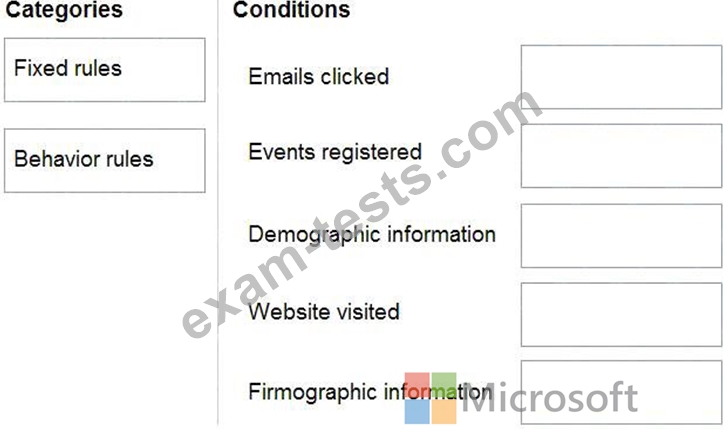
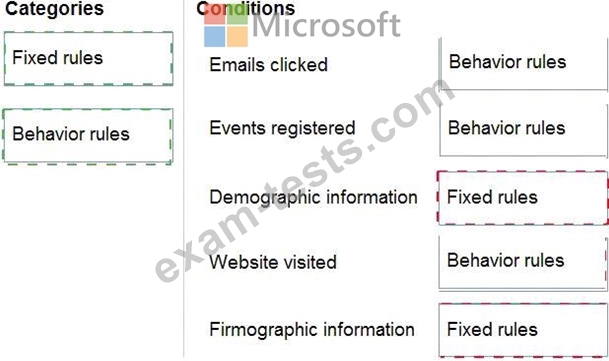
You are a Dynamics 365 Marketing functional consultant.
You are setting up conditions for a lead-scoring model.
Which categories should you use during the configuration? To answer, drag the appropriate category to the
correct condition. Each category may be used once, more than once, or not at all. You may need to drag the
split bar between panes or scroll to view content.
NOTE: Each correct selection is worth one point.

Question 67

You are setting up a conference event that will have a capacity of 500 people.
You want to enable a waitlist for the event so that if more than 500 people register and someone cancels their registration, the event will automatically register the next available person on the list.
Which three steps should you take, in sequence, to complete your task? To answer, move the appropriate actions from the list of actions to the answer area and arrange them in the correct order.


Question 68

You are an administrator working on a marketing campaign.
You need to understand the various types of digital content that are available for use with marketing.
Which Content Types match with the Purposes that are listed? To answer, drag the appropriate Content Type to the correct purpose. Each Content Type may be used once, more than once or not at all. You may need to drag the split bar between panes or scroll to view the content.
NOTE: Each correct selection is worth one point.


Question 69
Your customer is using an outbound subscription center in Dynamics 365 Customer Insights - Journeys.
Due to data privacy concerns, they want to implement a global double opt-in for new subscriptions and consent preferences.
Vou need to configure the settings for this requirement.
Solution: Set up a Subscription center.
Does this meet the goal?
Due to data privacy concerns, they want to implement a global double opt-in for new subscriptions and consent preferences.
Vou need to configure the settings for this requirement.
Solution: Set up a Subscription center.
Does this meet the goal?
Question 70

You have created an email message and believe that you are ready to go live.
Before doing so, you want to Check for Errors in the designer.
Which items are optional or required in order to pass the error check test? To answer, drag each answer option on the left to the appropriate item on the right. Each answer option may be used once, more than once, or not at all. You may need to drag the split bar between panes or scroll to view the content.
NOTE: Each correct selection is worth one point.

