

Question 36
DRAG DROP
You are implementing Dynamics 365 Sales for a beverage company.
The company sells drinks by individual cans, by the dozen, or by the case of 48 cans as follows:
There are three flavors: strawberry, vanilla, and chocolate.
Each can costs $5.00.
A dozen cans cost $55.00.
Each case has four dozen cans and costs $200.00.
A combination case includes a dozen cans of each flavor and costs $160.00.
Purchases of four or more cases receive an extra 10 percent off the price.
You need to set up the product catalog.
Which components should you use? To answer, move the appropriate components to the correct entry descriptions. You may use each component once, more than once, or not at all. You may need to move the split bar between panes or scroll to view content.
NOTE: Each correct selection is worth one point.

You are implementing Dynamics 365 Sales for a beverage company.
The company sells drinks by individual cans, by the dozen, or by the case of 48 cans as follows:
There are three flavors: strawberry, vanilla, and chocolate.
Each can costs $5.00.
A dozen cans cost $55.00.
Each case has four dozen cans and costs $200.00.
A combination case includes a dozen cans of each flavor and costs $160.00.
Purchases of four or more cases receive an extra 10 percent off the price.
You need to set up the product catalog.
Which components should you use? To answer, move the appropriate components to the correct entry descriptions. You may use each component once, more than once, or not at all. You may need to move the split bar between panes or scroll to view content.
NOTE: Each correct selection is worth one point.


Question 37
Note: This question is part of a series of questions that present the same scenario. Each question in the series contains a unique solution. Determine whether the solution meets the stated goals. Some question sets might have more than one correct solution, while others might not have a correct solution.
After you answer a question in this section, you will NOT be able to return to it. As a result, these questions will not appear in the review screen.
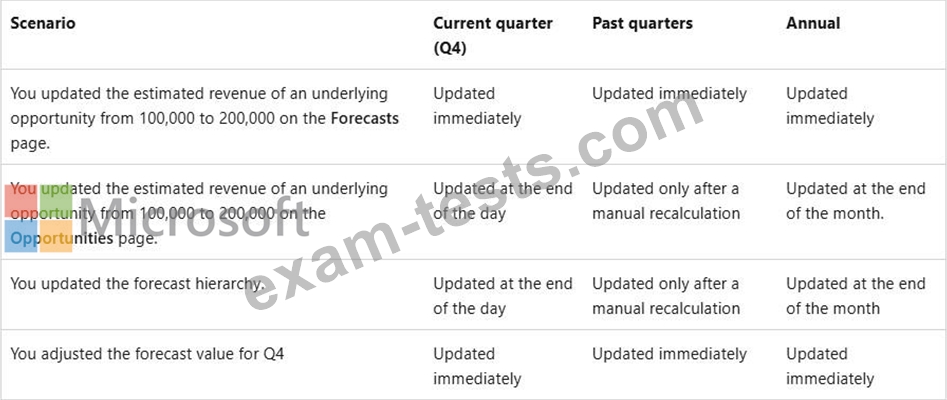
You configure forecasts for a clothing manufacturer.
A salesperson updates an opportunity and wants to refresh the forecast
You need to show the salesperson how to refresh the forecast.
Solution: Recalculate the opportunity.
Does this meet the goal?
After you answer a question in this section, you will NOT be able to return to it. As a result, these questions will not appear in the review screen.
You configure forecasts for a clothing manufacturer.
A salesperson updates an opportunity and wants to refresh the forecast
You need to show the salesperson how to refresh the forecast.
Solution: Recalculate the opportunity.
Does this meet the goal?

Question 38
Note: This question is part of a series of questions that present the same scenario. Each question in the series contains a unique solution that might meet the stated goals. Some question sets might have more than one correct solution, while others might not have a correct solution.
After you answer a question in this section, you will NOT be able to return to it. As a result, these questions will not appear in the review screen, You recently implemented Dynamics 365 Sales within your organization's sales team. Based on the initial evaluation, adoption is limited as most sales users prefer to work from Microsoft Outlook.
You decide to enable the Dynamics 365 App for Outlook.
You need to perform the various actions required. Each correct action is part of the solution but does NOT solve the problem completely.
Action: Within the system settings and email configuration, you set Process Email Using to Dynamics 365 for Outlook.
Does this meet the goal?
After you answer a question in this section, you will NOT be able to return to it. As a result, these questions will not appear in the review screen, You recently implemented Dynamics 365 Sales within your organization's sales team. Based on the initial evaluation, adoption is limited as most sales users prefer to work from Microsoft Outlook.
You decide to enable the Dynamics 365 App for Outlook.
You need to perform the various actions required. Each correct action is part of the solution but does NOT solve the problem completely.
Action: Within the system settings and email configuration, you set Process Email Using to Dynamics 365 for Outlook.
Does this meet the goal?
Question 39
BDM1 logs into the Sales Hub on June 3. 2024. BDM1 opens the assistant from the navigation bar.
Which two open opportunities will BDM1 see mentioned in the close date coming soon reminder cards? To answer, select the appropriate options in the answer area.
NOTE: Each correct selection is worth one point.

Which two open opportunities will BDM1 see mentioned in the close date coming soon reminder cards? To answer, select the appropriate options in the answer area.
NOTE: Each correct selection is worth one point.

Question 40
Case Study 1 - Contoso Ltd
Background information
Contoso Ltd. has started a new division that provides janitorial services to businesses.
The sales teams for this division are using a dedicated instance of Dynamics 365 Sales.
Contoso Ltd.'s sellers are becoming accustomed to Copilot in Sales and Sales Insights features.
They have identified several desired enhancements.
System configuration
The base currency for all opportunities in the system is US dollars (USD). The administrator has NOT enabled installed premium Sales Insights features. All users have Premium licenses.
Contoso Ltd. uses Exchange Online for email.
Only three default insights cards are turned on:
1. Close date coming soon
2. Meeting today
3. Upcoming meeting
The system administrator has set the following days before notifying me value for the Close date coming soon card to 21 days. Contoso Ltd. has also just set up Dynamics 365 Customer Insights
- Journeys for marketing automation. No segments or customer journeys have been defined yet.
Dynamics 365 Sales and Customer Insights - Journeys both share the same instance of Microsoft Dataverse.
Copilot in Dynamics 365 Sales settings
The following screenshots show the configured fields for opportunity settings summaries and recent changes in Copilot.


Contoso Ltd. Personnel
Business development managers
Contoso Ltd. has 30 business development managers (BDMs) across its sales teams. Each BDM is responsible for selling janitorial services to new and existing clients. All BDMs are assigned the sales manager security role in Dynamics 365 Sales.
Any BDM can own an opportunity, even if a different BDM owns the client account record. Any other BDMs assigned to work on the opportunity will be included in the opportunity record's sales team. Opportunity records owned by a BDM will never include any additional client stakeholders other than the named contact for the opportunity.
The BDMs have been told to document all client communications in Dynamics 365, but they frequently exchange emails with client contacts through Microsoft Exchange WITHOUT tracking them in Dynamics 365.
Digital sales team
Contoso Ltd. has a digital sales team that comprises 10 junior sales resources who focus on lead qualification and conversion to opportunities. Members of this team are assigned a single custom security role named Digital seller that is a copy of the standard Salesperson role. View audit history and view audit summary permissions are disabled.
The team currently receives leads from an online form on Contoso Ltd.'s website. Many online lead submissions end up being duplicates, and the team manually reconciles the duplicates by comparing last name, email address, and phone number for all submitted leads.
Clients
Client tiers
Clients are grouped into tiers based on annual revenue as calculated in a system outside Dynamics 365 Sales. Clients receive different levels of ongoing service and support based on their tier assignment.
Annual revenue values for accounts and corresponding tier values are written to Dynamics 365 through a nightly batch process. Client tier values are only updated when they change, and tier value will always be blank for accounts with no calculated annual revenue.
The tier structure is:
Tier A -- annual revenue greater than or equal to $10,000,000 USD
Tier B -- annual revenue greater than $5,000,000 USD and less than $10,000,000 USD Tier C -- annual revenue greater than $0 USD and less than or equal to $5,000,000 USD The tier label is stored in a custom text field named Client tier (contoso_clienttier) that contains only a single letter or is blank.
Northwind Traders account
There are three BDMs who frequently work together on large opportunities.
BDM1 is the account owner for Northwind Traders, a multinational client.
- BDM1 owns all Northwind Traders opportunities with estimated revenue greater than or equal to
$1,000,000. BMD2 and BDM3 are assisting BDM1 with several opportunities for Northwind Traders in different cities.
- BDM3 owns all other Northwind Traders opportunities. BDM3 is NOT a sales team member for any of the opportunities BDM1 owns.
- BDM2 is a sales team member for all Northwind Traders opportunities.
Client Contact1 is the primary contact for the Northwind Traders' account. There are two other client contacts with whom the Northwind account team regularly engages - Client Contact2 and Client Contact3.
BDM1 and Northwind Traders account
BDM1 has been on vacation for two weeks. During vacation, BDM1 did NOT log into Dynamics
365, and BDM2 made the following updates to several open Northwind Traders opportunities.

BMD2 also scheduled an internal meeting with BMD1 for the day they return to discuss a request from the primary contact for the account. The meeting has the "London office" opportunity as its regarding value.
Desired enhancements
The global sales lead requests the following enhancements:
1. A "Welcome" email should be sent to the primary contact for an account when the account first enters any client tier. This email should only be sent to the primary contact once.
2. Account owners should receive immediate notifications in the assistant in Dynamics 365 Sales when accounts change tiers. The notifications should include the account name and current tier.
3. A "Getting started" email should be sent to the main contact associated with an opportunity when the opportunity status is set to "Won."
1. The email should include a link to a custom onboarding form where the contact can supply information required to start the janitorial services for a given location.
2. If the contact does NOT click any links in the email, a follow-up email should be sent.
4. All emails between BDMs and client contacts should be available for relationship analytics KPIs. Emails sent by other users outside of Dynamics 365 should NOT be included in the KPIs.
The digital sales team lead requests the following enhancements:
1. The ability for team members to use Copilot to summarize changes to lead records.
2. Replace the current online form used by their team to capture new leads. The new form should automatically handle duplicates using the rules the team currently applies manually.
Hotspot Question
BDM1 has returned from vacation and needs to catch up on their scheduled tasks and activities.
Which two items can BMD1 select to see a reminder card for the meeting BDM2 scheduled in the assistant? To answer, select the appropriate options in the answer area.
NOTE: Each correct selection is worth one point.

Background information
Contoso Ltd. has started a new division that provides janitorial services to businesses.
The sales teams for this division are using a dedicated instance of Dynamics 365 Sales.
Contoso Ltd.'s sellers are becoming accustomed to Copilot in Sales and Sales Insights features.
They have identified several desired enhancements.
System configuration
The base currency for all opportunities in the system is US dollars (USD). The administrator has NOT enabled installed premium Sales Insights features. All users have Premium licenses.
Contoso Ltd. uses Exchange Online for email.
Only three default insights cards are turned on:
1. Close date coming soon
2. Meeting today
3. Upcoming meeting
The system administrator has set the following days before notifying me value for the Close date coming soon card to 21 days. Contoso Ltd. has also just set up Dynamics 365 Customer Insights
- Journeys for marketing automation. No segments or customer journeys have been defined yet.
Dynamics 365 Sales and Customer Insights - Journeys both share the same instance of Microsoft Dataverse.
Copilot in Dynamics 365 Sales settings
The following screenshots show the configured fields for opportunity settings summaries and recent changes in Copilot.
Contoso Ltd. Personnel
Business development managers
Contoso Ltd. has 30 business development managers (BDMs) across its sales teams. Each BDM is responsible for selling janitorial services to new and existing clients. All BDMs are assigned the sales manager security role in Dynamics 365 Sales.
Any BDM can own an opportunity, even if a different BDM owns the client account record. Any other BDMs assigned to work on the opportunity will be included in the opportunity record's sales team. Opportunity records owned by a BDM will never include any additional client stakeholders other than the named contact for the opportunity.
The BDMs have been told to document all client communications in Dynamics 365, but they frequently exchange emails with client contacts through Microsoft Exchange WITHOUT tracking them in Dynamics 365.
Digital sales team
Contoso Ltd. has a digital sales team that comprises 10 junior sales resources who focus on lead qualification and conversion to opportunities. Members of this team are assigned a single custom security role named Digital seller that is a copy of the standard Salesperson role. View audit history and view audit summary permissions are disabled.
The team currently receives leads from an online form on Contoso Ltd.'s website. Many online lead submissions end up being duplicates, and the team manually reconciles the duplicates by comparing last name, email address, and phone number for all submitted leads.
Clients
Client tiers
Clients are grouped into tiers based on annual revenue as calculated in a system outside Dynamics 365 Sales. Clients receive different levels of ongoing service and support based on their tier assignment.
Annual revenue values for accounts and corresponding tier values are written to Dynamics 365 through a nightly batch process. Client tier values are only updated when they change, and tier value will always be blank for accounts with no calculated annual revenue.
The tier structure is:
Tier A -- annual revenue greater than or equal to $10,000,000 USD
Tier B -- annual revenue greater than $5,000,000 USD and less than $10,000,000 USD Tier C -- annual revenue greater than $0 USD and less than or equal to $5,000,000 USD The tier label is stored in a custom text field named Client tier (contoso_clienttier) that contains only a single letter or is blank.
Northwind Traders account
There are three BDMs who frequently work together on large opportunities.
BDM1 is the account owner for Northwind Traders, a multinational client.
- BDM1 owns all Northwind Traders opportunities with estimated revenue greater than or equal to
$1,000,000. BMD2 and BDM3 are assisting BDM1 with several opportunities for Northwind Traders in different cities.
- BDM3 owns all other Northwind Traders opportunities. BDM3 is NOT a sales team member for any of the opportunities BDM1 owns.
- BDM2 is a sales team member for all Northwind Traders opportunities.
Client Contact1 is the primary contact for the Northwind Traders' account. There are two other client contacts with whom the Northwind account team regularly engages - Client Contact2 and Client Contact3.
BDM1 and Northwind Traders account
BDM1 has been on vacation for two weeks. During vacation, BDM1 did NOT log into Dynamics
365, and BDM2 made the following updates to several open Northwind Traders opportunities.
BMD2 also scheduled an internal meeting with BMD1 for the day they return to discuss a request from the primary contact for the account. The meeting has the "London office" opportunity as its regarding value.
Desired enhancements
The global sales lead requests the following enhancements:
1. A "Welcome" email should be sent to the primary contact for an account when the account first enters any client tier. This email should only be sent to the primary contact once.
2. Account owners should receive immediate notifications in the assistant in Dynamics 365 Sales when accounts change tiers. The notifications should include the account name and current tier.
3. A "Getting started" email should be sent to the main contact associated with an opportunity when the opportunity status is set to "Won."
1. The email should include a link to a custom onboarding form where the contact can supply information required to start the janitorial services for a given location.
2. If the contact does NOT click any links in the email, a follow-up email should be sent.
4. All emails between BDMs and client contacts should be available for relationship analytics KPIs. Emails sent by other users outside of Dynamics 365 should NOT be included in the KPIs.
The digital sales team lead requests the following enhancements:
1. The ability for team members to use Copilot to summarize changes to lead records.
2. Replace the current online form used by their team to capture new leads. The new form should automatically handle duplicates using the rules the team currently applies manually.
Hotspot Question
BDM1 has returned from vacation and needs to catch up on their scheduled tasks and activities.
Which two items can BMD1 select to see a reminder card for the meeting BDM2 scheduled in the assistant? To answer, select the appropriate options in the answer area.
NOTE: Each correct selection is worth one point.
