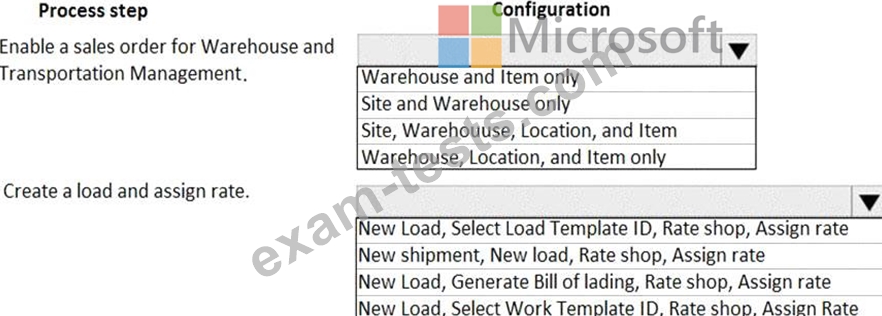
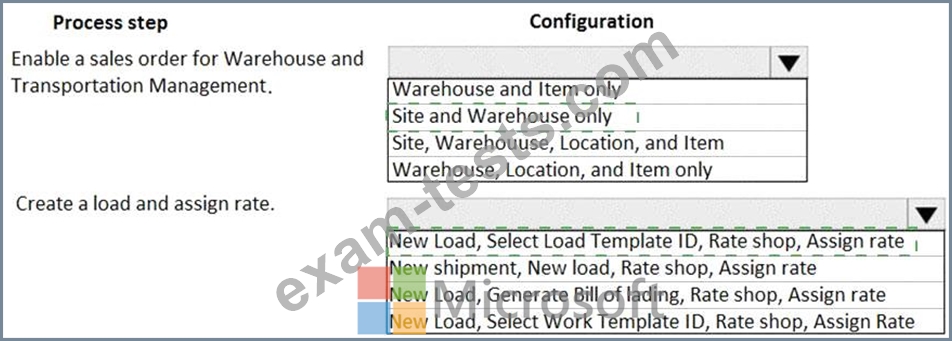
A company creates loads to ship sales orders. Loads must be shipped by using the lowest freight rates possible. You need to use the load planning workbench to create a load for sales order shipments. Which configuration options should you use? To answer, select the appropriate options in the answer area. NOTE: Each correct selection is worth one point.
Correct Answer:
Explanation
Question 22
SIMULATION You are a functional consultant for a company named Contoso Entertainment System USA (USMF). From sales order number 000720, you need to ensure that a product named Projector Television is delivered directly to a customer. To complete this task, sign in to Dynamics 365 portal.
You are a functional consultant for a company named Contoso Entertainment System USA (USMF). From sales order number 000720, you need to ensure that a product named Projector Television is delivered directly to a customer. To complete this task, sign in to Dynamics 365 portal.
Correct Answer:
See explanation below. Explanation When you configure Direct Delivery (direct from the Vendor), a PO is created to purchase the item from the Vendor and have it shipped directly to the customer. The instructions below include generating the PO and a product receipt. These steps may not be required in the exam but are included for reference. 1. Go to Navigation pane > Modules All sales orders. 2. Select New. 3. Search for and select sales order number 4. On the Action Pane,select Sales order . The Create delivery page lists all the open sales order lines as copied from the sales order. 5. Select the sales order line for the product named Projector Television. 6. The Vendor account field will be populated. A message informs you that the purchase order has now been created. 7. Expand the Line details section. 8. Select the Delivery tab and verify that the 9. On the Action Pane, select General 10. Select Related orders. 11. Select the link in the Purchase order field. 12. Expand the Line details section and select the Address tab. * The delivery address for this purchase order line is the customer's delivery address and not your company's address. 13. Select the Delivery tab. Like the sales order line, the associated purchase order line type is also set to Direct delivery. 14. On the Action Pane, select Purchase. 15. Select Confirmation. 16. Select OK. 17. On the Action Pane, select Receive. 18. Select Productreceipt. 19. In the Product receipt field, type a value. 20. Select OK. 21. On the Action Pane, select General 22. Select Related orders and highlight the desired record. * After the purchase order has been updated as received, or in other words, afterthe vendor has shipped the goods to your customer's address, the status of the originating sales order is automatically updated to Delivered. * The sales order can now be invoiced. 23. Select OK. 24. Close the page. 25. Select OK. Close the pages and returnto the home page. Reference: https://docs.microsoft.com/en-us/dynamics365/supply-chain/sales-marketing/direct-deliveries
Question 24
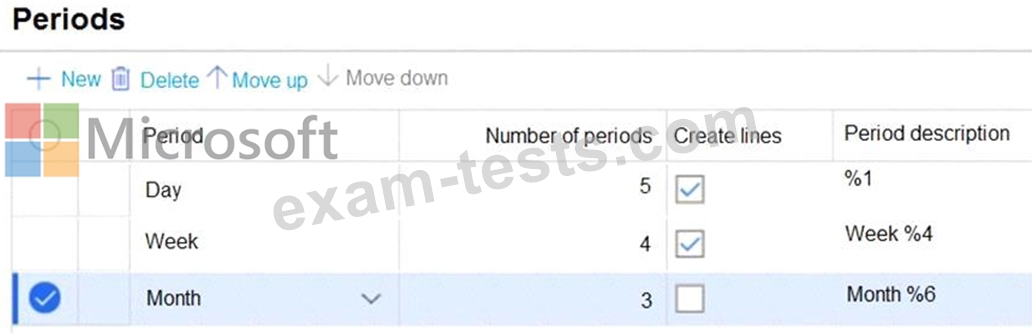
You are configuring the period templates that are used for inventory inquiries. Today's date is November 3, 2020. The period templates configuration is shown in the following graphic. You set the value for the Direction field to backward. Use the drop-down menus to select the answer choice that answers each question based on the information presented in the graphic. NOTE: Each correct selection is worth one point.
Correct Answer:
Explanation Graphical user interface, text Description automatically generated
Question 25
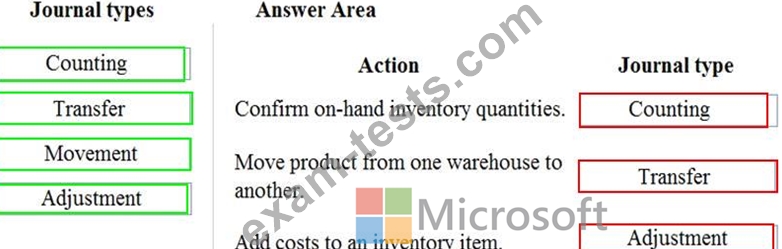
A company is implementing inventory by using Dynamics 365 Supply Chain Management. You need to set up inventory journals and ensure that they are used for the correct processes. Which journal types should you use? To answer, drag the appropriate journal types to the correct actions. Each journal type may be used once, more than once, or not at all. You may need to drag the split bar between panes or scroll to view content. NOTE: Each correct selection is worth one point.