

Question 46
You are implementing Dynamics 365 Business Central.
The purchasing manager wants to implement an approval system by using email notifications.
You need to set up the notification system.
Which setup should you use? To answer, drag the appropriate setup to the correct actions. Each setup may be used once, more than once, or not at all. You may need to drag the split bar between panes or scroll to view content.
NOTE: Each correct selection is worth one point.

The purchasing manager wants to implement an approval system by using email notifications.
You need to set up the notification system.
Which setup should you use? To answer, drag the appropriate setup to the correct actions. Each setup may be used once, more than once, or not at all. You may need to drag the split bar between panes or scroll to view content.
NOTE: Each correct selection is worth one point.

Question 47
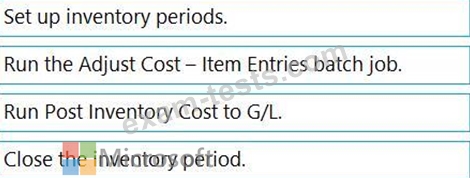
You need to configure the system to address the costing adjustment concerns.
Which four actions should you perform in sequence? To answer, move the appropriate actions from the list of actions to the answer area and arrange them in the correct order.

Which four actions should you perform in sequence? To answer, move the appropriate actions from the list of actions to the answer area and arrange them in the correct order.

Question 48
You need to create financial reports per company reporting requirements.
Which report configuration should you use to add the report descriptions lo financial reports? To answer, move the appropriate report configurations to the correct report descriptions. You may use each report configuration once, more than once, of not at all. You may need to move the split bar between panes or scroll to view content NOTE: Each correct selection is worth one point.
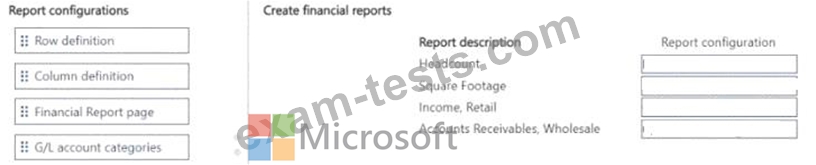
Which report configuration should you use to add the report descriptions lo financial reports? To answer, move the appropriate report configurations to the correct report descriptions. You may use each report configuration once, more than once, of not at all. You may need to move the split bar between panes or scroll to view content NOTE: Each correct selection is worth one point.


Question 49
You manage several companies within one Dynamics 365 Business Central database. Most users work in only one of these companies, where they have a specific role.
You need to set up security according to company requirements.
Which setup should you use? To answer, drag the appropriate setups to the correct requirements. Each setup may be used once, more than once, or not at all. You may need to drag the split bar between panes or scroll to view content.
NOTE: Each correct selection is worth one point.

You need to set up security according to company requirements.
Which setup should you use? To answer, drag the appropriate setups to the correct requirements. Each setup may be used once, more than once, or not at all. You may need to drag the split bar between panes or scroll to view content.
NOTE: Each correct selection is worth one point.

Question 50
You are setting up approval workflows in Dynamics 365 Business Central.
You need to configure approval limits.
Which approver limit types should you use? To answer, drag the appropriate approver limit types to the correct requirements. Each approver limit type may be used once, or not at all. You may need to drag the split bar between panes or scroll to view content.
NOTE: Each correct selection is worth one point.

You need to configure approval limits.
Which approver limit types should you use? To answer, drag the appropriate approver limit types to the correct requirements. Each approver limit type may be used once, or not at all. You may need to drag the split bar between panes or scroll to view content.
NOTE: Each correct selection is worth one point.
