

Question 56
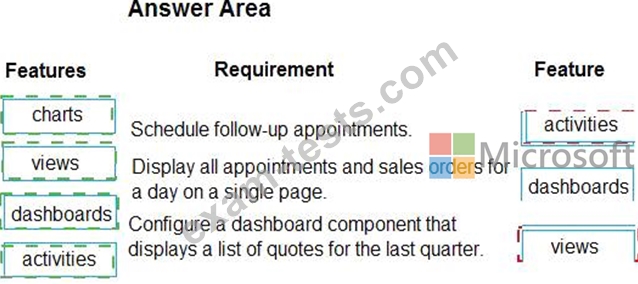
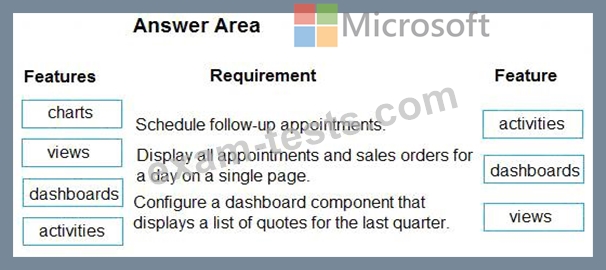
A company implements Dynamics 365 Sales. Users are unsure how to perform various tasks.
You need to recommend features to help the company configure the system.
What should you recommend? To answer, drag the appropriate features to the correct requirements. Each feature may be used once, more than once, or not at all. You may need to drag the split bar between panes or scroll to view content.
NOTE: Each correct selection is worth one point.
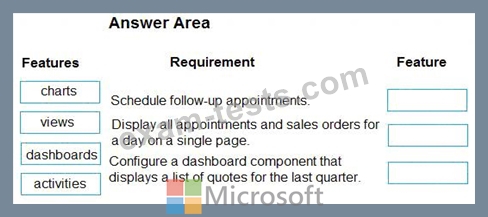
You need to recommend features to help the company configure the system.
What should you recommend? To answer, drag the appropriate features to the correct requirements. Each feature may be used once, more than once, or not at all. You may need to drag the split bar between panes or scroll to view content.
NOTE: Each correct selection is worth one point.
Question 57
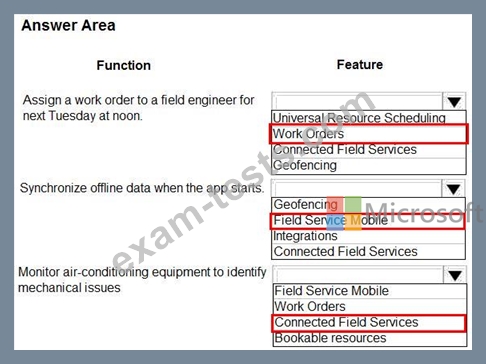
A company that services air-conditioning equipment is implementing Dynamics 365 Field Service.
You need to recommend the features that the company should implement to meet business requirements. Which features should you recommend? To answer, select the appropriate options in the answer area.
NOTE: Each correct selection is worth one point.

You need to recommend the features that the company should implement to meet business requirements. Which features should you recommend? To answer, select the appropriate options in the answer area.
NOTE: Each correct selection is worth one point.
Question 58
A company implements Dynamics 365 Sales.
You need to recommend the features to implement that meet the following requirements:
Display a landing page when a sales manager signs in that shows the pipeline, top leads, open opportunities, and won opportunities.
Display an interactive list that allows sales representatives to see details for their accounts including the name, address, phone number, contact, and last contact date for the account. Allow sorting by any column.
Which features should you recommend?
To answer, drag the appropriate features to the correct requirements. Each feature may be used once, more than once, or not at all. You may need to drag the split bar between panes or scroll to view content.
NOTE: Each correct selection is worth one point.

You need to recommend the features to implement that meet the following requirements:
Display a landing page when a sales manager signs in that shows the pipeline, top leads, open opportunities, and won opportunities.
Display an interactive list that allows sales representatives to see details for their accounts including the name, address, phone number, contact, and last contact date for the account. Allow sorting by any column.
Which features should you recommend?
To answer, drag the appropriate features to the correct requirements. Each feature may be used once, more than once, or not at all. You may need to drag the split bar between panes or scroll to view content.
NOTE: Each correct selection is worth one point.

Question 59
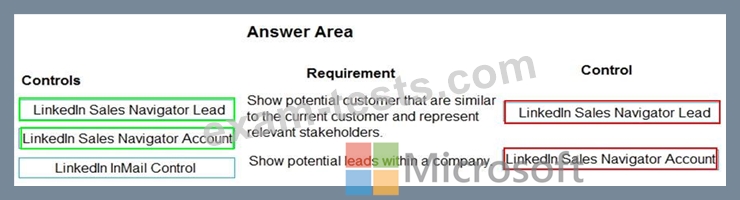
A company plans to implement Dynamics 365 Sales with LinkedIn Sales Navigator.
You need to determine the controls that you should implement.
Which controls should you use? To answer, drag the appropriate controls to the correct requirement. Each control may be used once, more than once, or not at all. You may need to drag the split bar between panes or scroll to view content.
NOTE: Each correct selection is worth one point.
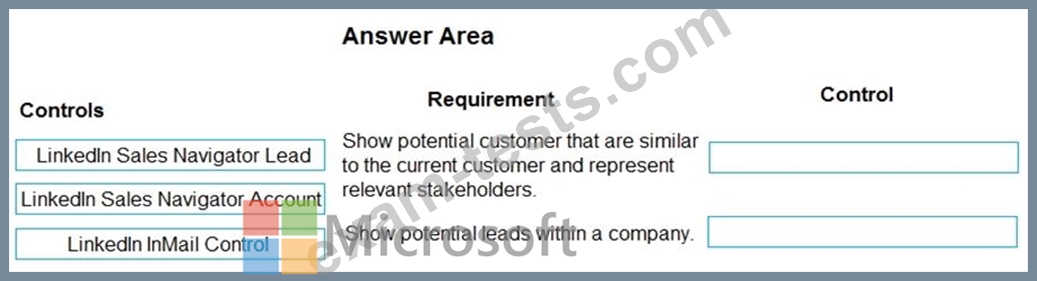
You need to determine the controls that you should implement.
Which controls should you use? To answer, drag the appropriate controls to the correct requirement. Each control may be used once, more than once, or not at all. You may need to drag the split bar between panes or scroll to view content.
NOTE: Each correct selection is worth one point.
Question 60
A company schedules technicians by using Dynamics 365 Field Service.
You need to demonstrate to the customer which tools are used for the different scheduling types.
Match each tool to its scheduling type.
To answer, drag the appropriate tool from the column on the left to its scheduling type on the right. Each tool may be used once, more than once, or not at all. Each correct match is worth one point.

You need to demonstrate to the customer which tools are used for the different scheduling types.
Match each tool to its scheduling type.
To answer, drag the appropriate tool from the column on the left to its scheduling type on the right. Each tool may be used once, more than once, or not at all. Each correct match is worth one point.
