Question 46
You have 20 computers that run Windows 10.
You configure all the computers to forward all the events from all the logs to a computer named Computer1 that runs Windows 10.
When you sign in to Computer1, you cannot see any security events from other computers. You can see all the other forwarded events from the other computers.
You need to ensure that the security events are forwarded to Computer1.
What should you do?
You configure all the computers to forward all the events from all the logs to a computer named Computer1 that runs Windows 10.
When you sign in to Computer1, you cannot see any security events from other computers. You can see all the other forwarded events from the other computers.
You need to ensure that the security events are forwarded to Computer1.
What should you do?
Question 47
Your company has an on-premises network that contains an Active Directory domain. The domain is synced to Microsoft Azure Active Directory (Azure AD). All computers in the domain run Windows 10 Enterprise.
You have a computer named Computer1 that has a folder named C:\Folder1.
You want to use File History to protect C:\Folder1.
Solution: You enable File History on Computer1. You then enable archiving for Folder1.
Does this meet the goal?
You have a computer named Computer1 that has a folder named C:\Folder1.
You want to use File History to protect C:\Folder1.
Solution: You enable File History on Computer1. You then enable archiving for Folder1.
Does this meet the goal?
Question 48
Note: This question is part of a series of questions that present the same scenario. Each question in the series contains a unique solution that might meet the stated goals. Some question sets might have more than one correct solution, while others might not have a correct solution.
After you answer a question in this section, you will NOT be able to return to it. As a result, these questions will not appear in the review screen.
A user named User1 has a computer named Computer1 that runs Windows 10. Computer1 is joined to an Azure Active Directory (Azure AD) tenant named contoso.com. User1 joins Computer1 to contoso.com by using [email protected].
Computer1 contains a folder named Folder1. Folder1 is in drive C and is shared as Share1. Share1 has the permission shown in the following table.

A user named User2 has a computer named Computer2 that runs Windows 10. User2 joins Computer2 to contoso.com by using [email protected].
User2 attempts to access Share1 and receives the following error message: "The username or password is incorrect." You need to ensure that User2 can connect to Share1.
Solution: In Azure AD, you create a group named Group1 that contains User1 and User2. You grant Group1 Modify access to Folder1.
Does this meet the goal?
After you answer a question in this section, you will NOT be able to return to it. As a result, these questions will not appear in the review screen.
A user named User1 has a computer named Computer1 that runs Windows 10. Computer1 is joined to an Azure Active Directory (Azure AD) tenant named contoso.com. User1 joins Computer1 to contoso.com by using [email protected].
Computer1 contains a folder named Folder1. Folder1 is in drive C and is shared as Share1. Share1 has the permission shown in the following table.
A user named User2 has a computer named Computer2 that runs Windows 10. User2 joins Computer2 to contoso.com by using [email protected].
User2 attempts to access Share1 and receives the following error message: "The username or password is incorrect." You need to ensure that User2 can connect to Share1.
Solution: In Azure AD, you create a group named Group1 that contains User1 and User2. You grant Group1 Modify access to Folder1.
Does this meet the goal?
Question 49
You have a workgroup computer named Computer1 that runs Windows 10 and has the users shown in the following table.
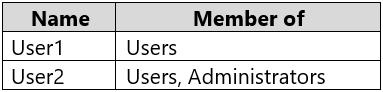
Computer1 contains an image file named C:\Folder\Image.jpg.
Computer1 has the Local Computer\Administrators Policy shown in the following table.

Computer1 has the Local Computer\Non-Administrators Policy shown in the following table.

Computer1 has the local computer policy shown in the following table.

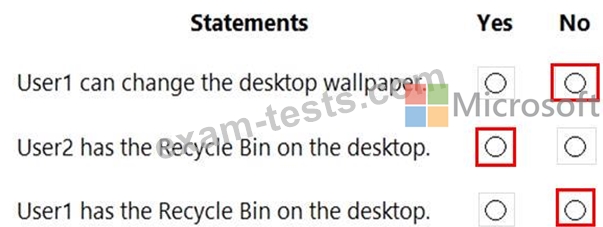
For each of the following statements, select Yes if the statement is true. Otherwise, select No.
NOTE: Each correct selection is worth one point.

Computer1 contains an image file named C:\Folder\Image.jpg.
Computer1 has the Local Computer\Administrators Policy shown in the following table.
Computer1 has the Local Computer\Non-Administrators Policy shown in the following table.
Computer1 has the local computer policy shown in the following table.
For each of the following statements, select Yes if the statement is true. Otherwise, select No.
NOTE: Each correct selection is worth one point.
Question 50
You have a computer that runs Windows 10.
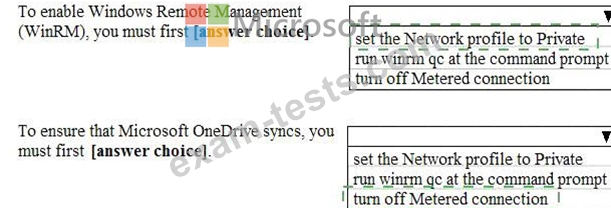
From the Settings app, you view the connection properties shown in the following exhibit.
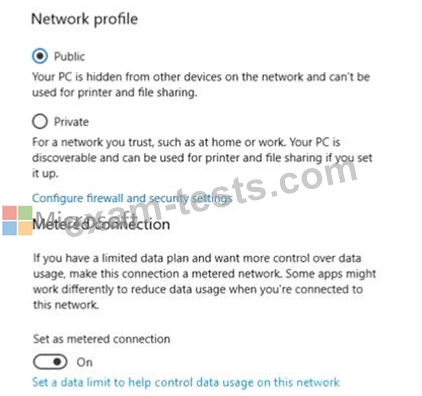
Use the drop-down menus to select the answer choice that completes each statement based on the information presented in the graphic.
NOTE: Each correct selection is worth one point.

From the Settings app, you view the connection properties shown in the following exhibit.
Use the drop-down menus to select the answer choice that completes each statement based on the information presented in the graphic.
NOTE: Each correct selection is worth one point.