

Question 111
You are a network administrator at your company.
A user attempts to start a computer and receives the following error message: "Bootmgr is missing." You need to resolve the issue.
You start the computer in the recovery mode.
Which command should you run next? To answer, select the appropriate options in the answer area.
NOTE: Each correct selection is worth one point.

A user attempts to start a computer and receives the following error message: "Bootmgr is missing." You need to resolve the issue.
You start the computer in the recovery mode.
Which command should you run next? To answer, select the appropriate options in the answer area.
NOTE: Each correct selection is worth one point.

Question 112
Your network contains an Active Directory domain. The domain contains 100 computers that run Windows 10.
You need to create a Start menu layout file. The solution must meet the following requirements:
Contain an app group named Contoso Apps that has several pinned items. Contoso Apps must be locked from user modification.
Ensure that users can customize other parts of the Start screen.
Minimize administrative effort.
Which four actions should you perform in sequence? To answer, move the appropriate commands from the list of commands to the answer area and arrange them in the correct order.

You need to create a Start menu layout file. The solution must meet the following requirements:
Contain an app group named Contoso Apps that has several pinned items. Contoso Apps must be locked from user modification.
Ensure that users can customize other parts of the Start screen.
Minimize administrative effort.
Which four actions should you perform in sequence? To answer, move the appropriate commands from the list of commands to the answer area and arrange them in the correct order.

Question 113
You have a computer named LON-CL1.Adatum.com that runs Windows 10.
From Event Viewer, you create a custom view named View1 that has the following filter:
* User: User1
* Logged: Any time
* Event logs: System
* Computer: LON-CL1
* Event IDs: 10000 - 11000
* Event level: Error, Verbose
You open Event Viewer and discover the event shown in the exhibit. (Click the Exhibit tab.)

The event does not appear in View1.
You need to ensure that the event appears in View1.
What should you do?
From Event Viewer, you create a custom view named View1 that has the following filter:
* User: User1
* Logged: Any time
* Event logs: System
* Computer: LON-CL1
* Event IDs: 10000 - 11000
* Event level: Error, Verbose
You open Event Viewer and discover the event shown in the exhibit. (Click the Exhibit tab.)
The event does not appear in View1.
You need to ensure that the event appears in View1.
What should you do?
Question 114
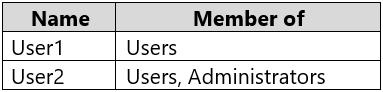
You have a workgroup computer named Computer1 that runs Windows 10 and has the users shown in the following table.
Computer1 contains an image file named C:\Folder\Image.jpg.
Computer1 has the Local Computer\Administrators Policy shown in the following table.

Computer1 has the Local Computer\Non-Administrators Policy shown in the following table.

Computer1 has the local computer policy shown in the following table.

For each of the following statements, select Yes if the statement is true. Otherwise, select No.
NOTE: Each correct selection is worth one point.

Computer1 contains an image file named C:\Folder\Image.jpg.
Computer1 has the Local Computer\Administrators Policy shown in the following table.
Computer1 has the Local Computer\Non-Administrators Policy shown in the following table.
Computer1 has the local computer policy shown in the following table.
For each of the following statements, select Yes if the statement is true. Otherwise, select No.
NOTE: Each correct selection is worth one point.

Question 115
You have a computer named Computer 1 that runs Windows 10.
You turn on System Protection and create a restore point named Point1.
You perform the following changes:
Add four files named File1.txt, File2.dll, File3.sys, and File4.exe to the desktop.
Run a configuration script that adds the following four registry keys:
- Key1 to HKEY_CURRENT_USER
- Key2 to HKEY_CLASSES_ROOT
- Key3 to HKEY_LOCAL_MACHINE\SYSTEM
- Key4 to HKEY_CURRENT_CONFIG
You restore Point1.
Which files and registry keys are removed? To answer, select the appropriate options in the answer area.
NOTE: Each correct selection is worth one point.

You turn on System Protection and create a restore point named Point1.
You perform the following changes:
Add four files named File1.txt, File2.dll, File3.sys, and File4.exe to the desktop.
Run a configuration script that adds the following four registry keys:
- Key1 to HKEY_CURRENT_USER
- Key2 to HKEY_CLASSES_ROOT
- Key3 to HKEY_LOCAL_MACHINE\SYSTEM
- Key4 to HKEY_CURRENT_CONFIG
You restore Point1.
Which files and registry keys are removed? To answer, select the appropriate options in the answer area.
NOTE: Each correct selection is worth one point.

