

Question 11
You have a Microsoft 365 subscription. All devices run Windows 10.
You need to prevent users from enrolling the devices in the Windows Insider Program.
What two configurations should you perform from Microsoft 365 Device Management? Each correct answer is a complete solution.
NOTE: Each correct selection is worth one point.
You need to prevent users from enrolling the devices in the Windows Insider Program.
What two configurations should you perform from Microsoft 365 Device Management? Each correct answer is a complete solution.
NOTE: Each correct selection is worth one point.
Question 12
You have devices enrolled in Microsoft Intune as shown in the following table.

You create an app protection policy named Policy1 that has the following settings:
Platform: Windows 10
Protected apps: App1
Exempt apps: App2
Network boundary: Cloud resources, IPv4 ranges
You assign Policy1 to Group1 and Group2. You exclude Group3 from Policy1.
Which devices will apply Policy1?
You create an app protection policy named Policy1 that has the following settings:
Platform: Windows 10
Protected apps: App1
Exempt apps: App2
Network boundary: Cloud resources, IPv4 ranges
You assign Policy1 to Group1 and Group2. You exclude Group3 from Policy1.
Which devices will apply Policy1?
Question 13
You are licensed for Microsoft Endpoint Manager.
You use Microsoft Endpoint Configuration Manager and Microsoft Intune.
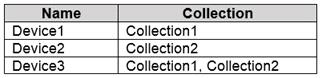
You have devices enrolled in Configuration Manager as shown in the following table.
In Configuration Manager, you enable co-management and configure the following settings:
Automatic enrolment in Intune: Pilot
Intune Auto Enrollment: Collection1
In Configuration Manager, you configure co-management staging to have the following settings:
Compliance policies: Collection2
Device Configuration: Collection1
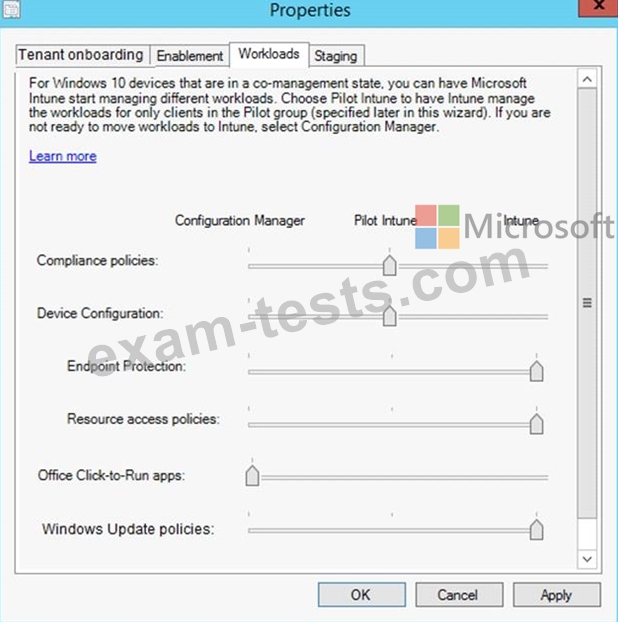
In Configuration Manager, you configure co-management workloads as shown in the following exhibit.
For each of the following statements, select Yes if the statement is true. Otherwise, select No.

You use Microsoft Endpoint Configuration Manager and Microsoft Intune.
You have devices enrolled in Configuration Manager as shown in the following table.
In Configuration Manager, you enable co-management and configure the following settings:
Automatic enrolment in Intune: Pilot
Intune Auto Enrollment: Collection1
In Configuration Manager, you configure co-management staging to have the following settings:
Compliance policies: Collection2
Device Configuration: Collection1
In Configuration Manager, you configure co-management workloads as shown in the following exhibit.
For each of the following statements, select Yes if the statement is true. Otherwise, select No.

Question 14
You have an Azure Active Directory (Azure AD) tenant that contains a user named User1. User1 has the device shown in the following table.

Enterprise State Roaming is configured for User1.
User1 signs in to Device4 and changes the desktop.
You need to identify on which devices User1 will have a changed desktop.
Which devices should you identify?
Enterprise State Roaming is configured for User1.
User1 signs in to Device4 and changes the desktop.
You need to identify on which devices User1 will have a changed desktop.
Which devices should you identify?
Question 15
Your company has a Microsoft 365 subscription.
The company uses Microsoft Intune to manage all devices.
The company uses conditional access to restrict access to Microsoft 365 services for devices that do not comply with the company's security policies.
You need to identify which devices will be prevented from accessing Microsoft 365 services.
What should you use?
The company uses Microsoft Intune to manage all devices.
The company uses conditional access to restrict access to Microsoft 365 services for devices that do not comply with the company's security policies.
You need to identify which devices will be prevented from accessing Microsoft 365 services.
What should you use?