

Question 1
You have 200 computers that run Windows 10. The computers are joined to Microsoft Azure Active Directory (Azure AD) and enrolled in Microsoft Intune.
You need to set a custom image as the wallpaper and sign-in screen.
Which two settings should you configure in Device restrictions? To answer, select the appropriate settings in the answer area.
NOTE: Each correct selection is worth one point.

You need to set a custom image as the wallpaper and sign-in screen.
Which two settings should you configure in Device restrictions? To answer, select the appropriate settings in the answer area.
NOTE: Each correct selection is worth one point.

Question 2
You need to meet the technical requirements for the LEG department computers.
Which three actions should you perform in sequence? To answer, move the appropriate actions from the list of actions to the answer area and arrange them in the correct order.
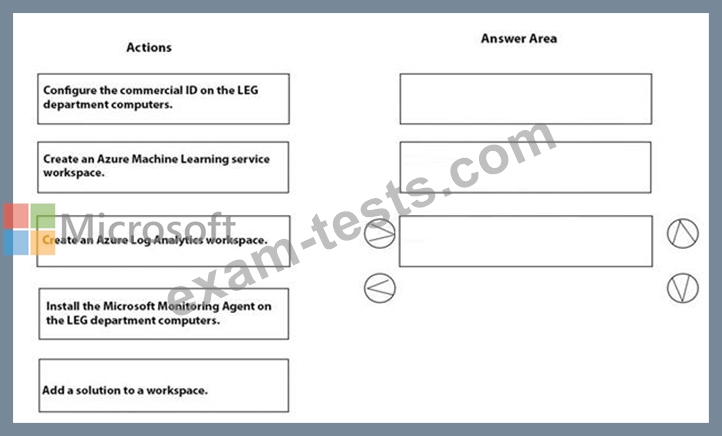
Which three actions should you perform in sequence? To answer, move the appropriate actions from the list of actions to the answer area and arrange them in the correct order.

Question 3
You need to meet the OOBE requirements for Windows AutoPilot.
Which two settings should you configure from the Azure Active Directory blade? To answer, select the appropriate settings in the answer area.
NOTE: Each correct selection is worth one point.

Which two settings should you configure from the Azure Active Directory blade? To answer, select the appropriate settings in the answer area.
NOTE: Each correct selection is worth one point.

Question 4
Your company uses Microsoft Intune. You have a Microsoft Store for Business account.
You need to ensure that you can deploy Microsoft Store for Business apps by using Intune.
Which three actions should you perform in sequence? To answer, move the appropriate actions from the list of actions to the answer area and arrange them in the correct order.
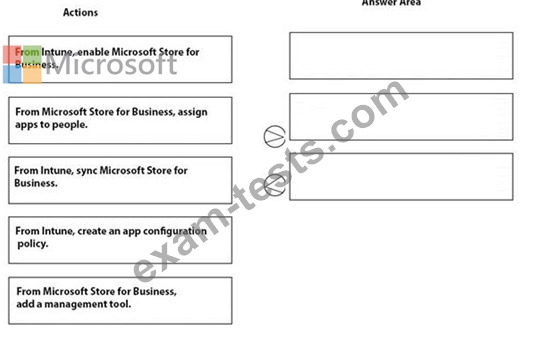
You need to ensure that you can deploy Microsoft Store for Business apps by using Intune.
Which three actions should you perform in sequence? To answer, move the appropriate actions from the list of actions to the answer area and arrange them in the correct order.

Question 5
You are licensed for Microsoft Endpoint Manager.
You use Microsoft Endpoint Configuration Manager and Microsoft Intune.
You have devices enrolled in Configuration Manager as shown in the following table.
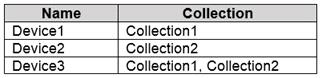
In Configuration Manager, you enable co-management and configure the following settings:
Automatic enrolment in Intune: Pilot
Intune Auto Enrollment: Collection1
In Configuration Manager, you configure co-management staging to have the following settings:
Compliance policies: Collection2
Device Configuration: Collection1
In Configuration Manager, you configure co-management workloads as shown in the following exhibit.
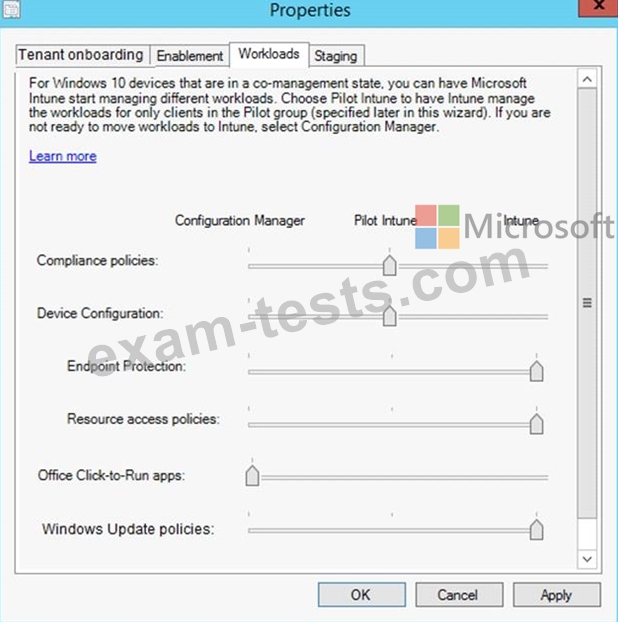
For each of the following statements, select Yes if the statement is true. Otherwise, select No.

You use Microsoft Endpoint Configuration Manager and Microsoft Intune.
You have devices enrolled in Configuration Manager as shown in the following table.
In Configuration Manager, you enable co-management and configure the following settings:
Automatic enrolment in Intune: Pilot
Intune Auto Enrollment: Collection1
In Configuration Manager, you configure co-management staging to have the following settings:
Compliance policies: Collection2
Device Configuration: Collection1
In Configuration Manager, you configure co-management workloads as shown in the following exhibit.
For each of the following statements, select Yes if the statement is true. Otherwise, select No.
