

Question 41
Drag and Drop Question
You have a Microsoft 365 subscription that uses Microsoft Intune.
You plan to use Windows Autopilot to provision 25 Windows 11 devices.
You need to meet the following requirements during device provisioning:
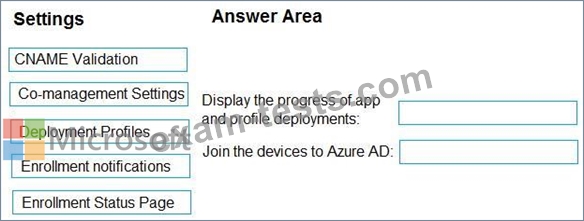
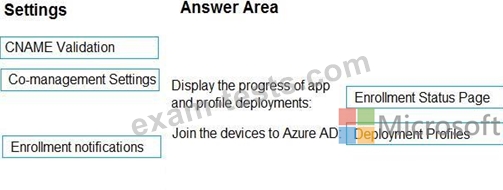
- Display the progress of app and profile deployments.
- Join the devices to Azure AD.
What should you configure to meet each requirement? To answer, drag the appropriate settings to the correct requirements. Each setting may be used once, more than once, or not at all. You may need to drag the split bar between panes or scroll to view content.
NOTE: Each correct selection is worth one point.
You have a Microsoft 365 subscription that uses Microsoft Intune.
You plan to use Windows Autopilot to provision 25 Windows 11 devices.
You need to meet the following requirements during device provisioning:
- Display the progress of app and profile deployments.
- Join the devices to Azure AD.
What should you configure to meet each requirement? To answer, drag the appropriate settings to the correct requirements. Each setting may be used once, more than once, or not at all. You may need to drag the split bar between panes or scroll to view content.
NOTE: Each correct selection is worth one point.
Question 42
You have a Microsoft 365 subscription that uses Microsoft Intune.
You plan to manage Windows updates by using Intune.
You create an update ring for Windows 10 and later and configure the User experience settings for the ring as shown in the following exhibit.
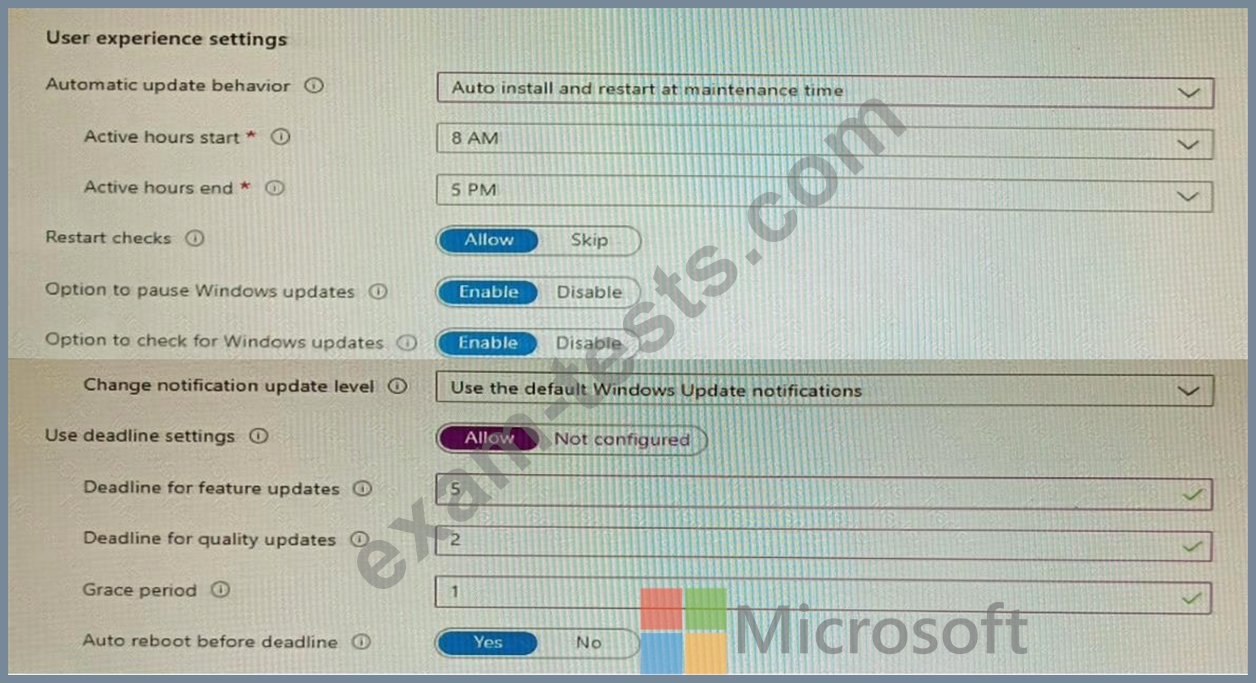
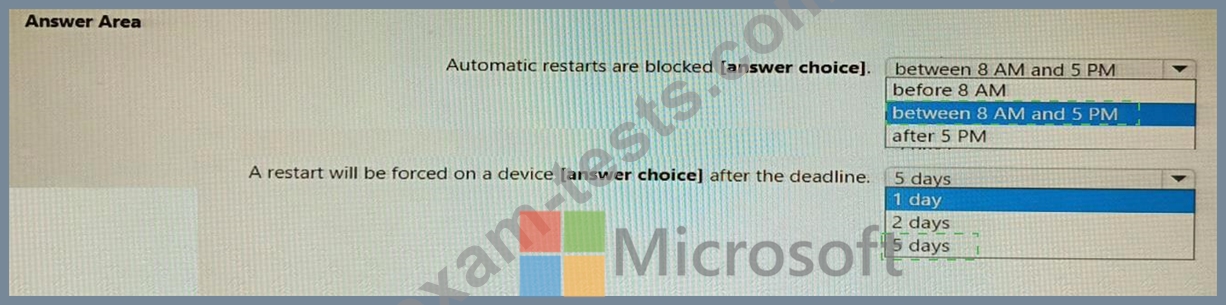
Use the drop-down menus to select the answer choice that completes each statement based on the information presented in the graphic.
NOTE: Each correct selection is worth one point.

You plan to manage Windows updates by using Intune.
You create an update ring for Windows 10 and later and configure the User experience settings for the ring as shown in the following exhibit.
Use the drop-down menus to select the answer choice that completes each statement based on the information presented in the graphic.
NOTE: Each correct selection is worth one point.

Question 43
You have a Microsoft 365 E5 subscription and a computer that runs Windows 11.
You need to create a customized installation of Microsoft 365 Apps for enterprise.
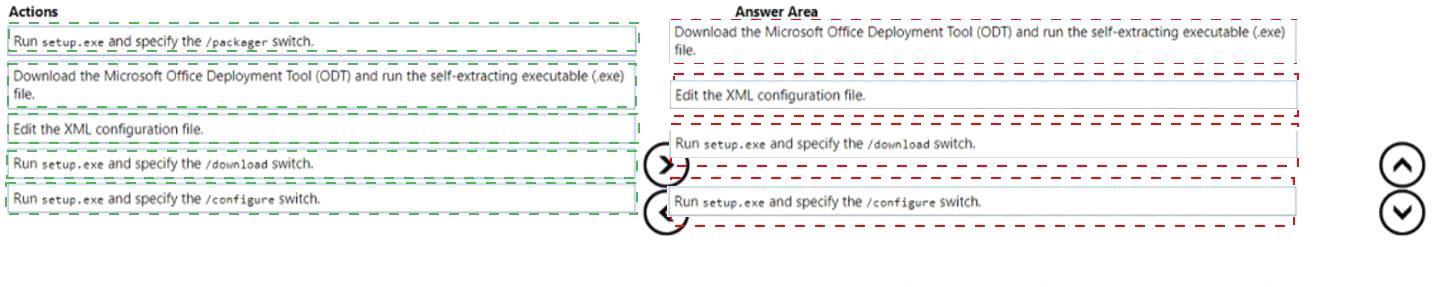
Which four actions should you perform in sequence? To answer, move the appropriate cmdlets from the list of cmdlets to the answer area and arrange them in the correct order.

You need to create a customized installation of Microsoft 365 Apps for enterprise.
Which four actions should you perform in sequence? To answer, move the appropriate cmdlets from the list of cmdlets to the answer area and arrange them in the correct order.
Question 44
Hotspot Question
You have a Microsoft 365 E5 subscription.
You use Microsoft Intune to manage Windows 365 Cloud PC devices.
You need to deploy a Windows 365 Security Baseline to the Cloud PC devices. The solution must meet the following requirements:
- Block data execution prevention.
- Enable virtualization-based security (VBS) and Secure Boot.
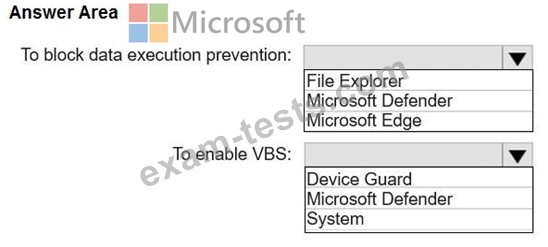
What should you configure for the Windows 365 Security Baseline profile? To answer, select the appropriate options in the answer area.
NOTE: Each correct selection is worth one point.
You have a Microsoft 365 E5 subscription.
You use Microsoft Intune to manage Windows 365 Cloud PC devices.
You need to deploy a Windows 365 Security Baseline to the Cloud PC devices. The solution must meet the following requirements:
- Block data execution prevention.
- Enable virtualization-based security (VBS) and Secure Boot.
What should you configure for the Windows 365 Security Baseline profile? To answer, select the appropriate options in the answer area.
NOTE: Each correct selection is worth one point.

Question 45
Your network contains an Active Directory domain. The domain contains a computer named Computer1 that runs Windows 8.1.
Computer1 has apps that are compatible with Windows 10.
You need to perform a Windows 10 in-place upgrade on Computer1.
Solution: You copy the Windows 10 installation media to a network share. You start Computer1 from Windows PE (WinPE), and then you run setup.exe from the network share.
Does this meet the goal?
Computer1 has apps that are compatible with Windows 10.
You need to perform a Windows 10 in-place upgrade on Computer1.
Solution: You copy the Windows 10 installation media to a network share. You start Computer1 from Windows PE (WinPE), and then you run setup.exe from the network share.
Does this meet the goal?