

Question 76
Note: This question is part of a series of questions that present the same scenario. Each question
in the series contains a unique solution that might meet the stated goals. Some question sets
might have more than one correct solution, while others might not have a correct solution.
After you answer a question in this section, you will NOT be able to return to it. As a result, these
questions will not appear in the review screen.
Your company has a Microsoft Office 365 tenant.
You suspect that several Office 365 features were recently updated.
You need to view a list of the features that were recently updated in the tenant.
Solution: You use the View service requests option in the Microsoft 365 admin center.
Does this meet the goal?
in the series contains a unique solution that might meet the stated goals. Some question sets
might have more than one correct solution, while others might not have a correct solution.
After you answer a question in this section, you will NOT be able to return to it. As a result, these
questions will not appear in the review screen.
Your company has a Microsoft Office 365 tenant.
You suspect that several Office 365 features were recently updated.
You need to view a list of the features that were recently updated in the tenant.
Solution: You use the View service requests option in the Microsoft 365 admin center.
Does this meet the goal?
Question 77
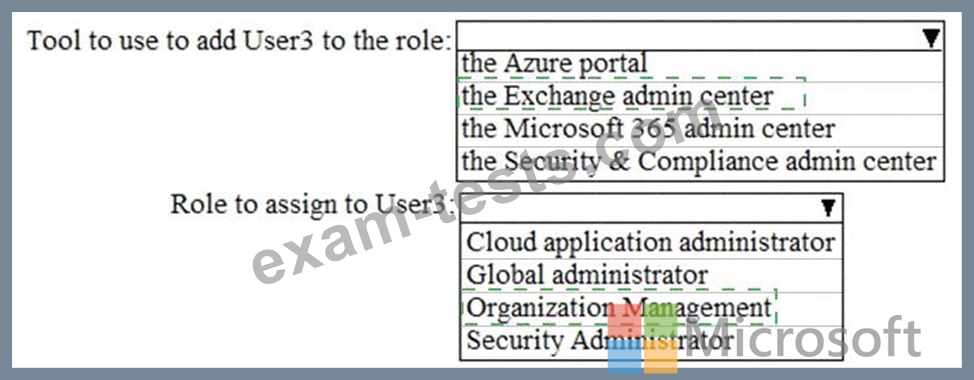
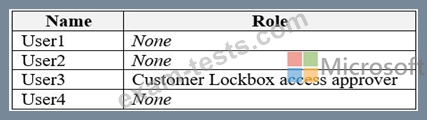
You need to meet the security requirements for User3. The solution must meet the technical requirements.
What should you do? To answer, select the appropriate options in the answer area.
NOTE: Each correct selection is worth one point.
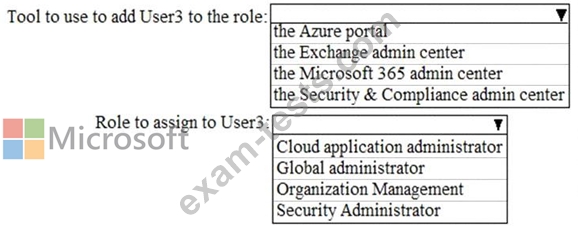
What should you do? To answer, select the appropriate options in the answer area.
NOTE: Each correct selection is worth one point.



Question 78
You have a Microsoft 365 Enterprise subscription.
You have a conditional access policy to force multi factor .mthentication when accessing Microsoft SharePoint from a mobile device You need to view which users authenticated by using multi factor authentication.
What should you do?
You have a conditional access policy to force multi factor .mthentication when accessing Microsoft SharePoint from a mobile device You need to view which users authenticated by using multi factor authentication.
What should you do?
Question 79
You have a Microsoft 365 subscription.
You are configuring permissions for Security & Compliance.
You need to ensure that the users can perform the tasks shown in the following table.

The solution must use the principle of least privilege.
To which role should you assign each user? To answer, select the appropriate options in the answer area.
NOTE: Each correct selection is worth one point.
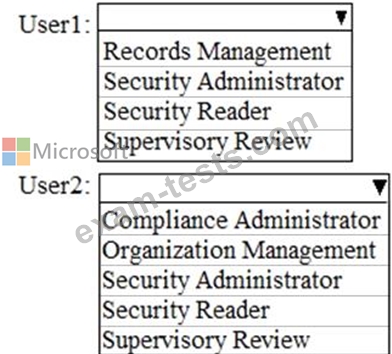
You are configuring permissions for Security & Compliance.
You need to ensure that the users can perform the tasks shown in the following table.
The solution must use the principle of least privilege.
To which role should you assign each user? To answer, select the appropriate options in the answer area.
NOTE: Each correct selection is worth one point.

Question 80
You have an Azure Active Directory (Azure AD) tenant named contoso.com that contains the users shown in the following table.

Multi-factor authentication (MFA) is configured to use 131.107.50/24 for trusted IPs.
The tenant contains the named locations shown in the following table.

You create a conditional access policy that has the following configurations:
* Users and groups assignment: All users
* Cloud apps assignment: App1
* Conditions: Include all trusted locations
* Grant access: require multi-factor authentication
For each of the following statements, select Yes if the statement is true. otherwise, select No.
NOTE: Each correct selection is worth one point.

Multi-factor authentication (MFA) is configured to use 131.107.50/24 for trusted IPs.
The tenant contains the named locations shown in the following table.
You create a conditional access policy that has the following configurations:
* Users and groups assignment: All users
* Cloud apps assignment: App1
* Conditions: Include all trusted locations
* Grant access: require multi-factor authentication
For each of the following statements, select Yes if the statement is true. otherwise, select No.
NOTE: Each correct selection is worth one point.

