

Question 141
You have a Microsoft 365 subscription.
You have a group named Support. Users in the Support group frequently send email messages to external users.
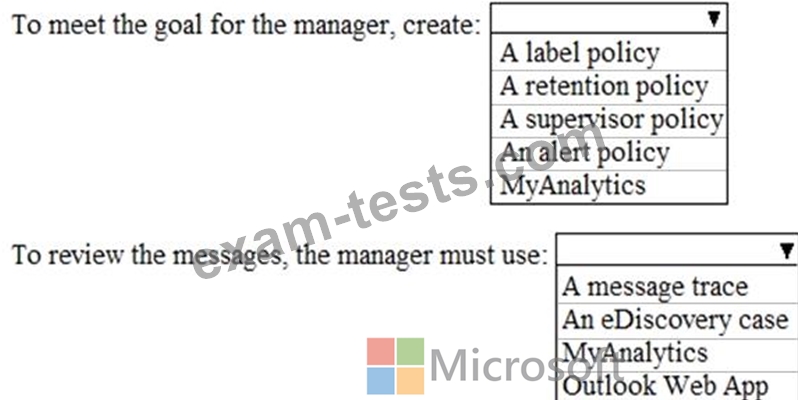
The manager of the Support group wants to randomly review messages that contain attachments.
You need to provide the manager with the ability to review messages that contain attachments sent from the Support group users to external users. The manager must have access to only 10 percent of the messages.
What should you do? To answer, select the appropriate options in the answer area.
NOTE: Each correct selection is worth one point.
You have a group named Support. Users in the Support group frequently send email messages to external users.
The manager of the Support group wants to randomly review messages that contain attachments.
You need to provide the manager with the ability to review messages that contain attachments sent from the Support group users to external users. The manager must have access to only 10 percent of the messages.
What should you do? To answer, select the appropriate options in the answer area.
NOTE: Each correct selection is worth one point.

Question 142
Your company has a Microsoft 365 subscription that contains the following domains:
Contoso.onmicrosoft.com
Contoso.com
You plan to add the following domains to Microsoft 365 and to use them with Exchange Online:
* Sub1.contoso.onmicrosoft.com
* Sub2.contoso.com
* Fabrikam.com
You need to identify the minimum number of DNS records that must be added for Exchange Online to receive inbound email messages for the three domains.
How many DNS records should you add? To answer, select the appropriate options in the answer area.
NOTE: Each correct selection is worth one point.

Contoso.onmicrosoft.com
Contoso.com
You plan to add the following domains to Microsoft 365 and to use them with Exchange Online:
* Sub1.contoso.onmicrosoft.com
* Sub2.contoso.com
* Fabrikam.com
You need to identify the minimum number of DNS records that must be added for Exchange Online to receive inbound email messages for the three domains.
How many DNS records should you add? To answer, select the appropriate options in the answer area.
NOTE: Each correct selection is worth one point.

Question 143
You are creating a report that will query Azure Active Directory (Azure AD) for group information by using the Microsoft Graph API. You need to retrieve an ordered list of groups by title. The solution must minimize the amount of data returned m the response.
How should you complete the Graph API call? To answer, select the appropriate options in the answer area.
NOTE: Each correct selection is worth one point.

How should you complete the Graph API call? To answer, select the appropriate options in the answer area.
NOTE: Each correct selection is worth one point.

Question 144
You plan to implement a new task pane in Microsoft Office.
For each of the following statements, select Yes if the statement is true. Otherwise, select No.
NOTE: Each correct selection is worth one point.

For each of the following statements, select Yes if the statement is true. Otherwise, select No.
NOTE: Each correct selection is worth one point.

Question 145
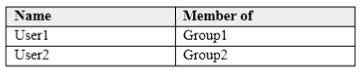
You have the Microsoft Azure Active Directory (Azure AD) users shown in the following table.
Your company uses Microsoft Intune.
Several devices are enrolled in Intune as shown in the following table.

The device compliance policies in Intune are configured as shown in the following table.

You create a conditional access policy that has the following settings:
The Assignments settings are configured as follows:
- Users and groups: Group1
- Cloud apps: Exchange Online
- Conditions: Include All device state, exclude Device marked as compliant Access controls is set to Block access.
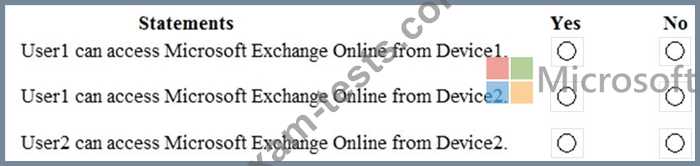
For each of the following statements, select yes if the statement is true. Otherwise, select No.
NOTE: Each correct selection is worth one point.
Your company uses Microsoft Intune.
Several devices are enrolled in Intune as shown in the following table.
The device compliance policies in Intune are configured as shown in the following table.
You create a conditional access policy that has the following settings:
The Assignments settings are configured as follows:
- Users and groups: Group1
- Cloud apps: Exchange Online
- Conditions: Include All device state, exclude Device marked as compliant Access controls is set to Block access.
For each of the following statements, select yes if the statement is true. Otherwise, select No.
NOTE: Each correct selection is worth one point.
