

Question 191
You have a Microsoft 365 E5 subscription.
You create an account tor a new security administrator named SecAdmin1.
You need to ensure that SecAdmin1 can manage Microsoft Defender for Office 365 settings and policies for Microsoft Teams, SharePoint and OneDrive.
Solution: From the Azure Active Directory admin center, you assign SecAdmin1 the Teams Administrator role.
Does this meet the goal?
You create an account tor a new security administrator named SecAdmin1.
You need to ensure that SecAdmin1 can manage Microsoft Defender for Office 365 settings and policies for Microsoft Teams, SharePoint and OneDrive.
Solution: From the Azure Active Directory admin center, you assign SecAdmin1 the Teams Administrator role.
Does this meet the goal?
Question 192
You have a Microsoft 365 E5 subscription that contains two users named Admin1 and Admin2.
All users are assigned a Microsoft 365 Enterprise E5 license and auditing is turned on.
You create the audit retention policy shown in the exhibit. (Click the Exhibit tab.)

After Policy1 is created, the following actions are performed:
* Admin1 creates a user named User1.
* Admin2 creates a user named User2.
How long will the audit events for the creation of User1 and User2 be retained? To answer, select the appropriate options in the answer area.NOTE: Each correct selection is worth one point.

All users are assigned a Microsoft 365 Enterprise E5 license and auditing is turned on.
You create the audit retention policy shown in the exhibit. (Click the Exhibit tab.)
After Policy1 is created, the following actions are performed:
* Admin1 creates a user named User1.
* Admin2 creates a user named User2.
How long will the audit events for the creation of User1 and User2 be retained? To answer, select the appropriate options in the answer area.NOTE: Each correct selection is worth one point.

Question 193
You have a Microsoft 365 subscription.
You are configuring permissions for Security & Compliance.
You need to ensure that the users can perform the tasks shown in the following table.

The solution must use the principle of least privilege.
To which role should you assign each user? To answer, select the appropriate options in the answer area.
NOTE: Each correct selection is worth one point.
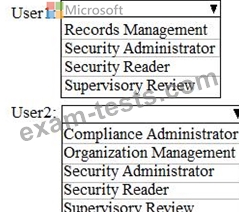
You are configuring permissions for Security & Compliance.
You need to ensure that the users can perform the tasks shown in the following table.
The solution must use the principle of least privilege.
To which role should you assign each user? To answer, select the appropriate options in the answer area.
NOTE: Each correct selection is worth one point.

Question 194
You have a Microsoft 365 subscription
All users are assigned a Microsoft 365 E3 License.
You enable auditing for your organization.
What is the maximum amount of time data will be retained in the Microsoft 365 audit log?
All users are assigned a Microsoft 365 E3 License.
You enable auditing for your organization.
What is the maximum amount of time data will be retained in the Microsoft 365 audit log?
Question 195
You have a Microsoft 365 subscription.
In the Exchange admin center, you have a data loss prevention (DLP) policy named Policy1 that has the following configurations:
Block emails that contain financial data.
Display the following policy tip text: Message blocked.
From the Security & Compliance admin center, you create a DLP policy named Policy2 that has the following configurations:
Use the following location: Exchange email.
Display the following policy tip text: Message contains sensitive data.
When a user sends an email, notify the user if the email contains health records.
What is the result of the DLP policies when the user sends an email? To answer, drag the appropriate results to the correct scenarios. Each result may be used once, more than once, or not at all. You may need to drag the split bar between panes or scroll to view content.
NOTE: Each correct selection is worth one point.

In the Exchange admin center, you have a data loss prevention (DLP) policy named Policy1 that has the following configurations:
Block emails that contain financial data.
Display the following policy tip text: Message blocked.
From the Security & Compliance admin center, you create a DLP policy named Policy2 that has the following configurations:
Use the following location: Exchange email.
Display the following policy tip text: Message contains sensitive data.
When a user sends an email, notify the user if the email contains health records.
What is the result of the DLP policies when the user sends an email? To answer, drag the appropriate results to the correct scenarios. Each result may be used once, more than once, or not at all. You may need to drag the split bar between panes or scroll to view content.
NOTE: Each correct selection is worth one point.
