

Question 256
You have a Microsoft 365 E5 subscription that includes the following active eDiscovery case:
Name: Case1
Included content: Group1, User1, Site1
Hold location: Exchange mailboxes, SharePoint sites, Exchange public folders The investigation for Case1 completes, and you close the case.
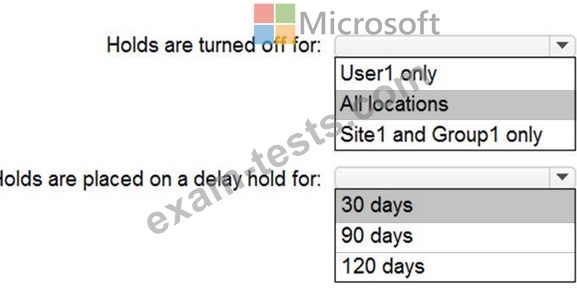
What occurs after you close Case1? To answer, select the appropriate options in the answer area.
NOTE: Each correct selection is worth one point.

Name: Case1
Included content: Group1, User1, Site1
Hold location: Exchange mailboxes, SharePoint sites, Exchange public folders The investigation for Case1 completes, and you close the case.
What occurs after you close Case1? To answer, select the appropriate options in the answer area.
NOTE: Each correct selection is worth one point.

Question 257
You have 100 computers that run Windows 8.1 and are enrolled in Upgrade Readiness.
Two of the computers are configured as shown in the following table.

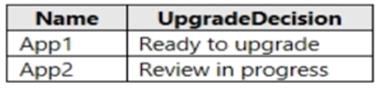
From Upgrade Readiness, you view the applications shown in the following table.
You enroll a computer named Computer3 in Upgrade Readiness. Computer3 has the following configurations:
8 GB of memory
64-bit architecture
An application named App3 installed
App3 is installed on Computer3 only.
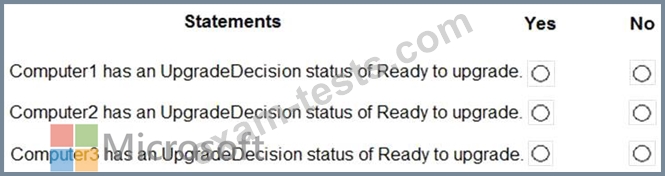
For each of the following statements, select Yes if the statement is true. Otherwise, select No.
NOTE: Each correct selection is worth one point.
Two of the computers are configured as shown in the following table.
From Upgrade Readiness, you view the applications shown in the following table.
You enroll a computer named Computer3 in Upgrade Readiness. Computer3 has the following configurations:
8 GB of memory
64-bit architecture
An application named App3 installed
App3 is installed on Computer3 only.
For each of the following statements, select Yes if the statement is true. Otherwise, select No.
NOTE: Each correct selection is worth one point.


Question 258
Your network contains an Active Directory forest named contoso.com that is synced to Microsoft Azure Active Directory (Azure AD).
You use Microsoft System Center Configuration Manager (Current Branch) for device management.
You have the Windows 10 devices shown in the following table.

You configure Configuration Manager co-management as follows:
Automatic enrollment in Intune: Pilot
Pilot collection: Collection2
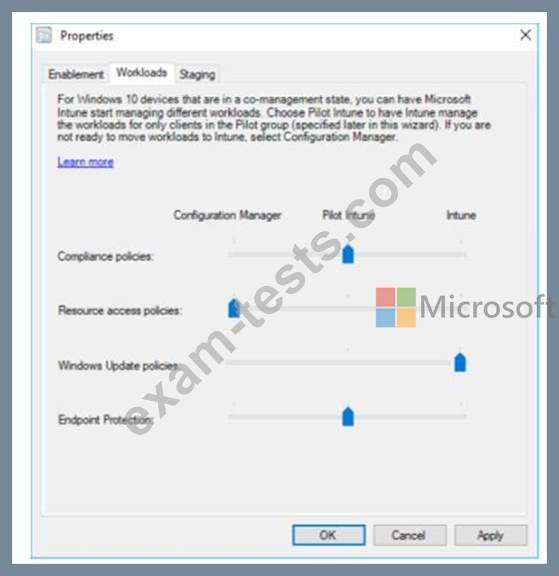
You configure co-management workloads as shown in the following exhibit.
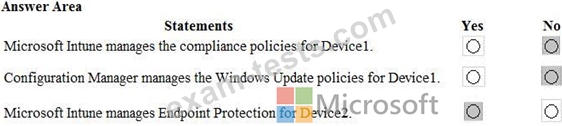
For each of the following statements, select Yes if the statement is true. Otherwise, select No.
NOTE: Each correct selection is worth one point.

You use Microsoft System Center Configuration Manager (Current Branch) for device management.
You have the Windows 10 devices shown in the following table.
You configure Configuration Manager co-management as follows:
Automatic enrollment in Intune: Pilot
Pilot collection: Collection2
You configure co-management workloads as shown in the following exhibit.
For each of the following statements, select Yes if the statement is true. Otherwise, select No.
NOTE: Each correct selection is worth one point.

Question 259
ON NO: 35 HOTSPOT
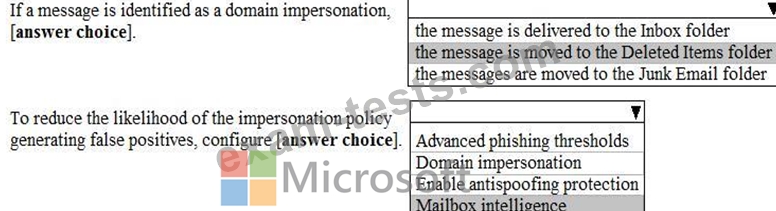
You configure an anti-phishing policy as shown in the following exhibit.

Use the drop-down menus to select the answer choice that completes each statement based on the information presented in the graphic.
NOTE: Each correct selection is worth one point.
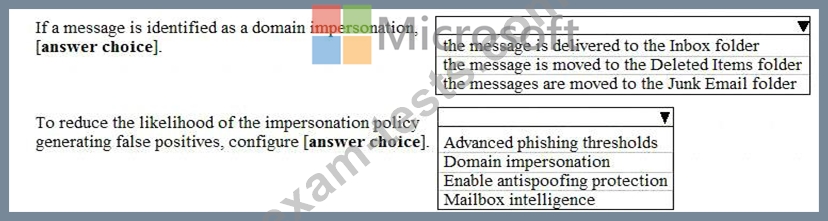
You configure an anti-phishing policy as shown in the following exhibit.
Use the drop-down menus to select the answer choice that completes each statement based on the information presented in the graphic.
NOTE: Each correct selection is worth one point.

Question 260
You use Windows Defender Advanced Threat Protection (Windows Defender ATP).
You have the Windows Defender ATP machine groups shown in the following table.

You plan to onboard computers to Windows Defender ATP as shown in the following table.

To which machine group will each computer be added? To answer, select the appropriate options in the answer are.
NOTE: Each correct selection is worth one point.

You have the Windows Defender ATP machine groups shown in the following table.
You plan to onboard computers to Windows Defender ATP as shown in the following table.
To which machine group will each computer be added? To answer, select the appropriate options in the answer are.
NOTE: Each correct selection is worth one point.
