

Question 81
You have a hybrid deployment that contains a Microsoft exchange Online tenant and anon premises Exchange Server 2019 server named Server1. Alt users use an email address suffix of @contoso.com.
On Server1, you create a new mailbox that uses an email address of [email protected] Users hosted in Exchange Online report that they receive a non-delivery report (NDR) When they attempt to send email messages to [email protected]. The NDR contains the following text: "User1 wasn't found at contoso.com." You verify that the Exchange Online users can send email successfully to the other mailboxes hosted on Server1. Users hosted on Server1 can send email to [email protected] successfully.
You need to identify what causes the email delivery to fail. What should you use?
On Server1, you create a new mailbox that uses an email address of [email protected] Users hosted in Exchange Online report that they receive a non-delivery report (NDR) When they attempt to send email messages to [email protected]. The NDR contains the following text: "User1 wasn't found at contoso.com." You verify that the Exchange Online users can send email successfully to the other mailboxes hosted on Server1. Users hosted on Server1 can send email to [email protected] successfully.
You need to identify what causes the email delivery to fail. What should you use?
Question 82
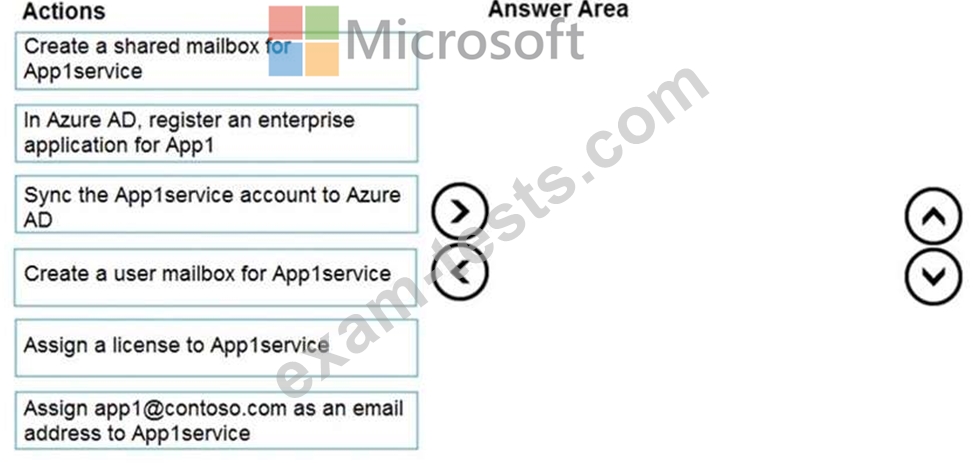
Your network contains an Active Directory domain and an Azure Active Directory (Azure AD) tenant in a hybrid deployment.
You implement a Microsoft Exchange Online tenant.
You plan to deploy a new on-premises app named App1 to a Windows server. The solution must meet the following requirements:
Use an Active Directory user account named App1service as a service account.
Be able to receive email requests by using an email address of [email protected].
Use App1service to sign in to the mailbox of App1 to view the requests.
In the domain, you create App1service.
Which three actions should you perform in sequence? To answer, move the appropriate actions from the list of actions to the answer area and arrange them in the correct order.
You implement a Microsoft Exchange Online tenant.
You plan to deploy a new on-premises app named App1 to a Windows server. The solution must meet the following requirements:
Use an Active Directory user account named App1service as a service account.
Be able to receive email requests by using an email address of [email protected].
Use App1service to sign in to the mailbox of App1 to view the requests.
In the domain, you create App1service.
Which three actions should you perform in sequence? To answer, move the appropriate actions from the list of actions to the answer area and arrange them in the correct order.

Question 83
Note: This question is part of a series of questions that present the same scenario. Each question in the series contains a unique solution that might meet the stated goals. Some question sets might have more than one correct solution, while others might not have a correct solution.
After you answer a question in this section, you will NOT be able to return to it. As a result, these questions will not appear in the review screen.
You have a Microsoft Exchange Server 2019 organization that contains 200 mailboxes.
You need to add a second email address to each mailbox. The address must have a syntax that uses the first letter of each user's last name, followed by the user's first name, and then @fabrikam.com.
Solution: You create an email address policy that uses the %1s%[email protected] address format.
Does this meet the goal?
After you answer a question in this section, you will NOT be able to return to it. As a result, these questions will not appear in the review screen.
You have a Microsoft Exchange Server 2019 organization that contains 200 mailboxes.
You need to add a second email address to each mailbox. The address must have a syntax that uses the first letter of each user's last name, followed by the user's first name, and then @fabrikam.com.
Solution: You create an email address policy that uses the %1s%[email protected] address format.
Does this meet the goal?
Question 84
You purchase a Microsoft 365 subscription.
You create mailboxes for 10 users. Each user has a PST file stored in a network share.
You need to migrate the PST files to the mailboxes.
In which order should you perform the actions? To answer, move all actions from the list of actions to the answer area and arrange them in the correct order.
NOTE: More than one order of answer choices is correct. You will receive credit for any of the correct orders you select.

You create mailboxes for 10 users. Each user has a PST file stored in a network share.
You need to migrate the PST files to the mailboxes.
In which order should you perform the actions? To answer, move all actions from the list of actions to the answer area and arrange them in the correct order.
NOTE: More than one order of answer choices is correct. You will receive credit for any of the correct orders you select.

Question 85
You have a Microsoft 365 E5 tenant that contains the users shown in the following table.

You have a connector for a remote domain named contoso.com as shown in the following exhibit.

You have a transport rule as shown in the following exhibit.

User1 sends an email message to [email protected] that has a subject line containing the word Confidential.
User2 sends an email message to [email protected] that has a subject line of New report. The body of the message contains the word confidential.
For each of the following statements, select Yes if the statement is true. Otherwise, select No.
NOTE: Each correct selection is worth one point.

You have a connector for a remote domain named contoso.com as shown in the following exhibit.
You have a transport rule as shown in the following exhibit.
User1 sends an email message to [email protected] that has a subject line containing the word Confidential.
User2 sends an email message to [email protected] that has a subject line of New report. The body of the message contains the word confidential.
For each of the following statements, select Yes if the statement is true. Otherwise, select No.
NOTE: Each correct selection is worth one point.
