

Question 46
You deploy a Microsoft Exchange Server 2019 organization.
You need to ensure that users of all new mailboxes are prevented from editing their personal information.
What should you do?
You need to ensure that users of all new mailboxes are prevented from editing their personal information.
What should you do?
Question 47
Your network contains an Active Directory forest named contoso.com.
You plan to implement Microsoft 365 and use Microsoft Exchange Online services.
You need to ensure that all client computers can use Autodiscover to connect to Microsoft 365.
Which record should you create? To answer, select the appropriate options in the answer area.
NOTE: Each correct selection is worth one point.

You plan to implement Microsoft 365 and use Microsoft Exchange Online services.
You need to ensure that all client computers can use Autodiscover to connect to Microsoft 365.
Which record should you create? To answer, select the appropriate options in the answer area.
NOTE: Each correct selection is worth one point.

Question 48
You have a Microsoft Exchange Online tenant that contains the users shown in the following table.

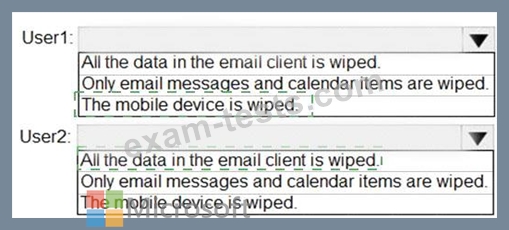
From the Exchange admin center, you issue a Wipe Data command for User1 and User2.
What occurs on the device of each user? To answer, select the appropriate options in the answer area.
NOTE: Each correct selection is worth one point.

From the Exchange admin center, you issue a Wipe Data command for User1 and User2.
What occurs on the device of each user? To answer, select the appropriate options in the answer area.
NOTE: Each correct selection is worth one point.

Question 49
You have a Microsoft 365 E5 subscription.
A user attempts to send an email message to an external recipient and receives the following error message: "Your message couldn't be delivered because you weren't recognized as a valid sender. The most common reason for this is that your email address is suspected of sending spam and it's no longer allowed to send messages outside of your organization. Contact your mail admin for assistance. Remote Server returned '550 5.1.8 Access denied, bad outbound sender'." You need to ensure that the user send email to external recipients.
What should you do?
A user attempts to send an email message to an external recipient and receives the following error message: "Your message couldn't be delivered because you weren't recognized as a valid sender. The most common reason for this is that your email address is suspected of sending spam and it's no longer allowed to send messages outside of your organization. Contact your mail admin for assistance. Remote Server returned '550 5.1.8 Access denied, bad outbound sender'." You need to ensure that the user send email to external recipients.
What should you do?
Question 50
Your network contains an Active Directory domain and an Azure Active Directory (Azure AD) tenant in a hybrid deployment.
You implement a Microsoft Exchange Online tenant.
You plan to deploy a new on-premises app named App1 to a Windows server. The solution must meet the following requirements:
Use an Active Directory user account named App1service as a service account.
Be able to receive email requests by using an email address of [email protected].
Use App1service to sign in to the mailbox of App1 to view the requests.
In the domain, you create App1service.
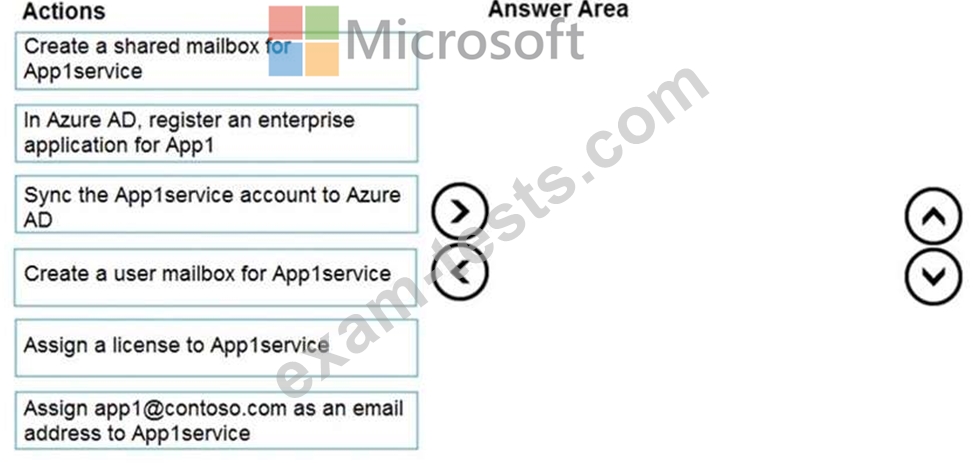
Which three actions should you perform in sequence? To answer, move the appropriate actions from the list of actions to the answer area and arrange them in the correct order.
You implement a Microsoft Exchange Online tenant.
You plan to deploy a new on-premises app named App1 to a Windows server. The solution must meet the following requirements:
Use an Active Directory user account named App1service as a service account.
Be able to receive email requests by using an email address of [email protected].
Use App1service to sign in to the mailbox of App1 to view the requests.
In the domain, you create App1service.
Which three actions should you perform in sequence? To answer, move the appropriate actions from the list of actions to the answer area and arrange them in the correct order.
