

Question 76
You have a Microsoft Exchange Server 2019 hybrid deployment.
You run the Get-HybridConfiguration cmdlet and receive the output shown in the following exhibit.

Use the drop-down menus to select the answer choice that completes each statement based on the information presented in the graphic.
NOTE: Each correct selection is worth one point.

You run the Get-HybridConfiguration cmdlet and receive the output shown in the following exhibit.
Use the drop-down menus to select the answer choice that completes each statement based on the information presented in the graphic.
NOTE: Each correct selection is worth one point.

Question 77
You recently implemented a hybrid deployment that contains a Microsoft Exchange Online tenant and an on- premises Exchange Server 2019 server named Server1. The public IP address of Server1 is 131.107.1.100.
The deployment is configured as shown in the following table.

Users hosted in Microsoft 365 report that they receive non-delivery reports (NDRs) when they attempt to send email messages to mailboxes hosted in Exchange Server 2019.
You need to ensure that the email is delivered successfully. The solution must ensure that email delivery is successful for all the users at your company.
What should you do?
The deployment is configured as shown in the following table.
Users hosted in Microsoft 365 report that they receive non-delivery reports (NDRs) when they attempt to send email messages to mailboxes hosted in Exchange Server 2019.
You need to ensure that the email is delivered successfully. The solution must ensure that email delivery is successful for all the users at your company.
What should you do?
Question 78
You have a Microsoft 365 subscription.
A safe attachments policy that uses Dynamic Delivery is applied to all recipients who match your SMTP domains.
You need to prevent attachments from being scanned when internal users send email to one another.
What should you do?
A safe attachments policy that uses Dynamic Delivery is applied to all recipients who match your SMTP domains.
You need to prevent attachments from being scanned when internal users send email to one another.
What should you do?
Question 79
You create a transport rule as shown in the following exhibit.

Use the drop-down menus to select the answer choice that completes each statement based on the information presented in the graphic.
NOTE: Each correct selection is worth one point.
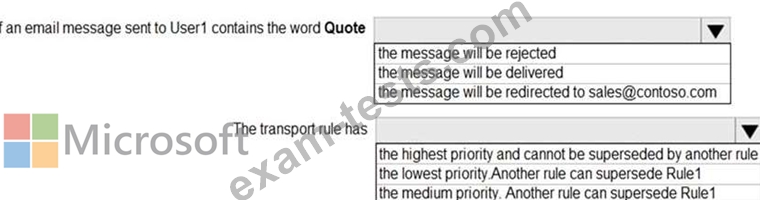
Use the drop-down menus to select the answer choice that completes each statement based on the information presented in the graphic.
NOTE: Each correct selection is worth one point.

Question 80
Note: This question is part of a series of questions that present the same scenario. Each question in the series contains a unique solution that might meet the stated goals. Some question sets might have more than one correct solution, while others might not have a correct solution.
After you answer a question in this section, you will NOT be able to return to it. As a result, these questions will not appear in the review screen.
You have a Microsoft Exchange Server 2019 organization that contains 200 mailboxes.
You need to add a second email address to each mailbox. The address must have a syntax that uses the first letter of each user's last name, followed by the user's first name, and then @fabrikam.com.
Solution: You convert all the mailboxes to shared mailboxes, and then you run the Set-Mailbox cmdlet and specify the -EmailAddressPolicyEnabled $true parameter.
Does this meet the goal?
After you answer a question in this section, you will NOT be able to return to it. As a result, these questions will not appear in the review screen.
You have a Microsoft Exchange Server 2019 organization that contains 200 mailboxes.
You need to add a second email address to each mailbox. The address must have a syntax that uses the first letter of each user's last name, followed by the user's first name, and then @fabrikam.com.
Solution: You convert all the mailboxes to shared mailboxes, and then you run the Set-Mailbox cmdlet and specify the -EmailAddressPolicyEnabled $true parameter.
Does this meet the goal?