

Question 151
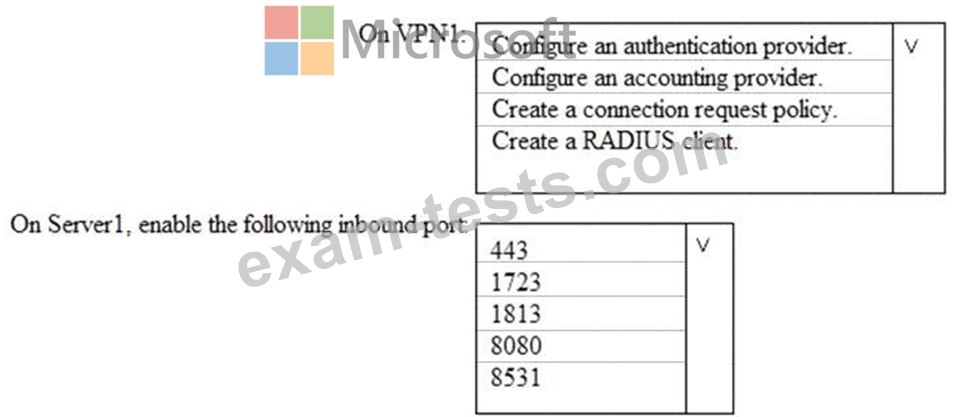
Your network contains an Active Directory domain named contoso.com. The domain contains a VPN server named VPN1 that runs Windows Server 2016 and has the Remote Access server role installed.
You have a Microsoft Azure subscription.
You are deploying Azure Advanced Threat Protection (ATP)
You install an Azure ATP standalone sensor on a server named Server1 that runs Windows Server 2016.
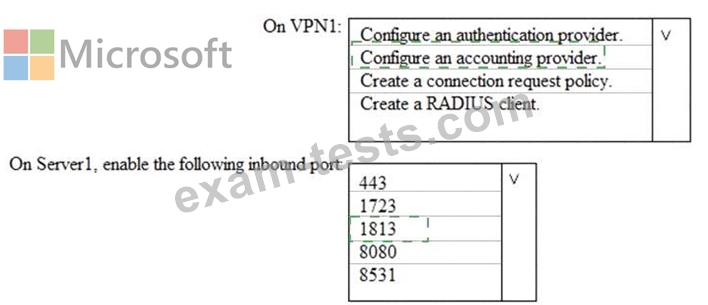
You need to integrate the VPN and Azure ATP.
What should you do? To answer, select the appropriate options in the answer area.
NOTE: Each correct selection is worth one point.
You have a Microsoft Azure subscription.
You are deploying Azure Advanced Threat Protection (ATP)
You install an Azure ATP standalone sensor on a server named Server1 that runs Windows Server 2016.
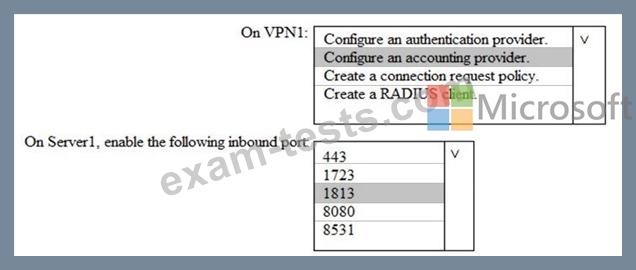
You need to integrate the VPN and Azure ATP.
What should you do? To answer, select the appropriate options in the answer area.
NOTE: Each correct selection is worth one point.
Question 152
You have a Microsoft 365 E5 subscription that contains two groups named Group1 and Group2 and the users shown in the following table.

You have the Privileged Access settings configured as shown in the following exhibit.

You have a privileged access policy that has the following settings:
* Policy name: New Transport Rule
* Policy type: Task
* Policy scope Exchange
* Approval Type: Manual
* Approver group: Group 1
User1 requests access to the New Transport Rule policy for a duration of two hours.
For each of the following statements, select Yes if the statement is true. Otherwise, select No.
NOTE: Each correct selection is worth one point.

You have the Privileged Access settings configured as shown in the following exhibit.
You have a privileged access policy that has the following settings:
* Policy name: New Transport Rule
* Policy type: Task
* Policy scope Exchange
* Approval Type: Manual
* Approver group: Group 1
User1 requests access to the New Transport Rule policy for a duration of two hours.
For each of the following statements, select Yes if the statement is true. Otherwise, select No.
NOTE: Each correct selection is worth one point.


Question 153
You have a Microsoft 365 subscription that uses a default domain name of contoso.com.
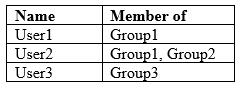
Microsoft Azure Active Directory (Azure AD) contains the users shown in the following table.
Microsoft Intune has two devices enrolled as shown in the following table:
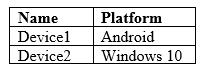
Both devices have three apps named App1, App2, and App3 installed.
You create an app protection policy named ProtectionPolicy1 that has the following settings:
Protected apps: App1
Exempt apps: App2
Windows Information Protection mode: Block
You apply ProtectionPolicy1 to Group1 and Group3. You exclude Group2 from ProtectionPolicy1.
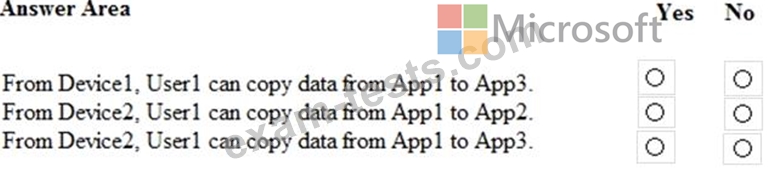
For each of the following statements, select Yes if the statement is true. Otherwise, select No.
NOTE: Each correct selection is worth one point.
Microsoft Azure Active Directory (Azure AD) contains the users shown in the following table.
Microsoft Intune has two devices enrolled as shown in the following table:
Both devices have three apps named App1, App2, and App3 installed.
You create an app protection policy named ProtectionPolicy1 that has the following settings:
Protected apps: App1
Exempt apps: App2
Windows Information Protection mode: Block
You apply ProtectionPolicy1 to Group1 and Group3. You exclude Group2 from ProtectionPolicy1.
For each of the following statements, select Yes if the statement is true. Otherwise, select No.
NOTE: Each correct selection is worth one point.

Question 154
Note: This question is part of a series of questions that present the same scenario. Each question in the series contains a unique solution that might meet the stated goals. Some question sets might have more than one correct solution, while others might not have a correct solution.
After you answer a question in this section, you will NOT be able to return to it. As a result, these questions will not appear in the review screen.
You have a Microsoft 365 subscription that contains the users shown in the following table.

You discover that all the users in the subscription can access Compliance Manager reports.
The Compliance Manager Reader role is not assigned to any users.
You need to recommend a solution to prevent a user named User5 from accessing the Compliance Manager reports.
Solution: You recommend assigning the Compliance Manager Reader role to User5.
Does this meet the goal?
After you answer a question in this section, you will NOT be able to return to it. As a result, these questions will not appear in the review screen.
You have a Microsoft 365 subscription that contains the users shown in the following table.
You discover that all the users in the subscription can access Compliance Manager reports.
The Compliance Manager Reader role is not assigned to any users.
You need to recommend a solution to prevent a user named User5 from accessing the Compliance Manager reports.
Solution: You recommend assigning the Compliance Manager Reader role to User5.
Does this meet the goal?
Question 155
Note: This question is part of a series of questions that present the same scenario. Each question in the series contains a unique solution that might meet the stated goals. Some question sets might have more than one correct solution, while others might not have a correct solution.
After you answer a question in this section, you will NOT be able to return to it. As a result, these questions will not appear in the review screen.
You have a Microsoft 365 subscription.
You have a user named User1. Several users have full access to the mailbox of User1.
Some email messages sent to User1 appear to have been read and deleted before the user viewed them.
When you search the audit log in Security & Compliance to identify who signed in to the mailbox of User1, the results are blank.
You need to ensure that you can view future sign-ins to the mailbox of User1.
You run the Set-MailboxFolderPermission -Identity "User1"
-User [email protected] -AccessRights Owner command.
Does that meet the goal?
After you answer a question in this section, you will NOT be able to return to it. As a result, these questions will not appear in the review screen.
You have a Microsoft 365 subscription.
You have a user named User1. Several users have full access to the mailbox of User1.
Some email messages sent to User1 appear to have been read and deleted before the user viewed them.
When you search the audit log in Security & Compliance to identify who signed in to the mailbox of User1, the results are blank.
You need to ensure that you can view future sign-ins to the mailbox of User1.
You run the Set-MailboxFolderPermission -Identity "User1"
-User [email protected] -AccessRights Owner command.
Does that meet the goal?