

Question 41
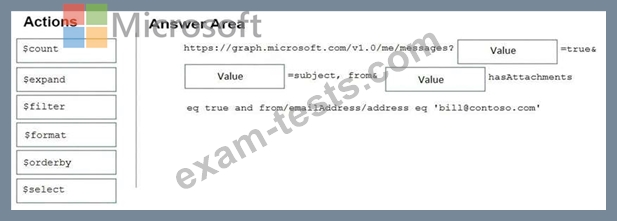
You are developing in application named App1.
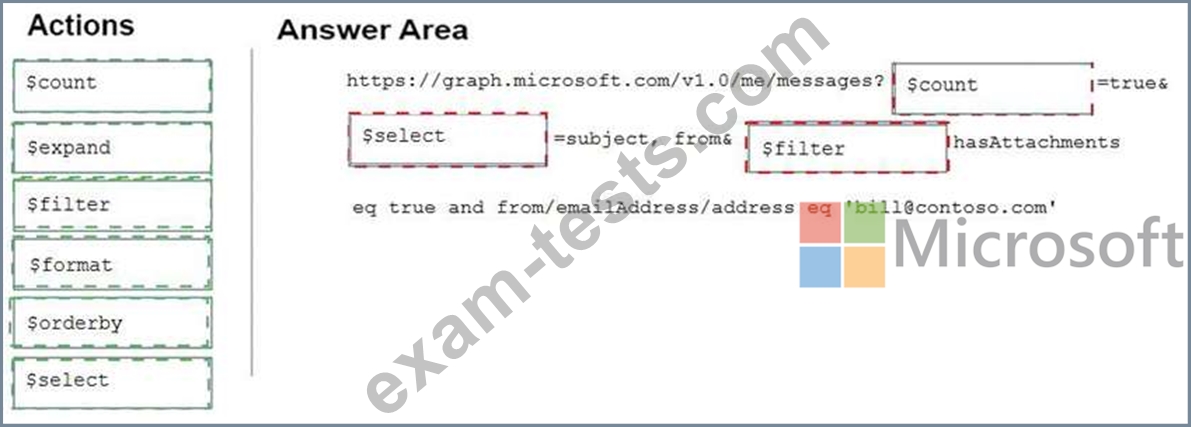
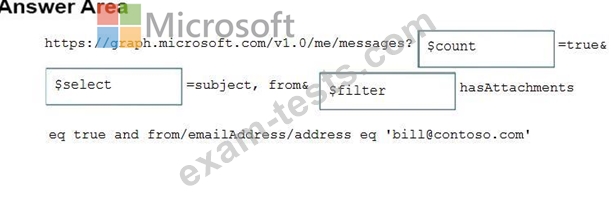
App1 needs to use the Microsoft Graph API to retrieve emails from Microsoft 365 for the current signed-in user. The solution must meet the following requirements:
* Emails that have attachments and are from [email protected] must be retrieved.
* The results must show the subject of the email, the sender address, and the count of emails retrieved.
How should you complete the URI to retrieve the results? To answer, drag the appropriate values to the correct targets. Each value may be used once, more than once, or not at all. You may need to drag the split bar between panes or scroll to view content.
NOTE: Each correct selection is worth one point.
App1 needs to use the Microsoft Graph API to retrieve emails from Microsoft 365 for the current signed-in user. The solution must meet the following requirements:
* Emails that have attachments and are from [email protected] must be retrieved.
* The results must show the subject of the email, the sender address, and the count of emails retrieved.
How should you complete the URI to retrieve the results? To answer, drag the appropriate values to the correct targets. Each value may be used once, more than once, or not at all. You may need to drag the split bar between panes or scroll to view content.
NOTE: Each correct selection is worth one point.
Question 42
For each of the following statements, select Yes if the statement is true. Otherwise, select No.
NOTE: Each correct selection is worth one point.

NOTE: Each correct selection is worth one point.

Question 43
You need to recommend the development environment and tools for the redesign of the research department's SharePoint Online sites. What should you recommend? To answer, select the appropriate options in the answer area. NOTE: Each correct selection is worth one point.


Question 44
You need to complete the MSAL.js code for SSO.
Which code segment should you insert at line 06?
Which code segment should you insert at line 06?
Question 45
This question requires that you evaluate the underlined BOLD text to determine if it is correct.
You develop a Microsoft Teams application that uses a messaging extension.
Users can invoke the messaging extension from the Teams sidebar menu.
Instructions: Review the underlined text. If it makes the statement correct, select "No change is needed". If the statement is incorrect, select the answer choice that makes the statement correct.
You develop a Microsoft Teams application that uses a messaging extension.
Users can invoke the messaging extension from the Teams sidebar menu.
Instructions: Review the underlined text. If it makes the statement correct, select "No change is needed". If the statement is incorrect, select the answer choice that makes the statement correct.