

Question 91
Your company has a Microsoft Office 365 subscription.
The company has the administrators and the security requirements shown in the following table.

You need to assign a role to each administrator to ensure that the administrators can meet the security requirements by using the Microsoft Teams admin center. The solution must use the principle of least privilege.
Which role should you assign to each administrator? To answer, drag the appropriate roles to the correct users. Each role may be used once, more than once, or not at all. You may need to drag the split bar between panes or scroll to view content.
NOTE: Each correct selection is worth one point.

The company has the administrators and the security requirements shown in the following table.
You need to assign a role to each administrator to ensure that the administrators can meet the security requirements by using the Microsoft Teams admin center. The solution must use the principle of least privilege.
Which role should you assign to each administrator? To answer, drag the appropriate roles to the correct users. Each role may be used once, more than once, or not at all. You may need to drag the split bar between panes or scroll to view content.
NOTE: Each correct selection is worth one point.

Question 92
Your company has a Microsoft Office 365 subscription.
The company has the administrators and the security requirements shown in the following table.

You need to assign a role to each administrator to ensure that the administrators can meet the security requirements by using the Microsoft Teams admin center. The solution must use the principle of least privilege.
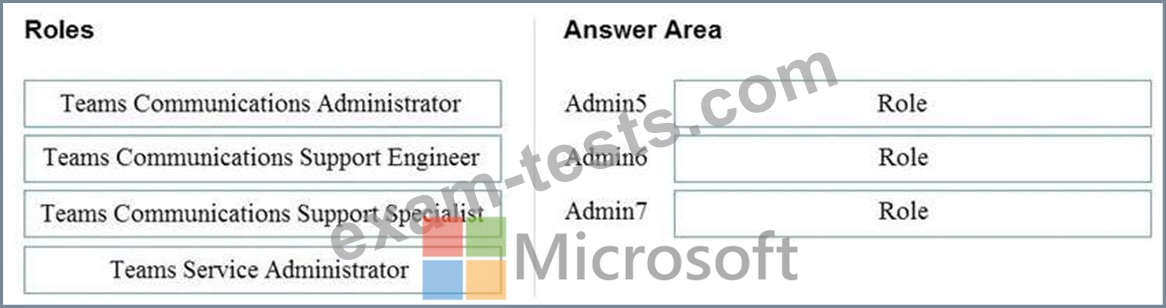
Which role should you assign to each administrator? To answer, drag the appropriate roles to the correct users.
Each role may be used once, more than once, or not at all. You may need to drag the split bar between panes or scroll to view content.
NOTE: Each correct selection is worth one point.
The company has the administrators and the security requirements shown in the following table.
You need to assign a role to each administrator to ensure that the administrators can meet the security requirements by using the Microsoft Teams admin center. The solution must use the principle of least privilege.
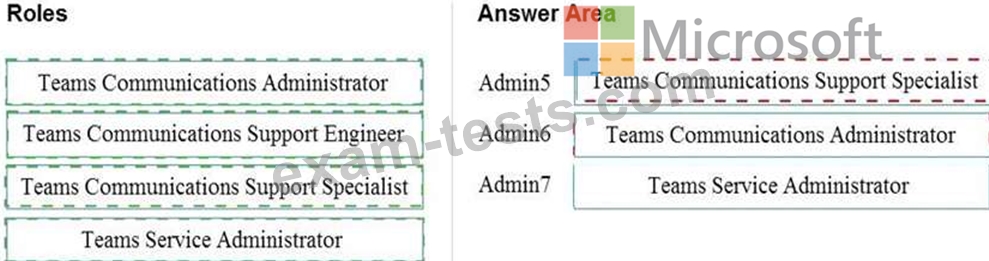
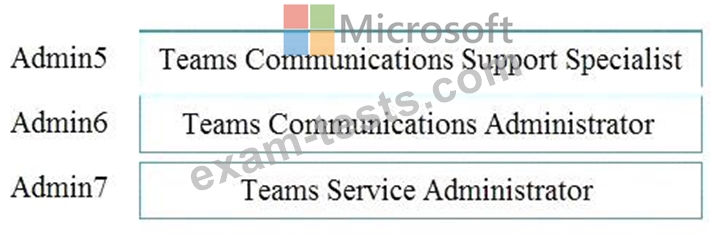
Which role should you assign to each administrator? To answer, drag the appropriate roles to the correct users.
Each role may be used once, more than once, or not at all. You may need to drag the split bar between panes or scroll to view content.
NOTE: Each correct selection is worth one point.
Question 93
Your company plans to upgrade to Microsoft Teams from Microsoft Skype for Business Online. The org-wide coexistence mode for Microsoft Teams is set to Teams Only.
The company has a user named User1.
You need to implement a migration solution that meets the following requirements:
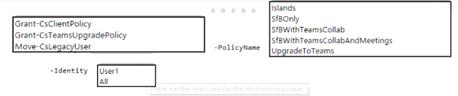
* User 1 must be able to chat and create meetings by using Skype for Business only.
* User 1 must be able to read and post messages by using Microsoft Teams channels.
How should you complete the PowerShell command? To answer, select the appropriate options in the answer are a. NOTE: Each correct selection is worth one point.
The company has a user named User1.
You need to implement a migration solution that meets the following requirements:
* User 1 must be able to chat and create meetings by using Skype for Business only.
* User 1 must be able to read and post messages by using Microsoft Teams channels.
How should you complete the PowerShell command? To answer, select the appropriate options in the answer are a. NOTE: Each correct selection is worth one point.

Question 94
You are Microsoft Teams administrator for your company.
You have the Org-wide app settings shown in the App Settings exhibit. (Click the App Settings tab.)

The company's global app permission policy is configured as shown in the Permission Policy exhibit. (Click the Permission Policy tab.)

The company's global app setup policy is configured as shown in the Setup Policy exhibit. (Click the Setup Policy tab.)

For each of the following statements, select Yes if the statement is true. Otherwise, select No.
NOTE: Each correct selection is worth one point.

You have the Org-wide app settings shown in the App Settings exhibit. (Click the App Settings tab.)
The company's global app permission policy is configured as shown in the Permission Policy exhibit. (Click the Permission Policy tab.)
The company's global app setup policy is configured as shown in the Setup Policy exhibit. (Click the Setup Policy tab.)
For each of the following statements, select Yes if the statement is true. Otherwise, select No.
NOTE: Each correct selection is worth one point.


Question 95
Note: This question is part of a series of questions that present the same scenario. Each question in the series contains a unique solution that might meet the stated goals. Some question sets might have more than one correct solution, while others might not have a correct solution.
After you answer a question in this section, you will NOT be able to return to it. As a result, these questions will not appear in the review screen.
Your company has a Microsoft 365 subscription that uses an Azure Active Directory (Azure AD) tenant named contoso.com.
You need to prevent guest users in the tenant from using cameras during Microsoft Teams meetings.
Solution: From the Microsoft 365 admin center, you modify the Sharing settings.
Does this meet the goal?
After you answer a question in this section, you will NOT be able to return to it. As a result, these questions will not appear in the review screen.
Your company has a Microsoft 365 subscription that uses an Azure Active Directory (Azure AD) tenant named contoso.com.
You need to prevent guest users in the tenant from using cameras during Microsoft Teams meetings.
Solution: From the Microsoft 365 admin center, you modify the Sharing settings.
Does this meet the goal?