

Question 161
You have a Microsoft 365 subscription that uses Microsoft Teams and 300 Microsoft Teams-certified IP
phones.
You need to locate, group, and filter the IP phones based on keywords.
What should you use?
phones.
You need to locate, group, and filter the IP phones based on keywords.
What should you use?
Question 162
You have a Microsoft Office 365 subscription.
All users are assigned a Calling Plan license.
You configure emergency calling.
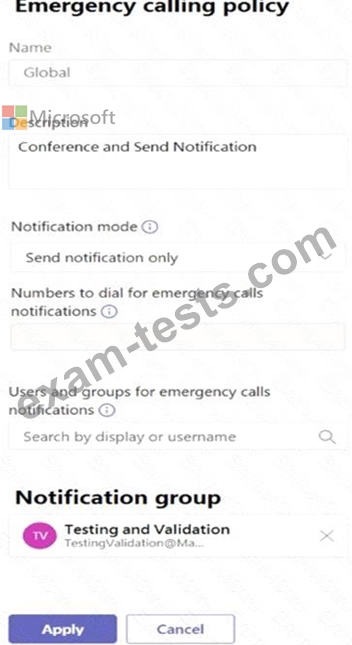
The global emergency calling policy is configured as shown in the Emergency Calling exhibit. (Click the Emergency Calling tab.)
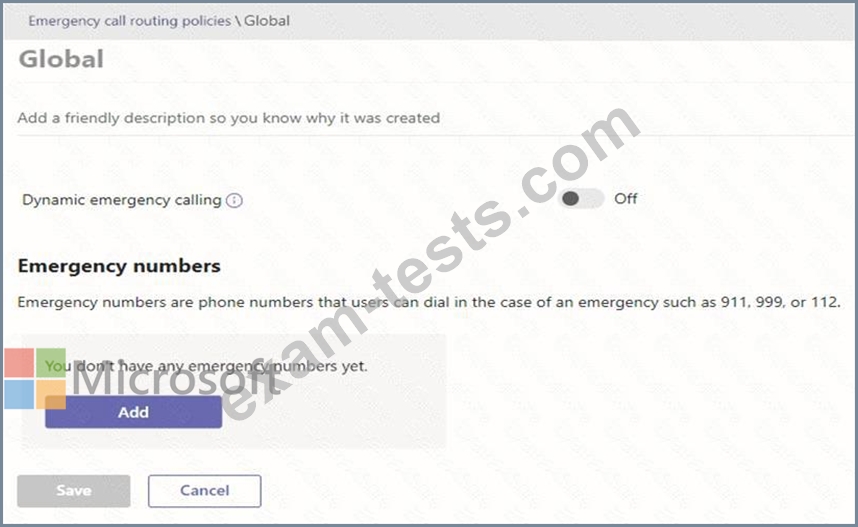
The global emergency call routing policy is configured as shown in the Emergency Call Routing exhibit.
(Click the Emergency Call Routing tab.)
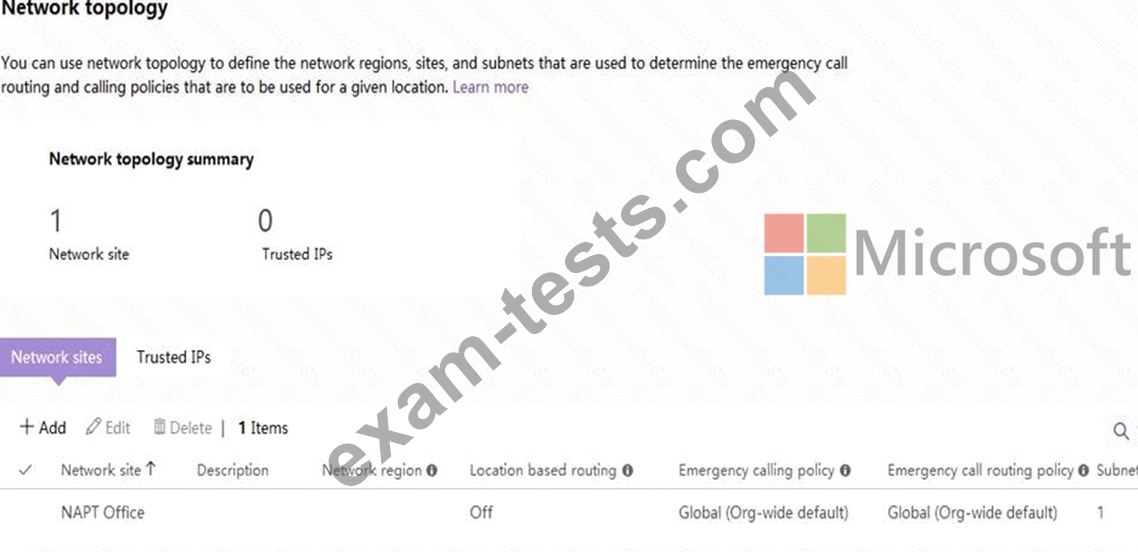
The network topology is configured as shown in the Network Topology exhibit. (Click the Network Topology tab.)
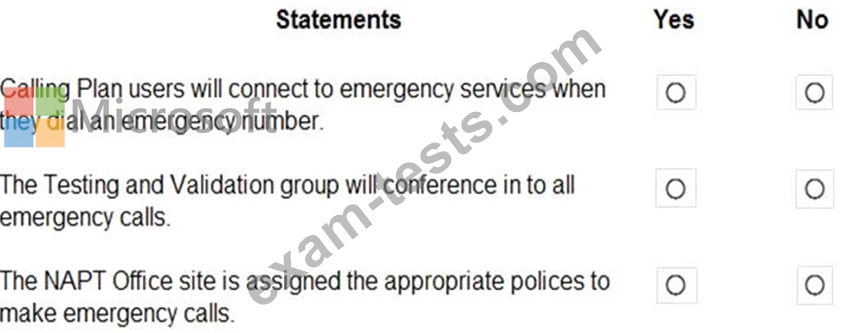
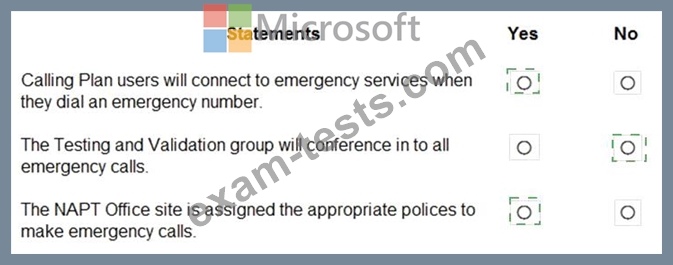
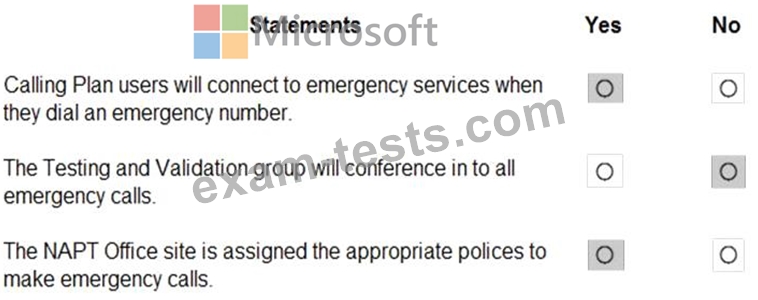
For each of the following statements, select Yes if the statement is true. Otherwise, select No.
NOTE: Each correct selection is worth one point.
All users are assigned a Calling Plan license.
You configure emergency calling.
The global emergency calling policy is configured as shown in the Emergency Calling exhibit. (Click the Emergency Calling tab.)
The global emergency call routing policy is configured as shown in the Emergency Call Routing exhibit.
(Click the Emergency Call Routing tab.)
The network topology is configured as shown in the Network Topology exhibit. (Click the Network Topology tab.)
For each of the following statements, select Yes if the statement is true. Otherwise, select No.
NOTE: Each correct selection is worth one point.
Question 163
You have a Microsoft 365 subscription that uses Microsoft Teams.
You need to configure phone settings to meet the following requirements:
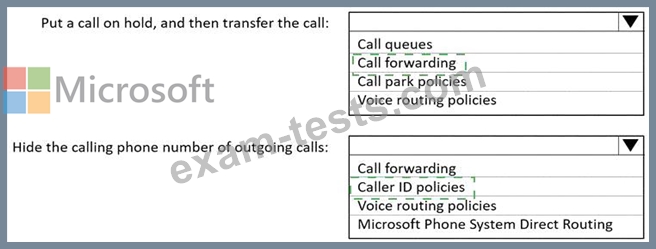
Put a call on hold, and then transfer the call.
Hide the calling phone number of outgoing calls.
What should you configure for each requirement? To answer, select the appropriate options in the answer area.
NOTE: Each correct selection is worth one point.

You need to configure phone settings to meet the following requirements:
Put a call on hold, and then transfer the call.
Hide the calling phone number of outgoing calls.
What should you configure for each requirement? To answer, select the appropriate options in the answer area.
NOTE: Each correct selection is worth one point.

Question 164
You have a Microsoft 365 subscription that contains a group named Group1.
You need to configure Group1 to meet the following requirements:
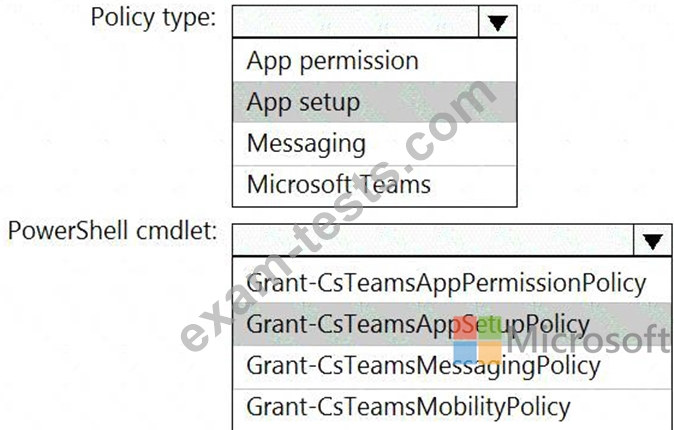
Users must not be permitted to pin apps to the Microsoft Teams app bar.
Only the Chat, Teams, and Calendar apps must appear on the Microsoft Teams app bar.
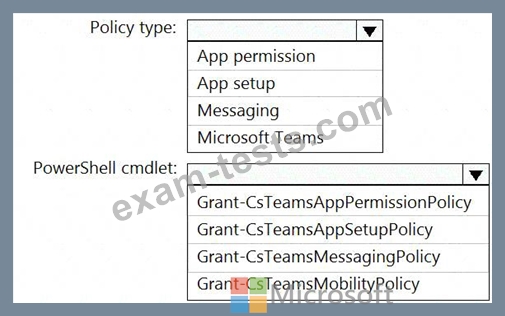
Which policy type should you create and which PowerShell cmdlet should you run to assign the policy? To answer, select the appropriate options in the answer area.
NOTE: Each correct selection is worth one point.
You need to configure Group1 to meet the following requirements:
Users must not be permitted to pin apps to the Microsoft Teams app bar.
Only the Chat, Teams, and Calendar apps must appear on the Microsoft Teams app bar.
Which policy type should you create and which PowerShell cmdlet should you run to assign the policy? To answer, select the appropriate options in the answer area.
NOTE: Each correct selection is worth one point.

Question 165
Your company has the users shown in the following table.
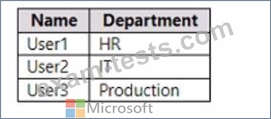
The company uses Teams.
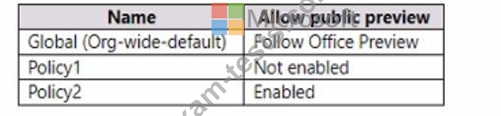
You have Teams update policies configured as shown in the following table.
The Teams update policies are assigned to departments as shown in the following table.

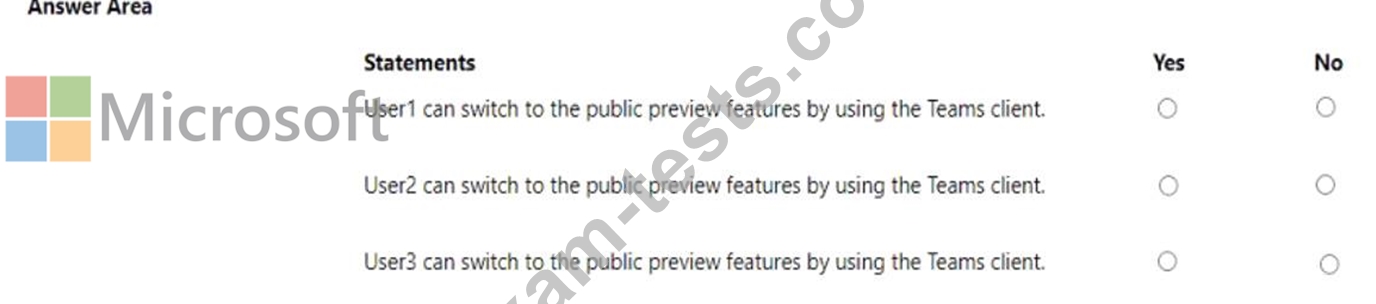
For each of the following statements, select Yes if True. Otherwise select No.
NOTE: Each correct selection is worth one point.
The company uses Teams.
You have Teams update policies configured as shown in the following table.
The Teams update policies are assigned to departments as shown in the following table.
For each of the following statements, select Yes if True. Otherwise select No.
NOTE: Each correct selection is worth one point.


Premium Bundle
Newest MS-700 Exam PDF Dumps shared by BraindumpsPass.com for Helping Passing MS-700 Exam! BraindumpsPass.com now offer the updated MS-700 exam dumps, the BraindumpsPass.com MS-700 exam questions have been updated and answers have been corrected get the latest BraindumpsPass.com MS-700 pdf dumps with Exam Engine here: