Question 11
You need to configure data retention policies for the teams. The solution must meet the data retention requirements.
Which content location should you include in the retention policies? To answer, drag the appropriate content locations to the correct requirements. Each content location may be used once, more than once, or not at all.
You may need to drag the split bar between panes or scroll to view content.
NOTE: Each correct selection is worth one point.

Which content location should you include in the retention policies? To answer, drag the appropriate content locations to the correct requirements. Each content location may be used once, more than once, or not at all.
You may need to drag the split bar between panes or scroll to view content.
NOTE: Each correct selection is worth one point.


Question 12
You have a Microsoft Teams team named Team1.
Team1 is deleted accidentally.
You need to recover Team1.
How should you complete the PowerShell script? To answer, select the appropriate options in the answer area.
NOTE: Each correct selection is worth one point.
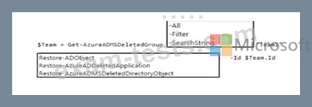
Team1 is deleted accidentally.
You need to recover Team1.
How should you complete the PowerShell script? To answer, select the appropriate options in the answer area.
NOTE: Each correct selection is worth one point.

Question 13
Your company has a Microsoft 365 subscription.
All users have a computer that runs Windows 10 and has Microsoft Teams installed.
A user reports the following issues:
* Users lose their connection during screen sharing.
* The user selection process takes too long to complete.
* The Microsoft Teams client crashes and restarts automatically.
You need to view the Microsoft Teams debug logs to troubleshoot the issues.
What should you do?
All users have a computer that runs Windows 10 and has Microsoft Teams installed.
A user reports the following issues:
* Users lose their connection during screen sharing.
* The user selection process takes too long to complete.
* The Microsoft Teams client crashes and restarts automatically.
You need to view the Microsoft Teams debug logs to troubleshoot the issues.
What should you do?
Question 14
You are reviewing the planning implementation of information barriers for your company.
You run the following command.

You active the information barrier policies.
For each of the following statements, select Yes if the statement is true, Otherwise, Select No.
Note: Each correct selection is worth one point.

You run the following command.
You active the information barrier policies.
For each of the following statements, select Yes if the statement is true, Otherwise, Select No.
Note: Each correct selection is worth one point.


Question 15
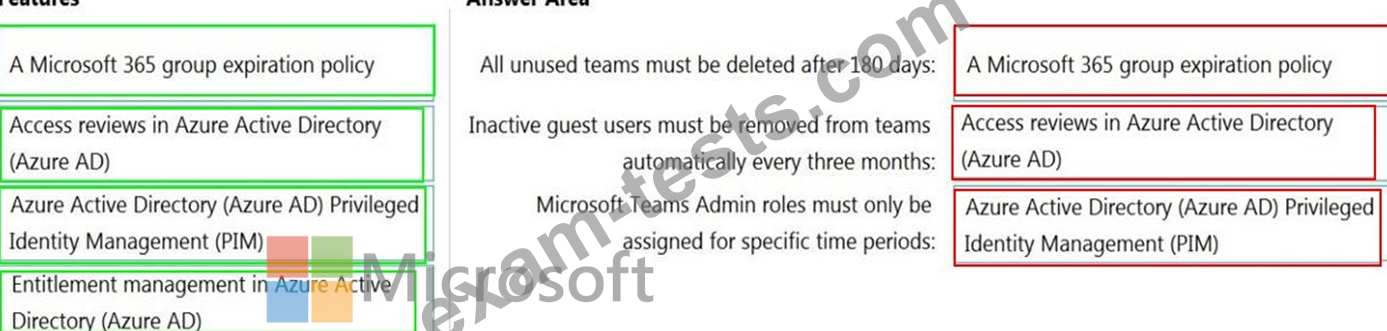
You have a Microsoft 365 subscription that has Azure Active Directory Premium Plan 2 licenses.
You need to implement Microsoft Teams lifecycle management to meet the following requirements:
All unused teams must be deleted after 180 days.
Inactive guest users must be removed from teams automatically every three months.
Microsoft Teams admin roles must only be assigned for specific time periods.
Which feature should you use for each requirement? To answer, drag the appropriate features to the correct requirements. Each feature may be used once, more than once, or not at all. You may need to drag the split bar between panes or scroll to view content.
NOTE: Each correct selection is worth one point.

You need to implement Microsoft Teams lifecycle management to meet the following requirements:
All unused teams must be deleted after 180 days.
Inactive guest users must be removed from teams automatically every three months.
Microsoft Teams admin roles must only be assigned for specific time periods.
Which feature should you use for each requirement? To answer, drag the appropriate features to the correct requirements. Each feature may be used once, more than once, or not at all. You may need to drag the split bar between panes or scroll to view content.
NOTE: Each correct selection is worth one point.