

Question 81
You have a Microsoft 365 subscription that uses Microsoft Teams and contains the users shown in the following table.

You have the team shown in the following table.
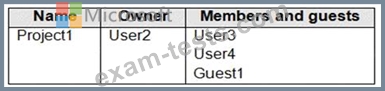
A new access review needs to be created for Project1.
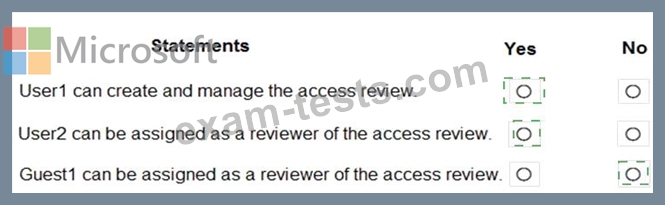
For each of the following statements, select Yes if the statement is true. Otherwise, select No.
NOTE: Each correct selection is worth one point.

You have the team shown in the following table.
A new access review needs to be created for Project1.
For each of the following statements, select Yes if the statement is true. Otherwise, select No.
NOTE: Each correct selection is worth one point.

Question 82
Your company has a Microsoft 365 subscription that contains a Microsoft Teams auto attendant.
Calls to the auto attendant will be redirected to a shared voicemail.
You need to create a group for the shared voicemail.
Which type of group should you create?
Calls to the auto attendant will be redirected to a shared voicemail.
You need to create a group for the shared voicemail.
Which type of group should you create?
Question 83
During the pilot project, you review the global policies in the Microsoft Teams admin center.
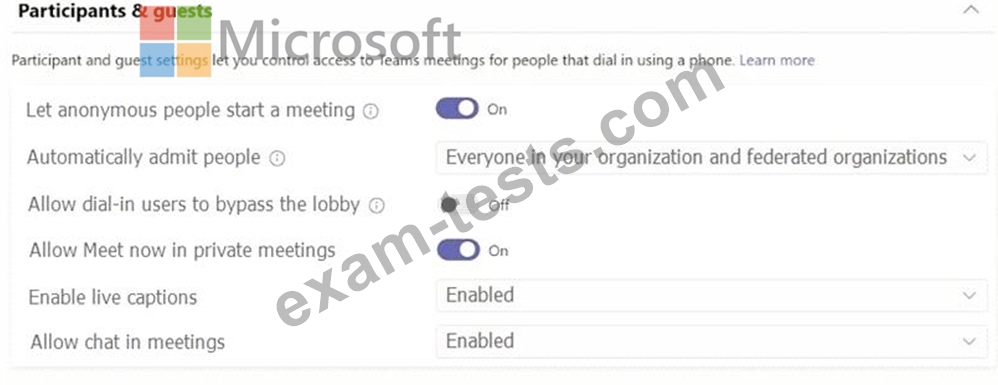
Contoso has a global meeting policy configured as shown in the following exhibit.
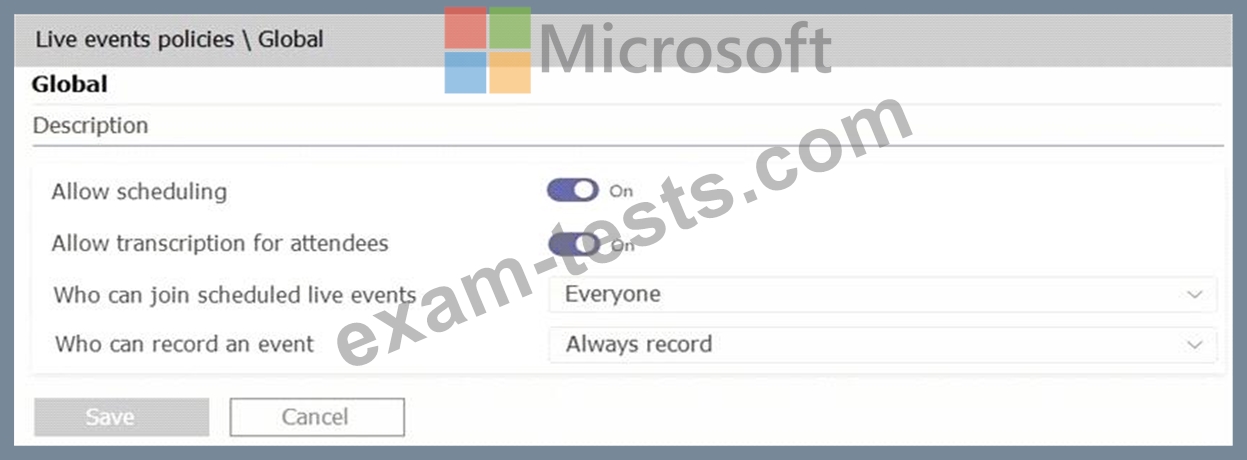
Contoso has a global live events policy configured as shown in the following exhibit.
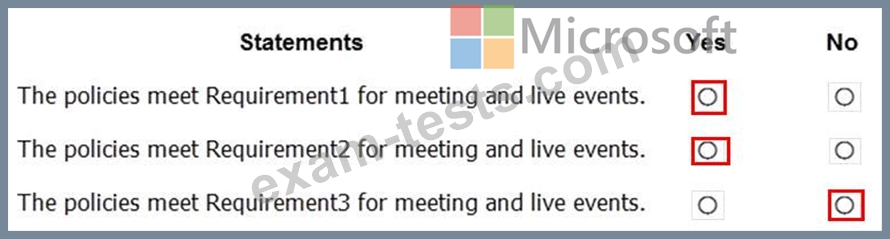
For each of the following statements, select Yes if the statement is true. Otherwise, select No.
NOTE: Each correct selection is worth one point.

Contoso has a global meeting policy configured as shown in the following exhibit.
Contoso has a global live events policy configured as shown in the following exhibit.
For each of the following statements, select Yes if the statement is true. Otherwise, select No.
NOTE: Each correct selection is worth one point.
Question 84
Your company uses the Microsoft teams.
You are planning the governance strategy for Microsoft teams. All task must be performed by a user who will be assigned the Global Administrator role and will not be a team owner.
Archive a tea
Restore a delete team
Permanently delete a team
Which tool should you identify for each task? To answer, drag the appropriate tools to the correct tasks. Each tool may be used once. More than once, or not at all. You may need to drag the split bar between panes or scroll to view content.
NOTE: Each correct selection is worth one point.

You are planning the governance strategy for Microsoft teams. All task must be performed by a user who will be assigned the Global Administrator role and will not be a team owner.
Archive a tea
Restore a delete team
Permanently delete a team
Which tool should you identify for each task? To answer, drag the appropriate tools to the correct tasks. Each tool may be used once. More than once, or not at all. You may need to drag the split bar between panes or scroll to view content.
NOTE: Each correct selection is worth one point.


Question 85
You are Microsoft Teams administrator for your company.
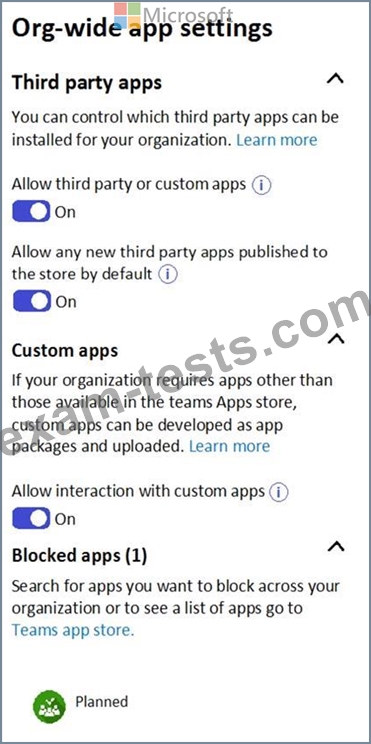
You have the Org-wide app settings shown in the App Settings exhibit. (Click the App Settings tab.)
The company's global app permission policy is configured as shown in the Permission Policy exhibit. (Click the Permission Policy tab.)

The company's global app setup policy is configured as shown in the Setup Policy exhibit. (Click the Setup Policy tab.)

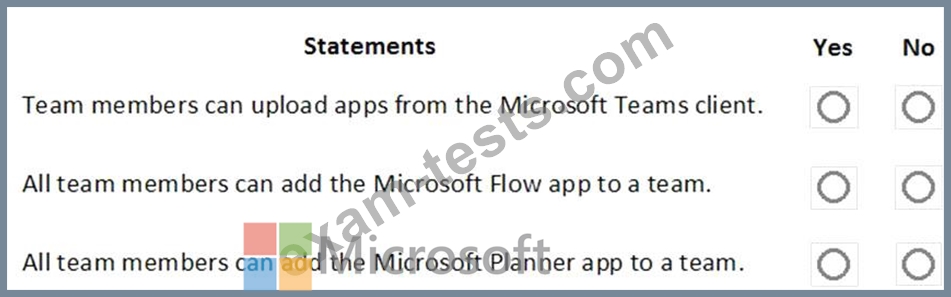
For each of the following statements, select Yes if the statement is true. Otherwise, select No.
NOTE: Each correct selection is worth one point.
You have the Org-wide app settings shown in the App Settings exhibit. (Click the App Settings tab.)
The company's global app permission policy is configured as shown in the Permission Policy exhibit. (Click the Permission Policy tab.)
The company's global app setup policy is configured as shown in the Setup Policy exhibit. (Click the Setup Policy tab.)
For each of the following statements, select Yes if the statement is true. Otherwise, select No.
NOTE: Each correct selection is worth one point.
