

Question 76
You have a Microsoft 365 E5 subscription that contains a hybrid deployment of Microsoft Skype for Business Server and a user named User1.
You need User1 to perform a tenant readiness assessment for Skype for Business upgrade by using Advisor for Teams.
Which two additional licenses should you assign to User1? To answer, select the appropriate settings in the answer area.
NOTE: Each correct selection is worth one point.

You need User1 to perform a tenant readiness assessment for Skype for Business upgrade by using Advisor for Teams.
Which two additional licenses should you assign to User1? To answer, select the appropriate settings in the answer area.
NOTE: Each correct selection is worth one point.

Question 77
You have a Microsoft 365 E5 subscription that uses Teams.
You need to implement a consistent team naming strategy that meets the following requirements:
* All team names must start with the department name of the user that created the team.
* All team names must be followed by the word Department.
How should you configure the group naming policy? To answer, drag the appropriate configurations to the correct requirements. Each configuration may be used once, more than once, or not at all. You may need to drag the split bar between panes or scroll to view content.
NOTE: Each correct selection is worth one point.

You need to implement a consistent team naming strategy that meets the following requirements:
* All team names must start with the department name of the user that created the team.
* All team names must be followed by the word Department.
How should you configure the group naming policy? To answer, drag the appropriate configurations to the correct requirements. Each configuration may be used once, more than once, or not at all. You may need to drag the split bar between panes or scroll to view content.
NOTE: Each correct selection is worth one point.


Question 78
You have a Microsoft Office 365 subscription.
You need to meet the following requirements:
Pin specific apps to the Microsoft Teams app bar.
Prevent users from installing third-party apps published in the Teams app store.
Prevent users from pinning apps to the Microsoft Teams app bar.
What should you use to meet each requirement? To answer, select the appropriate options in the answer area.
NOTE: Each correct selection is worth one point.

You need to meet the following requirements:
Pin specific apps to the Microsoft Teams app bar.
Prevent users from installing third-party apps published in the Teams app store.
Prevent users from pinning apps to the Microsoft Teams app bar.
What should you use to meet each requirement? To answer, select the appropriate options in the answer area.
NOTE: Each correct selection is worth one point.

Question 79
You have a Microsoft Teams team named Team1.
Team1 is deleted accidentally.
You need to recover Team1.
How should you complete the PowerShell script? To answer, select the appropriate options in the answer area.
NOTE: Each correct selection is worth one point.
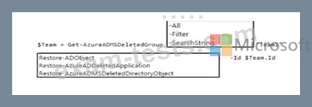
Team1 is deleted accidentally.
You need to recover Team1.
How should you complete the PowerShell script? To answer, select the appropriate options in the answer area.
NOTE: Each correct selection is worth one point.

Question 80
You are Microsoft Teams administrator for your company.
You have the Org-wide app settings shown in the App Settings exhibit. (Click the App Settings tab.)

The company's global app permission policy is configured as shown in the Permission Policy exhibit. (Click the Permission Policy tab.)

The company's global app setup policy is configured as shown in the Setup Policy exhibit. (Click the Setup Policy tab.)

For each of the following statements, select Yes if the statement is true. Otherwise, select No.
NOTE: Each correct selection is worth one point.

You have the Org-wide app settings shown in the App Settings exhibit. (Click the App Settings tab.)
The company's global app permission policy is configured as shown in the Permission Policy exhibit. (Click the Permission Policy tab.)
The company's global app setup policy is configured as shown in the Setup Policy exhibit. (Click the Setup Policy tab.)
For each of the following statements, select Yes if the statement is true. Otherwise, select No.
NOTE: Each correct selection is worth one point.
