

Question 106
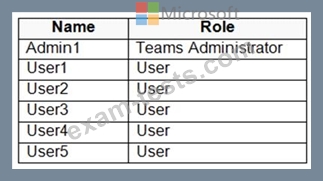
You have a Microsoft 365 subscription that uses Microsoft Teams and contains the users shown in the following table.
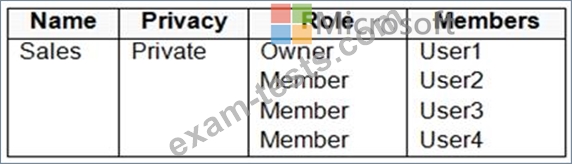
You have a team named Sales that is configured as shown in the following table.
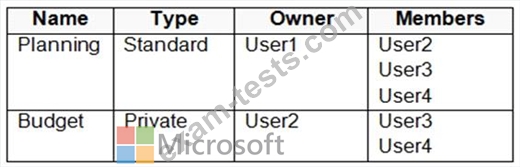
The Sales team contains the channels shown in the following table.
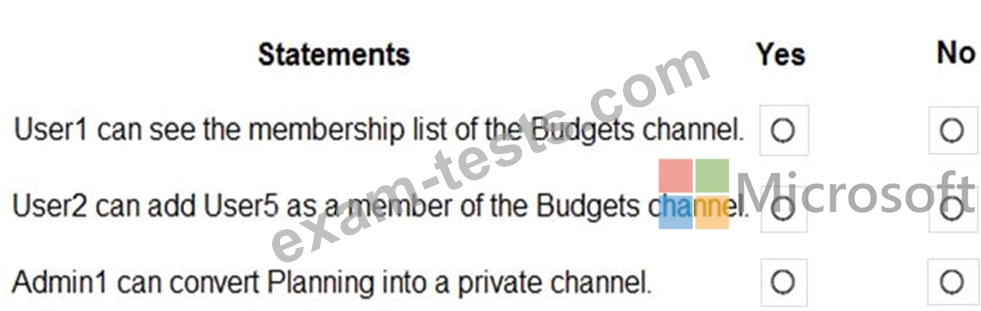
For each of the following statements, select Yes if the statement is true. Otherwise, select No.
NOTE: Each correct selection is worth one point.
You have a team named Sales that is configured as shown in the following table.
The Sales team contains the channels shown in the following table.
For each of the following statements, select Yes if the statement is true. Otherwise, select No.
NOTE: Each correct selection is worth one point.

Question 107
You have a Microsoft 365 subscription that uses Microsoft Teams and contains three users named User1, User2, and User3.
You need to configure Microsoft Teams to meet the following requirements:
Prevent User1 and User2 from creating private channels.
Ensure that User3 can control who can create private channels.
Minimize administrative effort.
Which three actions should you perform in sequence? To answer, move all actions from the list of actions to the answer area and arrange them in the correct order.
NOTE: More than one order of answer choices is correct. You will receive credit for any of the correct orders you select.

You need to configure Microsoft Teams to meet the following requirements:
Prevent User1 and User2 from creating private channels.
Ensure that User3 can control who can create private channels.
Minimize administrative effort.
Which three actions should you perform in sequence? To answer, move all actions from the list of actions to the answer area and arrange them in the correct order.
NOTE: More than one order of answer choices is correct. You will receive credit for any of the correct orders you select.


Question 108
Your company has a Microsoft Office 365 subscription.
The company has three departments. Each department contains a group as shown in the following table.

You plan to create a team for each group.
You need to ensure that a team can be created for each group. The solution must minimize administrative effort.
What should you do to each group? To answer, select the appropriate options in the answer area.
NOTE: Each correct selection is worth one point.

The company has three departments. Each department contains a group as shown in the following table.
You plan to create a team for each group.
You need to ensure that a team can be created for each group. The solution must minimize administrative effort.
What should you do to each group? To answer, select the appropriate options in the answer area.
NOTE: Each correct selection is worth one point.


Question 109
You have a Microsoft 365 subscription that contains a group named Group1.
You need to configure Group1 to meet the following requirements:
Users must not be permitted to pin apps to the Microsoft Teams app bar.
Only the Chat, Teams, and Calendar apps must appear on the Microsoft Teams app bar.
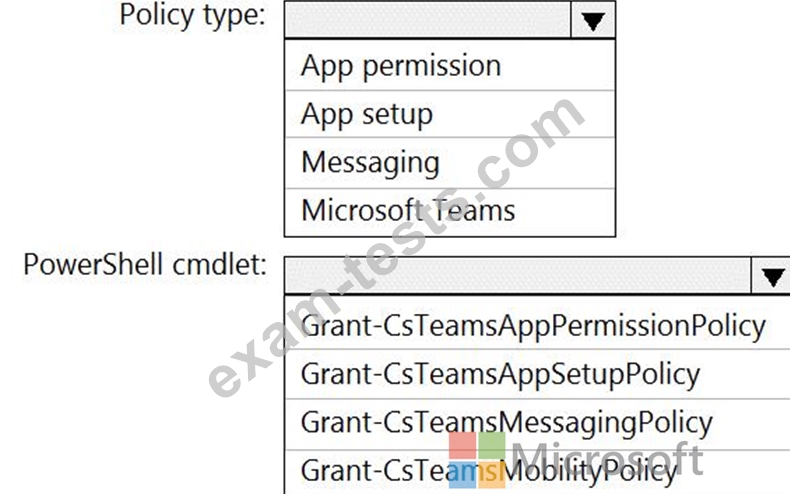
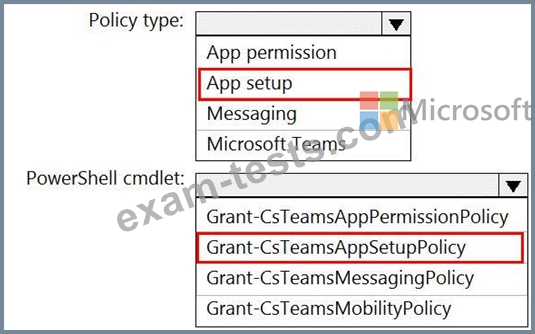
Which policy type should you create and which PowerShell cmdlet should you run to assign the policy? To answer, select the appropriate options in the answer area.
NOTE: Each correct selection is worth one point.
You need to configure Group1 to meet the following requirements:
Users must not be permitted to pin apps to the Microsoft Teams app bar.
Only the Chat, Teams, and Calendar apps must appear on the Microsoft Teams app bar.
Which policy type should you create and which PowerShell cmdlet should you run to assign the policy? To answer, select the appropriate options in the answer area.
NOTE: Each correct selection is worth one point.
Question 110
You have a Microsoft Office 365 subscription.
All users are assigned a Calling Plan license.
You configure emergency calling.
The global emergency calling policy is configured as shown in the Emergency Calling exhibit. (Click the Emergency Calling tab.)

The global emergency call routing policy is configured as shown in the Emergency Call Routing exhibit.
(Click the Emergency Call Routing tab.)

The network topology is configured as shown in the Network Topology exhibit. (Click the Network Topology tab.)

For each of the following statements, select Yes if the statement is true. Otherwise, select No.
NOTE: Each correct selection is worth one point.

All users are assigned a Calling Plan license.
You configure emergency calling.
The global emergency calling policy is configured as shown in the Emergency Calling exhibit. (Click the Emergency Calling tab.)
The global emergency call routing policy is configured as shown in the Emergency Call Routing exhibit.
(Click the Emergency Call Routing tab.)
The network topology is configured as shown in the Network Topology exhibit. (Click the Network Topology tab.)
For each of the following statements, select Yes if the statement is true. Otherwise, select No.
NOTE: Each correct selection is worth one point.

