

Question 261
You are the Microsoft Office 365 administrator for a company.
The company has the following requirements:
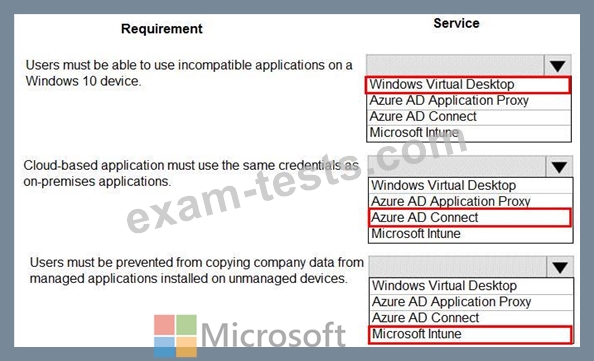
Users must be able to use incompatible applications on a Windows 10 device.
Cloud-based applications must use the same credentials as on-premises applications.
Users must be prevented from copying company data from managed applications installed on unmanaged devices.
You need to determine which technologies should be used for each requirement.
Which technologies should be used? To answer, select the appropriate options in the answer area.

The company has the following requirements:
Users must be able to use incompatible applications on a Windows 10 device.
Cloud-based applications must use the same credentials as on-premises applications.
Users must be prevented from copying company data from managed applications installed on unmanaged devices.
You need to determine which technologies should be used for each requirement.
Which technologies should be used? To answer, select the appropriate options in the answer area.
Question 262
A company deploys Microsoft Azure AD. You enable multi-factor authentication.
You need to inform users about the multi-factor authentication methods that they can use.
Which of the following methods is NOT a valid multi-factor authentication method in Microsoft 365?
You need to inform users about the multi-factor authentication methods that they can use.
Which of the following methods is NOT a valid multi-factor authentication method in Microsoft 365?
Question 263
A company experiences a Microsoft 365 outage that affects an entire region.
You check the Service Health Dashboard and observe that the service is healthy.
You need to find information in Service Health Dashboard that describes what happened during the outage.
What should you use?
You check the Service Health Dashboard and observe that the service is healthy.
You need to find information in Service Health Dashboard that describes what happened during the outage.
What should you use?
Question 264
This question requires that you evaluate the underlined text to determine if it is correct.
Microsoft 365 is a Platform as a service (PaaS).
Review the underlined text. If it makes the statement correct, select "No change is needed." If the statement is incorrect, select the answer choice that makes the statement correct.
Microsoft 365 is a Platform as a service (PaaS).
Review the underlined text. If it makes the statement correct, select "No change is needed." If the statement is incorrect, select the answer choice that makes the statement correct.
Question 265
A company deploys Azure App Services apps in Azure. Users authenticate to the apps by using single sign-on (SSO). The company requires access to the apps from the following types of devices:
* Personal devices that do not require an organizational account to sign in to the device
* Company devices in on-premises Active Directory that are automatically provisioned in Azure Active Directory (Azure AD) You need to identify how the devices will be provisioned in Azure AD.
What should you use? To answer, drag the appropriate Azure AD device identities to the correct requirements. Each Azure AD device identity may be used once, more than once. or not at all. You may need to drag the split bar between panes or scroll to view content.
NOTE: Each correct selection is worth one point.

* Personal devices that do not require an organizational account to sign in to the device
* Company devices in on-premises Active Directory that are automatically provisioned in Azure Active Directory (Azure AD) You need to identify how the devices will be provisioned in Azure AD.
What should you use? To answer, drag the appropriate Azure AD device identities to the correct requirements. Each Azure AD device identity may be used once, more than once. or not at all. You may need to drag the split bar between panes or scroll to view content.
NOTE: Each correct selection is worth one point.
