

Question 201
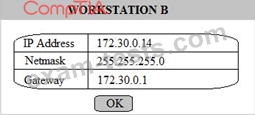
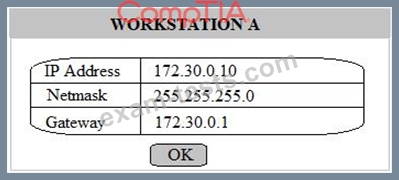
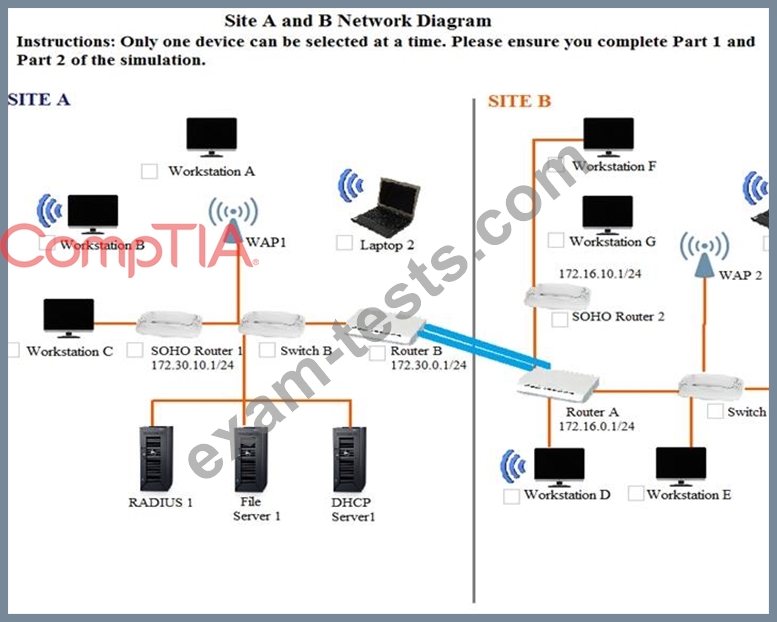
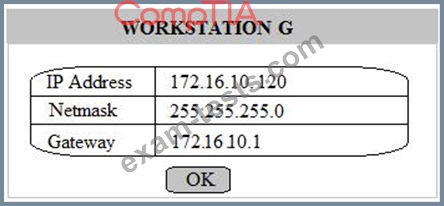
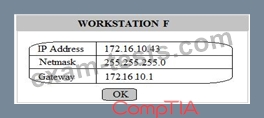
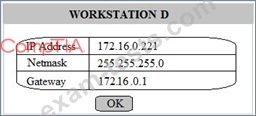
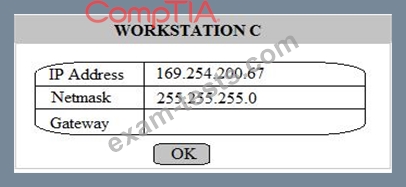
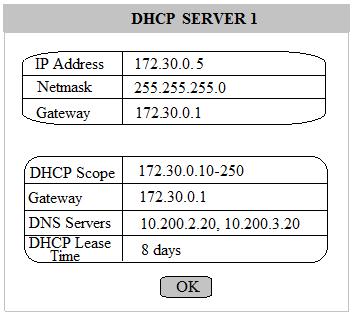
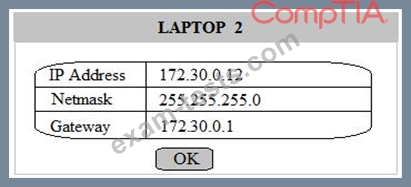
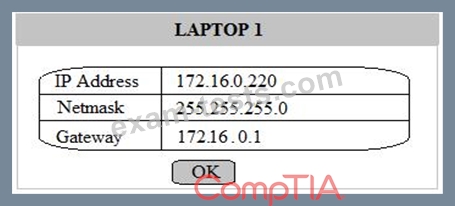
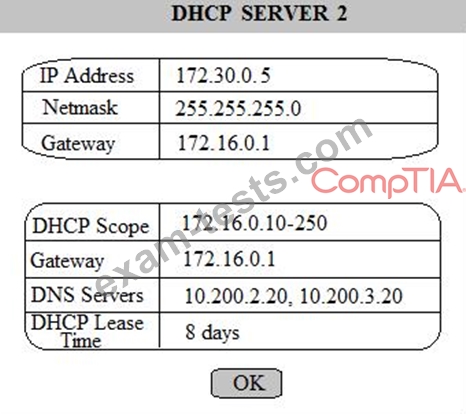
Multiple users are reporting that they are unable to access the network. The ENTIRE network is shown in the diagram. PCs are not statically assigned IP addresses. The following devices will display settings:
WorkstationA

WorkstationB
WorkstationC
WorkstationD
WorkstationE
WorkstationF
WorkstationG
Laptop1
Laptop2
DHCP server1
DHCP server2
Review the settings and select the box in the diagram that identifies the device causing the issue. Only one device can be selected at a time.
After checking the device that is causing the issue, select the second tab in the lower left hand corner.
Identify the reason as to why some users are unable to access the network.
Instructions:
When the simulation is complete, select the Done button to submit.
Part 1

Part 2
Identify the reason as to why some users are unable to access the network.
WorkstationA
WorkstationB
WorkstationC
WorkstationD
WorkstationE
WorkstationF
WorkstationG
Laptop1
Laptop2
DHCP server1
DHCP server2
Review the settings and select the box in the diagram that identifies the device causing the issue. Only one device can be selected at a time.
After checking the device that is causing the issue, select the second tab in the lower left hand corner.
Identify the reason as to why some users are unable to access the network.
Instructions:
When the simulation is complete, select the Done button to submit.
Part 1
Part 2
Identify the reason as to why some users are unable to access the network.
Question 202
You are tasked with creating a network that will accomplish the following requirements Requirements:
1) The remote sales team must be able to connect to the corporate network
2) Each department must have ONLY two PCs and a server
3) Each department must be segmented from each other
4) The following VLANs have been designated:
a) VLAN 2- Finance
b) VLAN 12- Sales
c) VLAN 22- Human Resources (HR)
Complete the network by dragging the required objects into the diagram
INSTRUCTIONS: Objects can be used multiple times and not all placeholders need to be filled

1) The remote sales team must be able to connect to the corporate network
2) Each department must have ONLY two PCs and a server
3) Each department must be segmented from each other
4) The following VLANs have been designated:
a) VLAN 2- Finance
b) VLAN 12- Sales
c) VLAN 22- Human Resources (HR)
Complete the network by dragging the required objects into the diagram
INSTRUCTIONS: Objects can be used multiple times and not all placeholders need to be filled


Question 203
In a service provider network, a company has an existing IP address scheme. Company A's network currently uses the following scheme:

Company b uses the following scheme:
Subnet 1: 192.168.1.50/28
The network administrator cannot force the customer to update its IP scheme. Considering this, which of the following is the BEST way for the company to connect these networks?
Company b uses the following scheme:
Subnet 1: 192.168.1.50/28
The network administrator cannot force the customer to update its IP scheme. Considering this, which of the following is the BEST way for the company to connect these networks?
Question 204
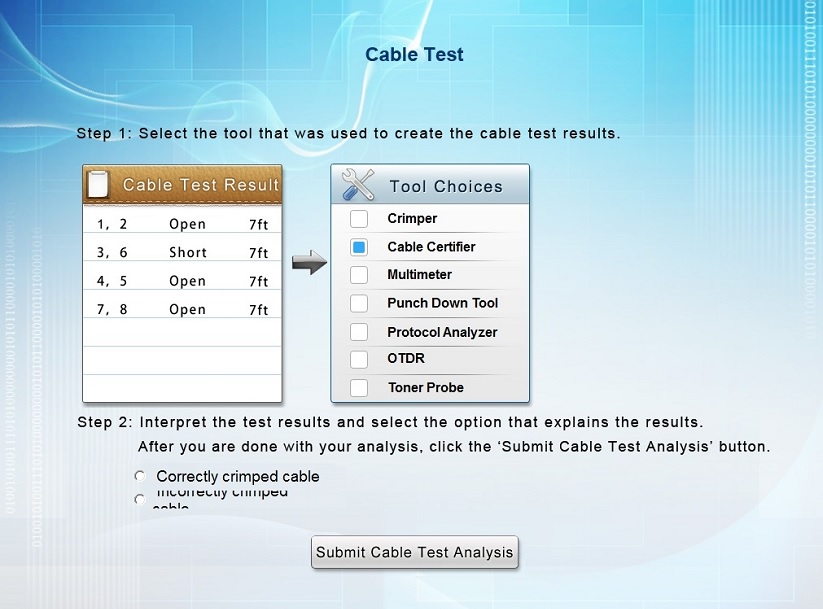
You have been tasked with testing a CAT5e cable. A summary of the test results can be found on the screen.
Step 1: Select the tool that was used to create the cable test results.
Step 2: Interpret the test results and select the option that explains the results. After you are done with your analysis, click the 'Submit Cable Test Analysis' button.
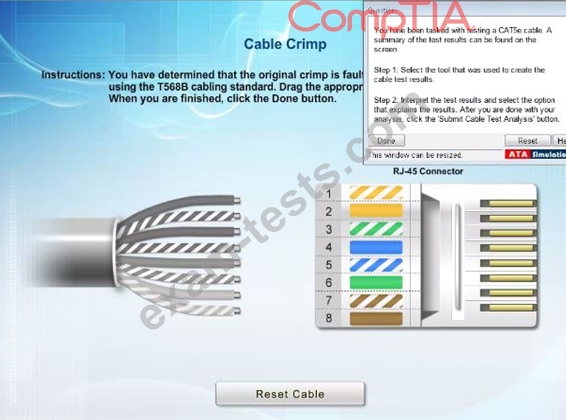
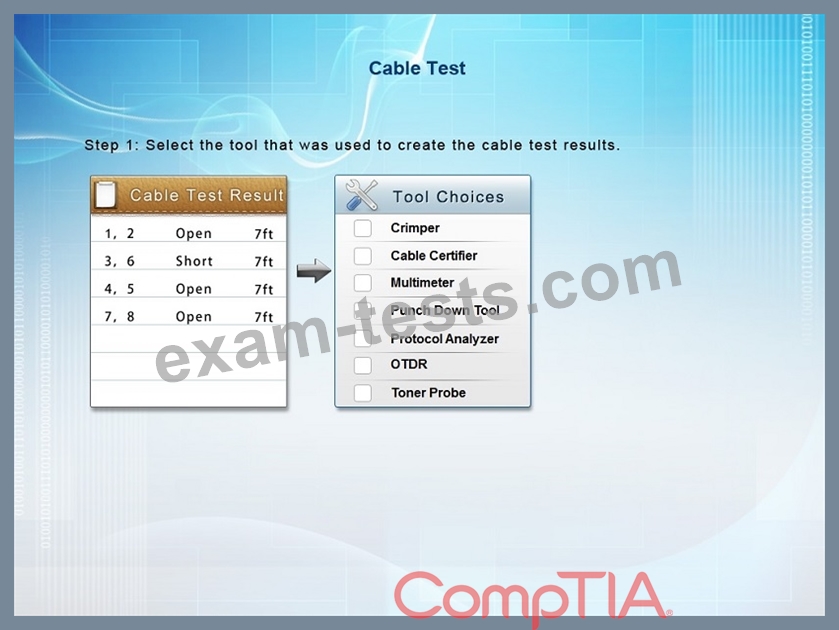
Step 1: Select the tool that was used to create the cable test results.
Step 2: Interpret the test results and select the option that explains the results. After you are done with your analysis, click the 'Submit Cable Test Analysis' button.

Question 205
Which of the following would MOST likely contain information about credential reuse?